
X-Particles Render Info
X-Particles can display information about each frame when rendered in the form of a watermark on the rendered image.
To do this, add the X-Particles Render Info post-effect to the Cinema 4D render settings.
Basic Properties
Section titled “Basic Properties”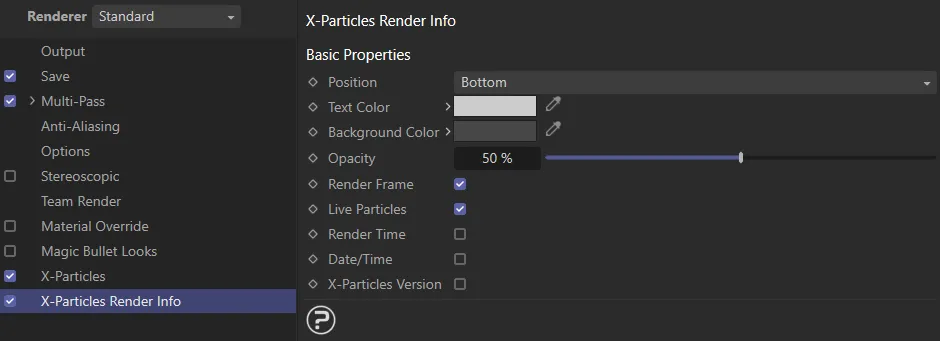
The X-Particles Render Info menu settings.
Position
Section titled “Position”A drop-down menu setting, where the information will appear, either at the Top or Bottom of the image.
Text Color, Background Color
Section titled “Text Color, Background Color”The colors used for the text and the background to it.
Opacity
Section titled “Opacity”The opacity of the watermark.
Each check box, if checked, will display a certain piece of information.
Render Frame
Section titled “Render Frame”The current frame number.
Live Particles
Section titled “Live Particles”The number of live particles in the frame.
Render Time
Section titled “Render Time”The time to render the frame.
Date/Time
Section titled “Date/Time”The current date and time.
X-Particles Version
Section titled “X-Particles Version”The version of X-Particles used.
Copyright © 2026 INSYDIUM LTD. All rights reserved.