

xpLight
xpLight works in conjunction with a Sprite object which is generating lights.
General tab
Section titled “General tab”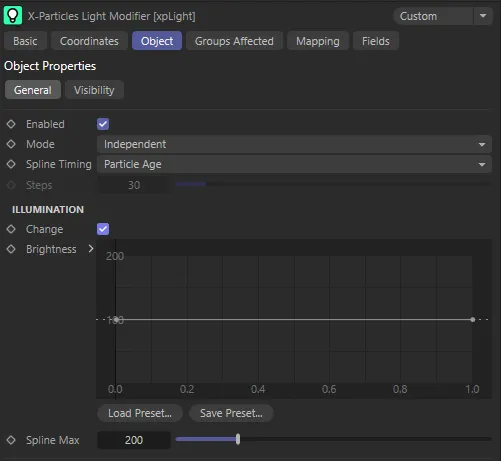
xpLight General tab menu.
Enabled
Section titled “Enabled”Checking this box activates xpLight.
Set at Independent, by default.
You can change this to Action-Controlled.
Independent Mode
Section titled “Independent Mode”In this mode, particles will be affected if they come into the field of effect of the modifier.
Action-Controlled Mode
Section titled “Action-Controlled Mode”When in the Action-Controlled Mode setting, the modifier will only act on a particle when told to do so by an action.
Spline Timing
Section titled “Spline Timing”Set as Particle Age, by default, all the parameters which can be changed with this modifier are controlled by splines.
How the splines are used depends on this setting
The alternative option is Step Count.
Particle Age
Section titled “Particle Age”Newly-created particles take the value from the leftmost point of the spline.
Particles at the end of their lifespan take the value from the rightmost point.
Step Count
Section titled “Step Count”When entering the modifier’s field of effect, particles will take the value from the leftmost point of the spline.
After the number of steps in the Steps parameter, each of which is equivalent to 1 frame, the particles will take the value from the rightmost point.
When the Spline Timing is set to Step Count, this parameter sets the number of steps, after each of which, (each equivalent to 1 frame), the particles will take the value from the rightmost point.
Illumination
Section titled “Illumination”These settings change the brightness of illumination from the light (not the visible light brightness).
Change
Section titled “Change”Enable this to change the illumination level.
Brightness
Section titled “Brightness”This spline is a percentage value, so a value of 100 = 100% brightness.
Values of greater than 100 are valid, as with any light.
Spline Max
Section titled “Spline Max”Alter this setting to change the maximum value allowed in the spline, if required.
Visibility tab
Section titled “Visibility tab”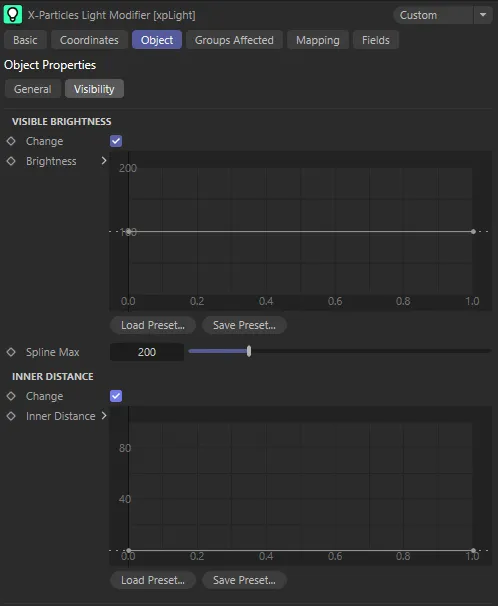
xpLight Visibility tab menu.
Visible Brightness
Section titled “Visible Brightness”Change
Section titled “Change”Check this box to change the light brightness.
Brightness
Section titled “Brightness”This spline is a percentage value, so a value of 100 = 100% brightness.
Values of greater than 100 are valid, as with any light.
Spline Max
Section titled “Spline Max”Alter this setting to change the maximum value allowed in the spline, if required.
Inner Distance
Section titled “Inner Distance”Change
Section titled “Change”Enable this setting to change the inner distance setting of a visible light.
Inner Distance
Section titled “Inner Distance”The spline values are in scene units.
The modifier will not set the inner distance to be higher than the light’s outer distance (i.e. the particle radius).
Groups Affected tab
Section titled “Groups Affected tab”Groups
Section titled “Groups”To specify the group, drag and drop the desired Group object into this field.
This setting is useful if you want to ensure that the spawned particles are, or are not, affected by xpLight.
Mapping tab
Section titled “Mapping tab”The modifier’s settings can be mapped to particle data.
Use the dedicated manual page, below, for instructions on how this works.
Fields tab
Section titled “Fields tab”You can use the Fields options to control where xpLight operates.
Copyright © 2026 INSYDIUM LTD. All rights reserved.