

xpLife
The xpLife modifier kills particles or alters their lifespan.
Object properties
Section titled “Object properties”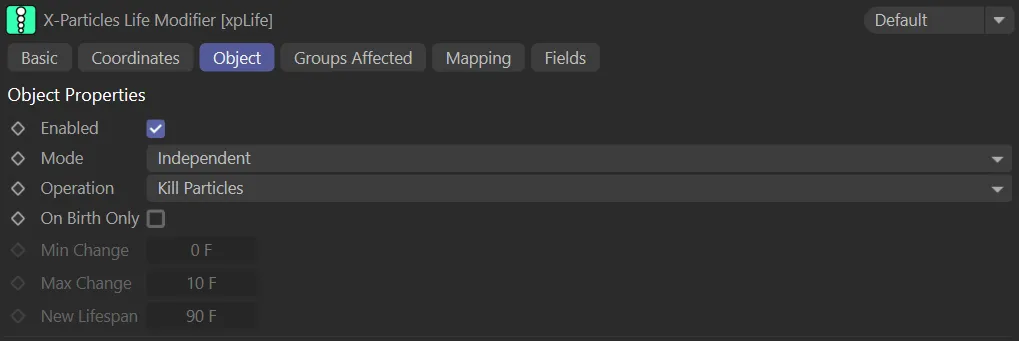
The xpLife Object tab menu.
Enabled
Section titled “Enabled”Checking this box enables the xpLife modifier.
Set at Independent, by default.
You can change this to Action-Controlled.
Independent Mode
Section titled “Independent Mode”In this mode, particles will be affected if they come into the field of effect of the modifier.
Action-Controlled Mode
Section titled “Action-Controlled Mode”When in the Action-Controlled setting, the modifier will only act on a particle when told to do so by an action.
Operation
Section titled “Operation”Set to Kill Particles, by default.
The alternatives are: Increase Lifespan, Decrease Lifespan, Set New Lifespan and Set New Lifespan Relative to Age.
Kill Particles
Section titled “Kill Particles”In this mode, the modifier will kill particles, removing them completely from the scene.
If using a field with this modifier, the probability of a particle being killed depends upon the field’s falloff value.
The further a particle travels within a fields falloff, the higher the probability of it being killed.
Particles that pass through the inner offset zone will always be killed.
This animation demonstrates the Operation setting of Kill Particles.
Increase Particle Lifespan, Decrease Particle Lifespan
Section titled “Increase Particle Lifespan, Decrease Particle Lifespan”Here the particle lifespan will be changed but the particle will not be killed.
There are two values which you can change: these are the minimum and maximum possible changes to the lifespan.
For example, if the minimum value is 5 frames and the maximum is 10 frames the lifespan will change by at least 5 frames and at most by 10 frames.
Again, this is influenced by the modifier’s field and the maximum change will only occur within the field’s inner offset zone.
With Operation set to Increase Lifespan, any particle entering the field will have their lifespan extended.
Animation showing the Operation set to Decrease Particle Lifespan, actioned on entering the modifier’s field.
Set New Lifespan
Section titled “Set New Lifespan”This enables you to set the lifespan to a specific value, found in the New Lifespan setting.
With Operation set to Set New Lifespan, in this scene, the New Lifespan value of 90 frames is added to any particle entering the xpLife field.
Set Lifespan Relative to Age
Section titled “Set Lifespan Relative to Age”All the other modes change the existing lifespan, either lengthening or shortening it.
In this mode, you can set the lifespan relative to the current age plus the time given in Minimum Change and Maximum Change.
In this mode, the new lifespan will be set to the age (not the current lifespan) of the particle plus a random value derived from the minimum and maximum settings.
For example, if the age of the particle when the modifier affects it is 30 frames, with a lifespan of 90 frames, and the minimum and maximum values are at their defaults of zero and 10 frames respectively, the particle lifespan will be set to 30 frames plus a value between 0 (zero) and 10 - that is, the new lifespan will be set to a value of 30 to 40 frames.
If you want to use a specific value, simply set the minimum and maximum values to the same setting.
To prevent this, either make the falloff size small enough that the particle can only be affected once or, for more accuracy, make the modifier action-controlled and use an action to turn off the modifier after setting the new lifespan.
In this scene, the Min Change and Max Change parameters are keyframed to reduce from 40 frames to 5 frames, with the Operation set to Set Lifespan Relative to Age.
On Birth Only
Section titled “On Birth Only”If this is enabled, only newly-born particles will be killed.
This is only available if Operation is set to Kill Particles.
With Operation set to Kill Particles, but On Birth Only disabled, killing all particles entering the field.
In this second animation, On Birth Only is enabled, allowing any particle born outside, to enter the field later, without being killed.
Min Change, Max Change
Section titled “Min Change, Max Change”These are the values used when Operation is set to Increase (or Decrease) Particle Lifespan or Set Lifespan Relative to Age.
With the Operation set to Increase Lifespan and both Min Change and Max Change set to 1 frame, particles that enter the field have an increased lifespan with no variation.
In this second animation, the Min Change is set at 0 (zero) frames and Max Change at 3 frames, so particles that enter the field have their lives extended with a variation of between 1 and 3 frames.
New Lifespan
Section titled “New Lifespan”Only available when Operation is set to Set New Lifespan; this is the new lifespan of the particle.
Groups Affected tab
Section titled “Groups Affected tab”Groups
Section titled “Groups”To specify the group, drag and drop the desired Group object into this field.
This setting is useful if you want to ensure that the spawned particles are, or are not, affected by xpLife.
Mapping tab
Section titled “Mapping tab”The modifier’s settings can be mapped to particle data.
Use the dedicated manual page, below, for instructions on how this works.
Fields tab
Section titled “Fields tab”You can use the Fields options to control where xpLife operates.
Copyright © 2026 INSYDIUM LTD. All rights reserved.