

xpBlend
Using xpBlend, you can blend the particle properties of radius, mass, color, scale and rotation with adjacent particles from the same or different emitters.
General tab
Section titled “General tab”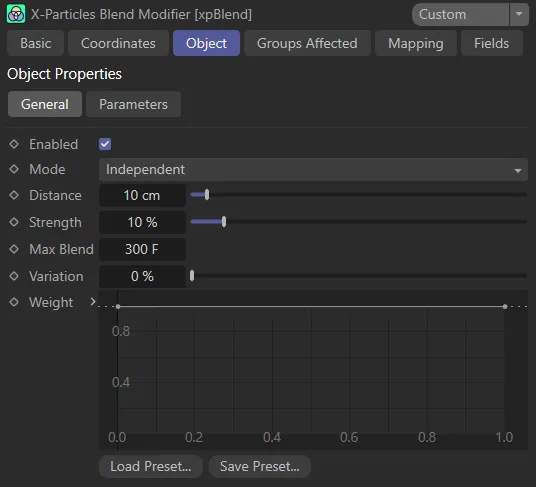
xpBlend General tab menu.
Enabled
Section titled “Enabled”Check this box to enable the xpBlend modifier.
Independent is the default setting.
Alternatively, you can change this to Action-Controlled.
Independent Mode
Section titled “Independent Mode”In this mode, particles will be affected if they come into the field of effect of the modifier.
Action-Controlled Mode
Section titled “Action-Controlled Mode”When in the Action-Controlled Mode setting, the modifier will only act on a particle when told to do so by an action.
Distance
Section titled “Distance”A particle’s properties will only be blended with its neighbor’s if the particles are within this Distance value.
Higher Distance settings will result in greater blending and lower settings will mean there is less blending.
In this animation, the Distance value is increased, first from 0 (zero) to 15cm and then 50cm.
Strength
Section titled “Strength”Sets the strength of the blending - the degree of blending from one particle to another.
Animation, showing the effect of increasing the Strength value from 0 (zero) to 100% and then up to 1000%.
Max Blend
Section titled “Max Blend”This allows you to specify the length of time for which the modifier will affect a particle, by selecting the frame when you want your blending to end.
In this animation, you can see the result of increasing the Max Blend parameter from 5 frames up to 30 frames.
Variation
Section titled “Variation”Gives you additional control on the Max Blend setting, so that the blending doesn’t stop immediately, but over a set number of frames.
Weight
Section titled “Weight”The Weight spline curve maps the Strength value (Y-axis) to the Distance value (X-axis) and can be manipulated to change your blending scene.
Parameters tab
Section titled “Parameters tab”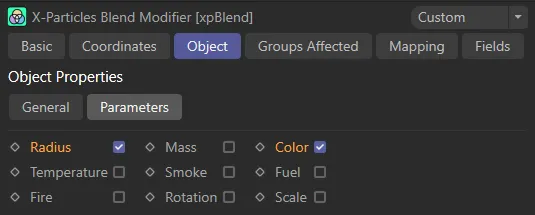
xpBlend Parameters tab menu.
The Parameters tab allows you to select which parameters you wish to blend.
The options are: Radius, Temperature, Fire, Mass, Smoke, Rotation, Color, Fuel and Scale.
Simply check the box to enable the parameter you wish to select.
Enabling the Radius parameter, to blend only the particle radii.
Enabling both the Mass and Color parameters to blend particle mass and color.
Groups Affected tab
Section titled “Groups Affected tab”Groups
Section titled “Groups”To specify the group, drag and drop the desired Group object into this field.
This setting is useful if you want to ensure that the spawned particles are, or are not, affected by xpBlend.
Mapping tab
Section titled “Mapping tab”The modifier’s settings can be mapped to particle data.
Use the dedicated manual page, below, for instructions on how this works.
Fields tab
Section titled “Fields tab”You can use the Fields options to control where xpBlend operates.
Copyright © 2026 INSYDIUM LTD. All rights reserved.