

xpPushApart
xpPushApart pushes particles away from one another until they get to a defined distance.
Object Properties
Section titled “Object Properties”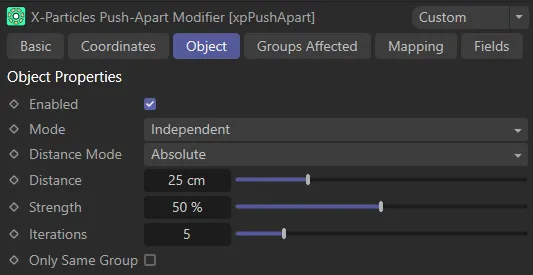
Object tab menu for xpPushApart.
Enabled
Section titled “Enabled”Ticking this box activates xpPushApart.
Set at Independent, by default.
You can change this to Action-Controlled.
Independent Mode
Section titled “Independent Mode”In this mode, particles will be affected if they come into the field of effect of the modifier.
Action-Controlled Mode
Section titled “Action-Controlled Mode”When in the Action-Controlled Mode setting, the modifier will only act on a particle when told to do so by an action.
Distance Mode
Section titled “Distance Mode”Set to Absolute by default.
The alternative setting is Use Particle Radius.
Absolute
Section titled “Absolute”The distance is a set value.
In this animation, Distance Mode is set to Absolute, pushing particles 10cm away from each other.
Use Particle Radius
Section titled “Use Particle Radius”Here, the distance is taken from the particle radius.
Animation showing Distance Mode set to Use Particles Radius, taking all available particles into account.
Distance
Section titled “Distance”Only available if the Distance Mode is set to Absolute, this is the distance to push the particles away from one another.
Animated Distance value increasing from 0 (zero) cm to 9cm, then to 40cm.
Strength
Section titled “Strength”Increasing the Strength setting will speed up the pushing apart process.
Animating the Strength value from 1% to 100%, increasing the push speed.
Iterations
Section titled “Iterations”The default setting of 5 should suffice in most scenes.
You can increase this to improve the accuracy of the simulation, but this will slow things down, as there are more calculations to carry out in each frame.
Only Same Group
Section titled “Only Same Group”Regardless of how many groups there are affected by the modifier, if this box is checked, each particle will only be pushed away from particles in the same group.
In the left-hand animation, with the Only Same Groups option enabled, particles of different groups are prevented from pushing each other away. Blue (outlined) particles are sat on top of green particles, with no interaction between the separate groups. Only Same Groups is disabled in the right-hand scene; now, particles from different groups will push each other away.
Groups Affected tab
Section titled “Groups Affected tab”Groups
Section titled “Groups”To specify the group, drag and drop the desired Group object into this field.
This setting is useful if you want to ensure that the spawned particles are, or are not, affected by xpPushApart.
Mapping tab
Section titled “Mapping tab”The modifier’s settings can be mapped to particle data.
Use the dedicated manual page, below, for instructions on how this works.
Fields tab
Section titled “Fields tab”You can use the Fields options to control where xpPushApart operates.
Copyright © 2026 INSYDIUM LTD. All rights reserved.