

nxWind
Overview Video
Section titled “Overview Video”nxWind simulates the effect of wind on particle movement.
Object tab
Section titled “Object tab”Visible in Editor
Section titled “Visible in Editor”When ticked, an icon will appear and the direction for the particles will be shown by an arrow in the viewport.
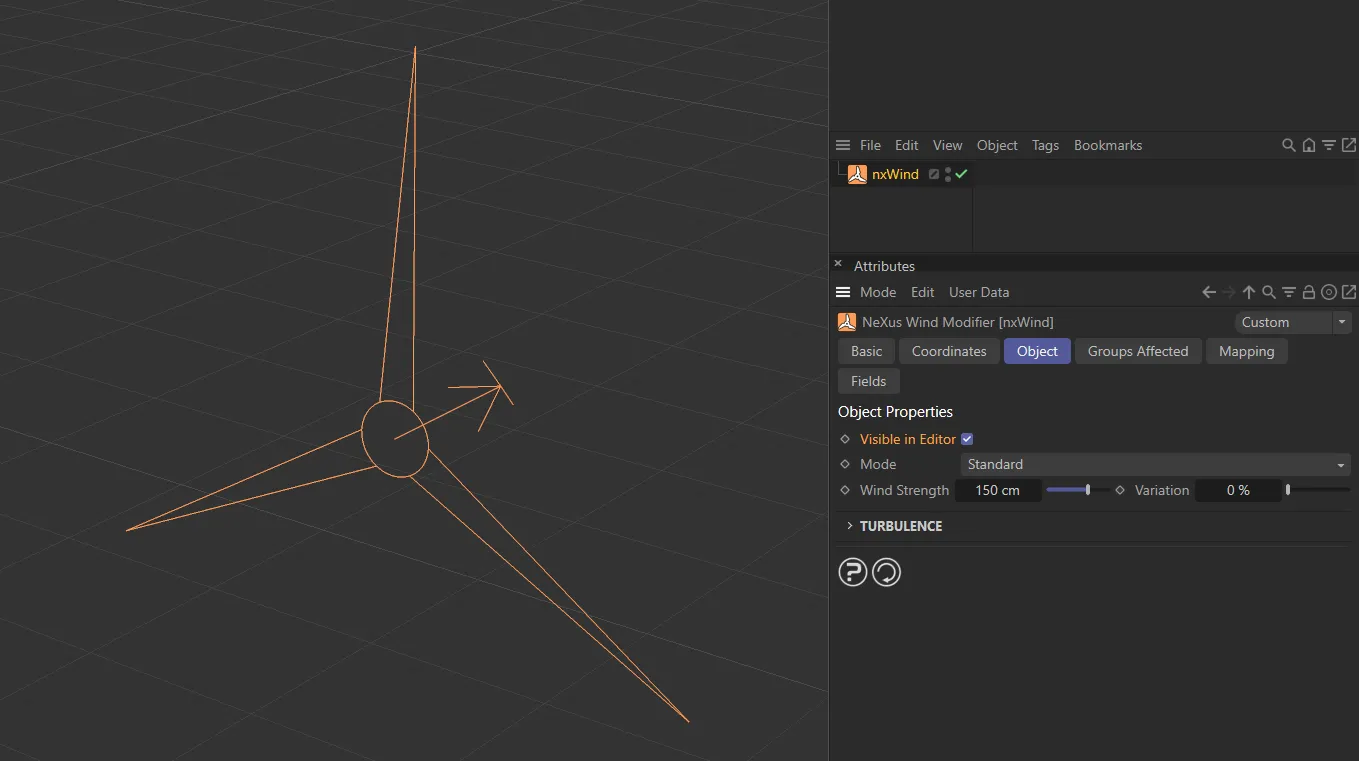
nxWind icon, when Visible in Editor is enabled, with the direction arrow showing the direction that the wind is pushing the particles.
Set as Standard, by default, this sets the wind type.
The alternative is Von Karman.
Standard
Section titled “Standard”Animation to demonstrate the Mode set as Standard (Dryden).
Von Karman
Section titled “Von Karman”In this animation, the Mode is Von Karman, giving a more physically accurate gusts.
Wind Strength
Section titled “Wind Strength”The strength of the wind speed effect.
Negative values are permitted and will reverse the wind direction.
Animation to demonstrate the Wind Strength value animated from 150 to negative -50.
Variation
Section titled “Variation”This will give a more organic look to the strength, with some variation, breaking up the flow of particles.
Animation demonstrating the Variation value animated from 0 (zero) to 80%.
Turbulence
Section titled “Turbulence”Turbulence
Section titled “Turbulence”This slider controls the strength of turbulence in the wind.
In this animation, there is a demonstration of the Turbulence value, in Standard mode, being animated from 0 (zero) to 100%.
Here, the same settings as above are replicated, except with the Mode set to Von Karman.
Axis Strength
Section titled “Axis Strength”The X, Y and Z sliders limit and control the turbulence in the relative axes.
This can also be used to boost the effect, at values over 100%.
Coordinate System
Section titled “Coordinate System”Set at Local, by default, this determines which coordinate space the turbulence effects.
The alternative is World.
Sets the axis calculations on local coordinates.
By default, the axes are oriented in the world coordinates.
Frequency
Section titled “Frequency”This parameter relates to the rate at which the noise animates, changing how fast the turbulence changes.
This animation illustrates the effect of decreasing the Frequency value from 100% to 20%, in the Standard mode, slowing down the noise frequency.
Again, this set up is identical to the animation above, except this time in Von Karman mode*.*
This controls the size of the noise in the Turbulence setting.
Animation demonstrating different Scale values, in the Standard mode, changing the look of the wind turbulence.
In the Von Karman mode, there is a slight difference in that this scale is the ‘Scale Length’ in relation to the Von Karman model.
Instead of just scaling the turbulence (like nxTurbulence and other tools that use it), the scale length describes the characteristic size of turbulent eddies or gusts in the atmosphere and provides a measure of the spatial distribution and intensity of atmospheric turbulence.
Once again, identical settings to the animation above, but the Mode setting is changed to Von Karman.
Friction Velocity
Section titled “Friction Velocity”This parameter is exclusive to the Von Karman mode.
Friction velocity characterizes the intensity of turbulence in the atmosphere.
It emulates the shear stress between the atmosphere and the Earth’s surface, which generates turbulent eddies or gusts.
These turbulent eddies or gusts have a characteristic size (as determined by scale, see above), which are related to the friction velocity and the von Karman constant.
The higher the velocity, the more intense the gusts and vice versa.
This animation demonstrates the effect of the Friction Velocity parameter, exclusive to the Von Karman mode*.*
Groups Affected tab
Section titled “Groups Affected tab”Groups
Section titled “Groups”To specify the group, drag and drop the desired Group object into this field.
This setting is useful if you want to ensure that the spawned particles are, or are not, affected by nxWind.
Mapping tab
Section titled “Mapping tab”The modifier’s settings can be mapped to particle data.
Use the dedicated manual page, below, for instructions on how this works.
Fields tab
Section titled “Fields tab”You can use the Fields options to control where nxWind operates.
Copyright © 2026 INSYDIUM LTD. All Rights Reserved.