

nxVorticity
Overview Video
Section titled “Overview Video”nxVorticity amplifies the natural motion of fluid particles to create swirling currents and eddies.
Object tab
Section titled “Object tab”Radius
Section titled “Radius”Each particle searches within the Radius value for other particles.
The velocity of all particles within the radius is then used to calculate the vorticity forces.
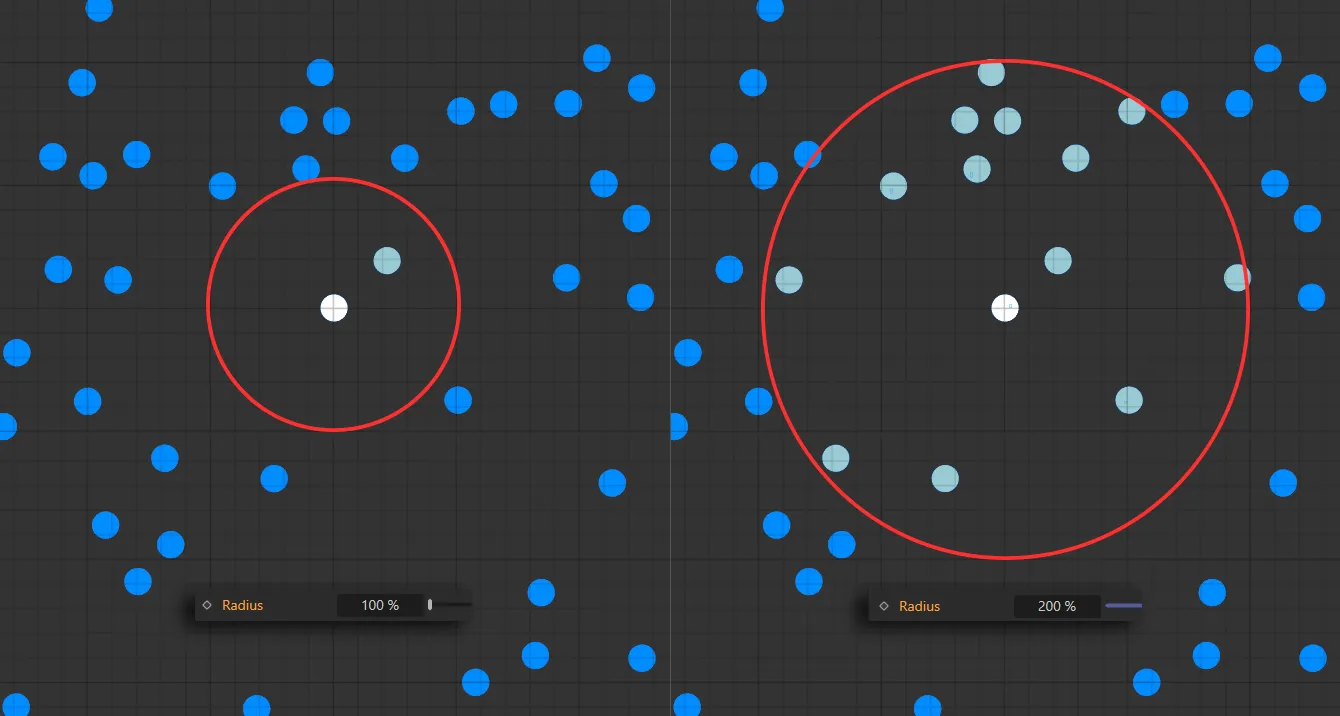
Graphical representation of the nxVorticity search area when Radius is set to 100% on the left and 200% on the right.
At lower percentage amounts simulation is quicker and you will see lots of smaller, separate areas of details in swirling.
Raising the percentage over 100% will result in larger, smoother swirls.
Animation showing an increase in the Radius value from 100% to 300%.
Strength
Section titled “Strength”Increases the strength of the vorticity.
Animation increasing the Strength setting from 0 (zero) % to 6%.
Force Limit
Section titled “Force Limit”Limits the force that can be built up, clamping the effects of the Strength parameter, to maintain control over the modifier.
In this animation, the Force Limit value is decreased from 10 to 2.
Exclude Emitters
Section titled “Exclude Emitters”Drag and drop any scene emitters into this link field to exclude them from the effect of the modifier.
Animation demonstrating the exclusion of the right emitter from the vorticity forces.
Groups Affected tab
Section titled “Groups Affected tab”Groups
Section titled “Groups”To specify the group, drag and drop the desired Group object into this field.
This setting is useful if you want to ensure that the spawned particles are, or are not, affected by nxVorticity.
Mapping tab
Section titled “Mapping tab”The modifier’s settings can be mapped to particle data.
Use the dedicated manual page, below, for instructions on how this works.
Fields tab
Section titled “Fields tab”You can use the Fields options to control where nxVorticity operates.
Copyright © 2026 INSYDIUM LTD. All Rights Reserved.