

xpInherit
xpInherit causes a particle to inherit certain parameters from particles from another emitter.
The particles which provide the parameters to be inherited are called the ‘provider’ particles in this manual.
General tab
Section titled “General tab”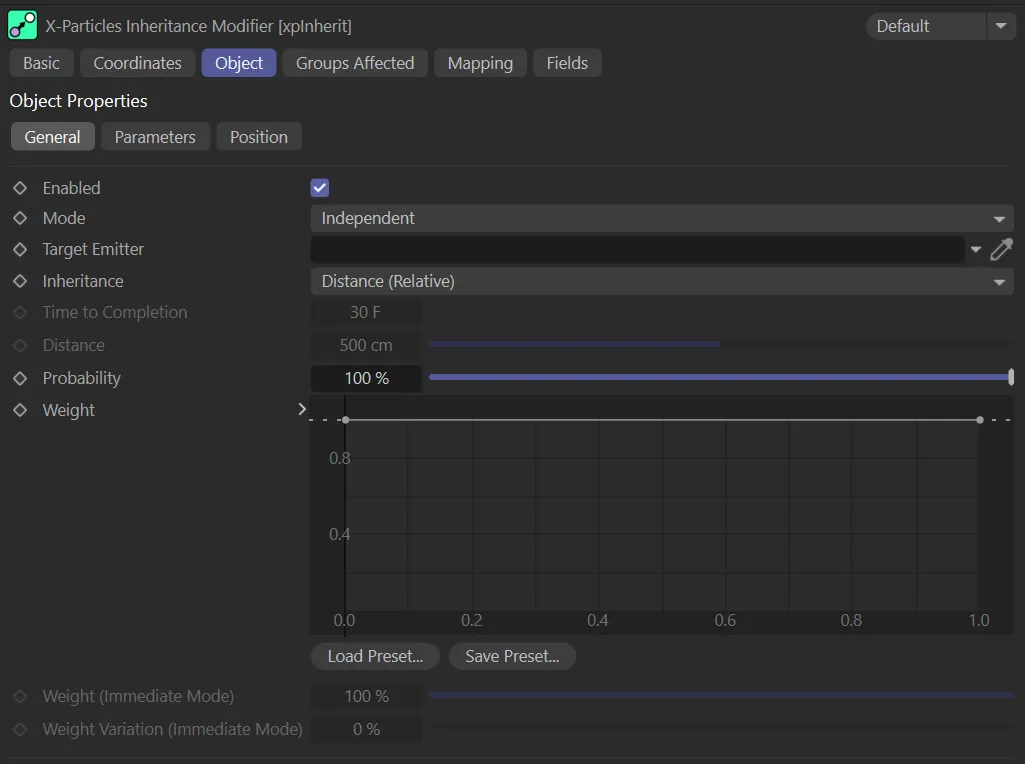
xpInherit General tab.
Enabled
Section titled “Enabled”Checking this box enables the xpInherit modifier.
This first scene shows the particles from the target xpEmitter.
In this animation, a second xpEmitter has been added, with particles from the inherit emitter.
Finally, you can see the effect when xpInherit is enabled, with particles from the second emitter inheriting the defined parameters from the first.
Set at Independent, by default.
You can change this to Action-Controlled.
Independent Mode
Section titled “Independent Mode”In this mode, particles will be affected if they come into the field of effect of the modifier.
Action-Controlled Mode
Section titled “Action-Controlled Mode”When in the Action-Controlled setting, the modifier will only act on a particle when told to do so by an action.
Until that point, the particle will not be affected, but once activated for a particular particle, the modifier will influence the particle - that is, it will play back the history.
Target Emitter
Section titled “Target Emitter”Particles affected by this modifier will inherit parameters from those emitted from another emitter.
This field contains the emitter whose particles have the parameters which will be inherited.
If this field is empty, the modifier will have no effect.
Inheritance
Section titled “Inheritance”Set at Distance (Relative), by default, inheritance can take place in three other ways: Distance (Absolute), Time and Immediate.
Distance (Relative)
Section titled “Distance (Relative)”In this mode, the particles inherit parameters as soon as they are inside the modifier’s field of effect.
The rate of change of the parameter will depend on the distance between the two particles - the particle which is to inherit a parameter and the one providing it.
If the particles never get closer to one another, the particles will never inherit the properties of the target particle, such as rotation.
The only exception to this is if Position is inherited, since that will always move the particles closer together.
Distance (Absolute)
Section titled “Distance (Absolute)”With this mode, instead of the relative change in distance between two particles being used, a fixed value given in the Distance setting is used instead.
If the distance between the two particles is less than this value, one particle will inherit the parameters of the other.
The rate of change will depend on the distance between the particles in relation to the Distance setting.
The particle parameter will change to that of the provider particle over time; it is not affected by the distance between the particles.
The time to complete the change is given in the Time to Completion setting.
Immediate
Section titled “Immediate”With this mode the change in parameter takes place immediately.
For example, if you choose Position as the parameter to change, the particle will immediately jump to the position of the provider particle.
Time to Completion
Section titled “Time to Completion”This the time taken to complete inheritance of a parameter if Inheritance is set to Time.
Time to Completion is set at 80 frames, in this animation, so each particle rushes to complete in the timeframe.
In this second scene, with Time to Completion raised to 200 frames, the particles can move more slowly to complete.
Distance
Section titled “Distance”The distance between the two particles must be less than this value before inheritance will occur.
This setting is only used if Inheritance is set to Distance (Absolute).
This animation demonstrates a Distance setting of 90cm, so only particles within this distance are affected.
With the Distance value raised to 115cm, more particles are affected, as shown in this scene.
Probability
Section titled “Probability”This is the probability that a particle will inherit the selected data from the source particle.
If this value is 0 (zero) %, no inheritance will occur; if it is 100%, all particle will inherit from their source.
By keyframing this value, you can spread the inheritance by a group of particles over time, rather than all of them inheriting data simultaneously.
With a 90% Probability value, demonstrated here, most particles are inheriting from their source.
Weight
Section titled “Weight”With this spline control, you can affect the weight applied to each inherited parameter.
If the weight is zero, nothing will be inherited.
At a weight value of 1, the parameter is inherited completely.
If you don’t want to alter the distance, use the Time mode instead.
The custom Weight spline is driving the effect shown here.
Weight (Immediate Mode)
Section titled “Weight (Immediate Mode)”Only available if Inheritance is set to Immediate mode.
It has the same function as the Weight spline but, as the change is immediate, only a single value is needed.
Weight Variation (Immediate Mode)
Section titled “Weight Variation (Immediate Mode)”This is only available if Inheritance is set to Immediate mode.
It enables you to add some variation to the Weight (Immediate Mode) parameter for different particles.
With 100% Weight (Immediate Mode) applied and no Weight Variation (Immediate Mode), each particle immediately inherits from their source.
In this second animation, both settings are set at 50%, giving a variation to the sim.
Parameters tab
Section titled “Parameters tab”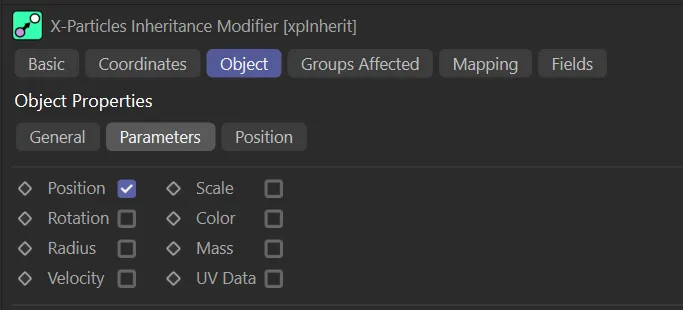
xpInherit Parameters tab menu.
You can choose which parameter(s) the particle will inherit from the provider by checking the required boxes.
Particles can inherit UV data from the source particle.
For this to work, UV Emission Data must be enabled in the xpEmitter’s Extended Data tab.
In this scene, with Radius and Color now enabled, particles inherit their target particle’s color and radius.
Position tab
Section titled “Position tab”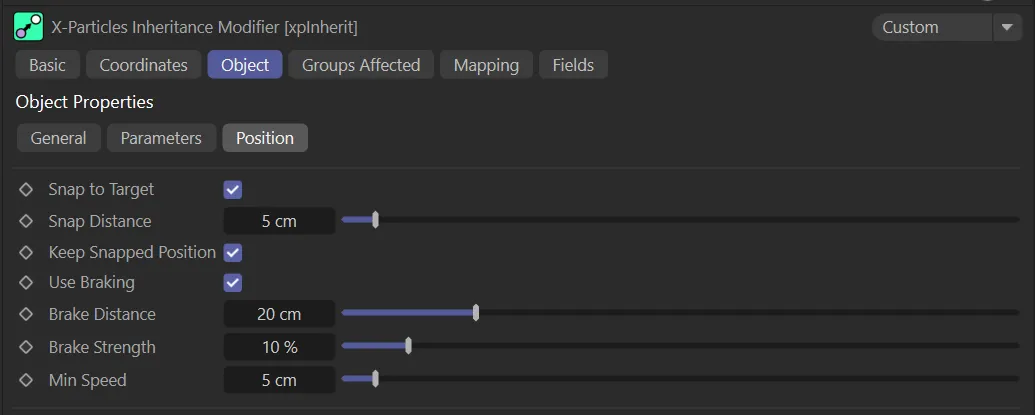
xpInherit Position tab menu.
Some of these settings are only available if Inheritance is not set to Immediate and Position is one of the parameters to inherit.
They control how the particle moves towards the provider particle’s position.
In Immediate mode you can only use the Snap to Target, Snap Distance and Keep Snapped Position controls.
Snap to Target
Section titled “Snap to Target”If checked, this will cause the particle to snap to the provider particle’s position when the distance between them is less than the Snap Distance setting.
Snap Distance
Section titled “Snap Distance”When the distance between the two particles is less than this value, the particle will snap to the provider particle’s position, provided that Snap to Target is checked.
In this animation, with Snap to Target enabled, the Snap Distance parameter is key-framed, from 5 to 55cm, so that the snapping distance increases over time.
Keep Snapped Position
Section titled “Keep Snapped Position”If enabled, once snapped to its target, the particle will maintain the same position and direction/speed as the provider particle.
For this to function correctly, it also sets the particle velocity to the same as the target.
This is fine, unless the target particle is stuck to a source object.
If that happens, the target particle will not move but, internally, it still has a speed and direction.
The particle being moved by the modifier is not stuck, so each frame two things will happen: the particle is moved to the target particle’s position and receives the target particle’s velocity; the emitter will then move the particle (but not the target particle, as it is stuck) using the inherited velocity.
The result is that you will see an offset between the two particles.
The solution to this is very simple, set the target particle’s speed to zero; then it will work as intended.
Use Braking
Section titled “Use Braking”Braking causes the particle to slow down as it approaches the provider’s position.
Check this box to use braking.
Brake Distance
Section titled “Brake Distance”Braking will commence when the distance between the two particles is less than this value.
Here, the Brake Distance is keyframed, from 0 (zero) to 100cm, so that particles from a greater distance away eventually slow down.
Brake Strength
Section titled “Brake Strength”This the percentage reduction in speed each frame when braking is active.
To prevent the particles slowing almost to zero, set the Min Speed value.
The larger the Brake Strength value, the harder the particles are braked.
Lower values will give smoother braking but, if too low, the particle may snap to the provider position with a noticeable jump.
The Brake Strength is keyframed, in this scene, increasing from 10 to 100%, so that the particles increasingly slow down their approach over time.
Min Speed
Section titled “Min Speed”The minimum speed the particle can have when braked.
Groups Affected tab
Section titled “Groups Affected tab”Groups
Section titled “Groups”To specify the group, drag and drop the desired Group object into this field.
This setting is useful if you want to ensure that the spawned particles are, or are not, affected by xpInherit.
Mapping tab
Section titled “Mapping tab”The modifier’s settings can be mapped to particle data.
Use the dedicated manual page, below, for instructions on how this works.
Fields tab
Section titled “Fields tab”You can use the Fields options to control where xpInherit operates.
Copyright © 2026 INSYDIUM LTD. All rights reserved.