

xpHistory
xpHistory provides a localized, non-saveable cache, which you can use to play back the animation of a particle.
General tab
Section titled “General tab”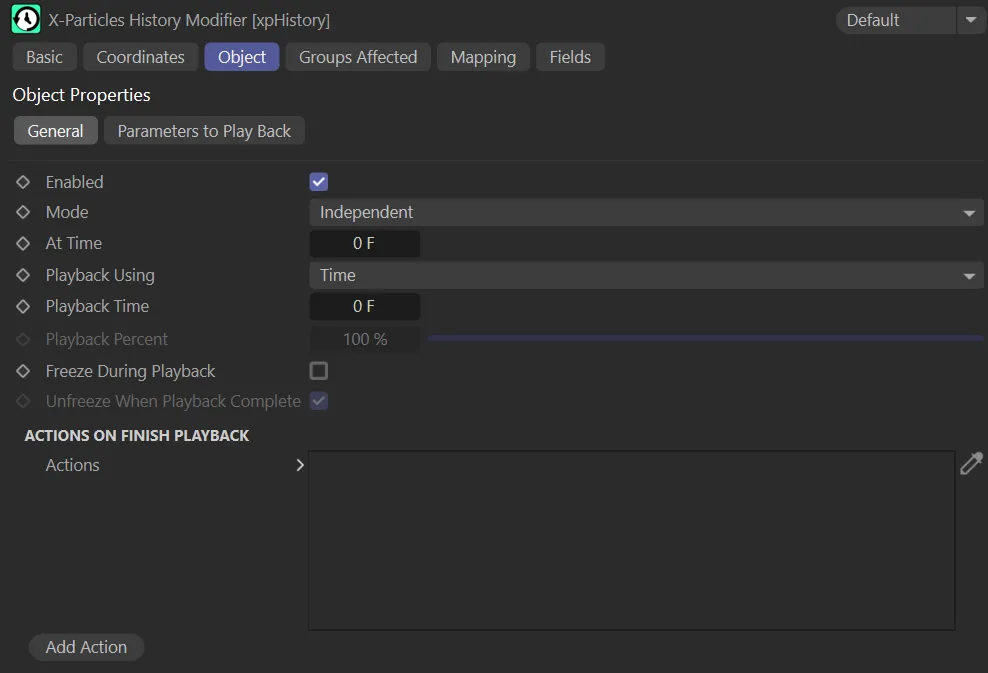
The xpHistory General tab.
Enabled
Section titled “Enabled”Checking this box enables the xpHistory modifier.
Enabled is unticked, in this animation.
With Enabled checked, the repeat occurs at the At Time setting of frame 75.
Set at Independent, by default.
You can change this to Action-Controlled.
Independent Mode
Section titled “Independent Mode”In this mode, particles will be affected if they come into the field of effect of the modifier.
Action-Controlled Mode
Section titled “Action-Controlled Mode”When in the Action-Controlled setting, the modifier will only act on a particle when told to do so by an action.
Until that point, the particle will not be affected, but once activated for a particular particle, the modifier will influence the particle - that is, it will play back the history.
At Time
Section titled “At Time”This is the time in the document when playback will start.
In this animation, the At Time setting is reduced, from the previous setting of 75, to 15, directing the repeat to occur on frame 15.
Playback Using
Section titled “Playback Using”Time is the default setting.
The alternative is Percent.
You can set the length of the playback in frames (or seconds).
Percent
Section titled “Percent”If this is selected, the length of the playback time will be the percentage of the total number of frames stored in the history.
Playback Time
Section titled “Playback Time”The length of the play back in frames or other time units, if Time is selected in Playback Using.
In this scene, the Playback Time is reduced from 100 to 60 frames. This directs the reversed playback to only occur for 60 frames before resuming normal playback.
Playback Percent
Section titled “Playback Percent”The length of the play back as a percentage of the total history stored by the particle, if Percent is selected in Playback Using.
Playback Percent is set at 85%, in this scene, only playing 85% of the animation before normal playback is resumed.
With Playback Percent at 100%, the entire history is played.
Freeze During Playback
Section titled “Freeze During Playback”This will prevent the emitter from moving, scaling or rotating particles during playback, leaving these parameters under the control of the modifier.
To unfreeze them when playback is complete, you can either use an action or you can enable Unfreeze When Playback Complete, which reverses the effect of this.
Freeze During Playback is enabled, in this animation, freezing the playback once the Playback Percent setting of 85% has been reached.
Unfreeze When Playback Complete
Section titled “Unfreeze When Playback Complete”Only available when Freeze During Playback is enabled.
It will automatically unfreeze the particles, allowing the emitter to take over moving, scaling and rotating them again.
Alternatively, you can leave this disabled and do the same thing with an action.
If you want to keep the particles frozen when playback is complete, untick this box.
Actions On Finish Playback
Section titled “Actions On Finish Playback”Actions
Section titled “Actions”When play back is complete, the modifier will trigger any actions found in this list.
Add Action
Section titled “Add Action”Click this button to create a new action and add it to the list.
Parameters to Play Back tab
Section titled “Parameters to Play Back tab”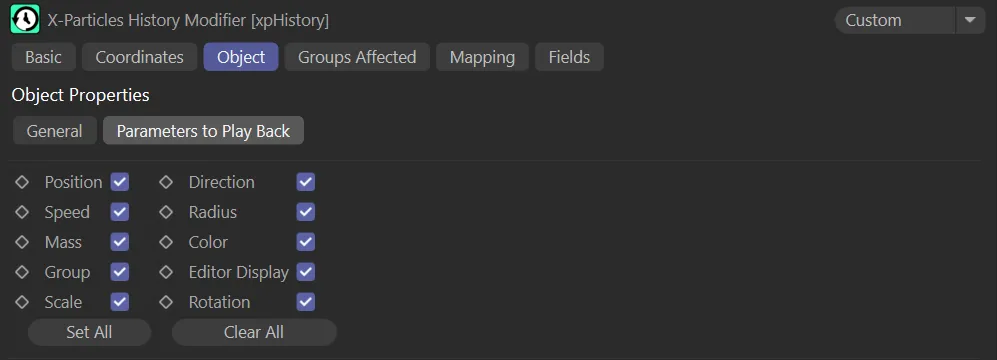
xpHistory Parameters to Play Back tab menu.
The modifier stores all these parameters for each frame, but you don’t need to play them all back if that is not required.
Simply select from this list which parameters you want to play back when the playback is triggered.
Set All, Clear All
Section titled “Set All, Clear All”These two buttons will either check all the boxes or uncheck them all, respectively.
Groups Affected tab
Section titled “Groups Affected tab”Groups
Section titled “Groups”To specify the group, drag and drop the desired Group object into this field.
This setting is useful if you want to ensure that the spawned particles are, or are not, affected by xpHistory.
Mapping tab
Section titled “Mapping tab”The modifier’s settings can be mapped to particle data.
Use the dedicated manual page, below, for instructions on how this works.
Fields tab
Section titled “Fields tab”You can use the Fields options to control where xpHistory operates.
This Linear field is controlling the xpHistory operation, showing only half of the animation playback.
Copyright © 2026 INSYDIUM LTD. All rights reserved.