

nxConstraints - Friction
Overview Video
Section titled “Overview Video”This layer adds a friction force between particles.
Friction
Section titled “Friction”The strength of friction is given in this setting.
Animation comparing Friction strengths of 10%, on the left, and 100%, on the right.
Weight
Section titled “Weight”The Weight setting alters the influence each constraint type provides to the overall, global solution.
If you are only using one layer, this can be left at the default, 100%.
If you are combining different constraints in several layers, you could reduce this weight to lessen the effects of the connections and blend in other layers.
Connection Limit
Section titled “Connection Limit”This parameter sets the limit on the number of connections each particle can make with other particles, when building a friction force.
In this animation, the Connection Limit is raised from 1 to 10.
Radius
Section titled “Radius”The distance between particles must be less than this value for friction to be enabled.
This animation shows an increase in the Radius value, from 0 (zero) to 30cm.
Static
Section titled “Static”This value is a percentage of the Radius value.
Within this distance the particles have the full friction stiffness applied, which results in a static friction, where they will try to hold each other together to stop relative motion between them.
Animation demonstrating a Static value of 0 (zero) % on the left and 100% on the right.
Kinetic
Section titled “Kinetic”If the distance between particles is greater than the value derived from the Static parameter, this setting then controls how stiff the kinetic friction is.
This animation shows a comparison of a Kenetic value of 2%, on the left, and 100%, on the right.
Falloff
Section titled “Falloff”Set as Cubic, by default, this is the falloff of the friction effect over the Radius value.
The alternatives are: Flat, Linear and Quadratic.
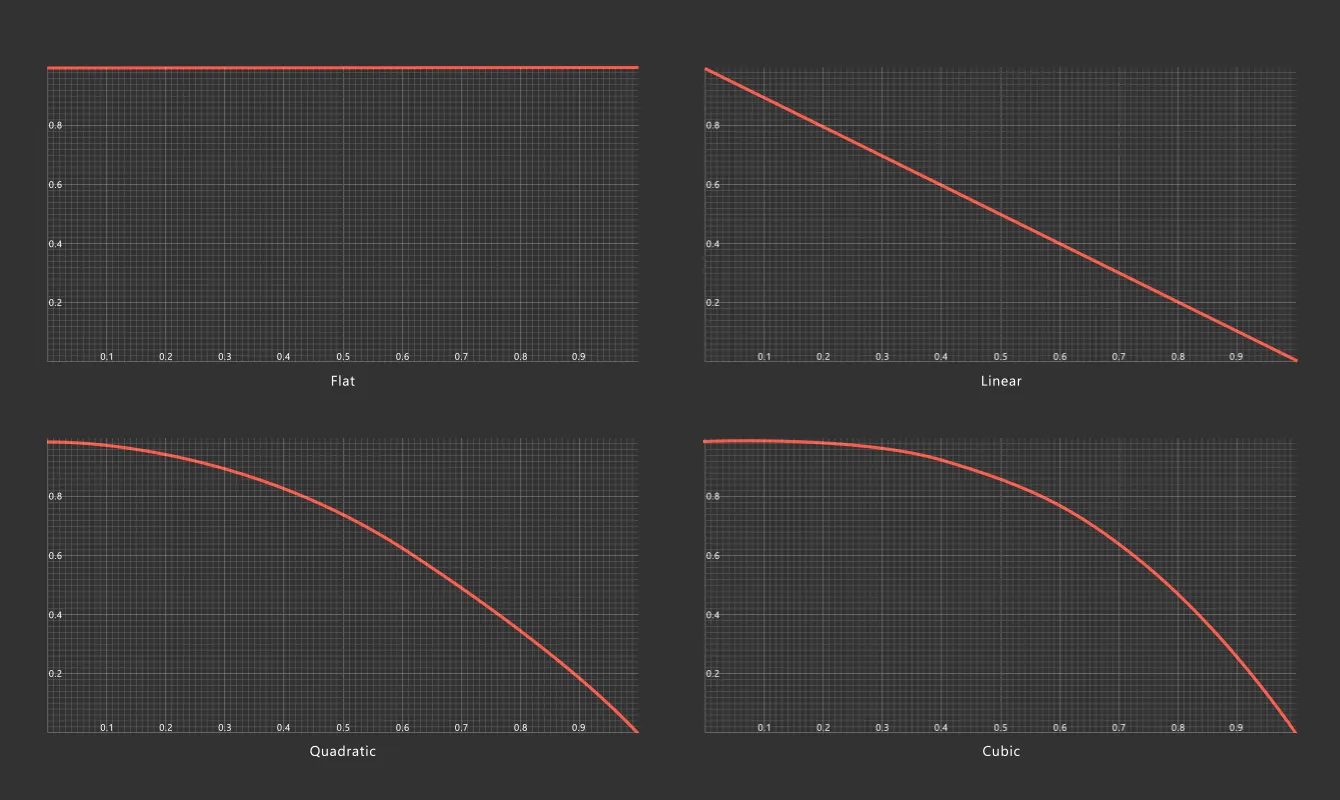
Graphical representation of the four friction Falloff types.
Copyright © 2026 INSYDIUM LTD. All Rights Reserved.