

nxAvoid
xpAvoid changes particle direction to avoid other objects in the scene. It can also be used to freeze and kill particles, once an object is detected.
Object tab
Section titled “Object tab”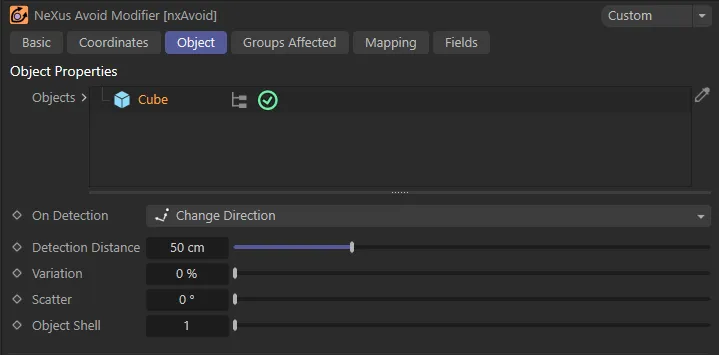
xpAvoid Object tab menu.
Objects
Section titled “Objects”Scene objects dropped into this list will be avoided by particles.
They can be disabled by clicking the yellow check mark, turning it into a blue minus symbol.
When an object is dropped in and highlighted, a list of options will show below.
On Detection
Section titled “On Detection”Set as Change Direction, by default, this gives particles instruction on what to do when they detect a possible collision with an object in the Objects list (within the Detection Distance setting).
The alternative options are Freeze and Die.
Change Direction
Section titled “Change Direction”The particle will change direction to avoid the object.
This animation shows the xpShatter object in the nxAvoid modifier. With On Detection set in the Change Direction mode, particles are avoiding the shatter object by the Detection Distance value of 100cm.
Freeze
Section titled “Freeze”The particle will freeze.
It can be unfrozen again using an Action object or the xpNegate modifier.
In this animation, with On Detection set to Freeze, once the particles come within the Detection Distance of 60cm they will freeze.
The particle will be killed.
Unlike freezing, this cannot be reversed later.
Animation demonstrating the On Detection setting of Die, where particles will be killed when they enter the Detection Distance of the xpJoin_Cubes, which is keyframed to grow.
Detection Distance
Section titled “Detection Distance”This is the distance in scene units at which the particle will detect that there is an object to be avoided and starts to be influenced by the object’s detection type.
In this animation, the Detection Distance is keyframed to grow, in the On Detection mode of Change Direction.
The shorter this distance, the closer the particle will get to the object before starting to turn to avoid the object.
If you set this too low (e.g. less than the distance the particle will travel in one frame), the particle may fail to avoid the object altogether.
A similar setting to above, with a shorter Detection Distance of 20cm.
In this animation, with the Detection Distance raised to 85cm, the particles are hugging together more tightly in the available space.
Variation
Section titled “Variation”Applies some random variation to the Detection Distance, so that the particles don’t all start to avoid the object at the same time.
With the same settings as the previous animation, a Variation of 80% is applied here, giving a more natural flow.
Scatter
Section titled “Scatter”Use this to add some spread to the particles’ change of direction.
This is better utilized at low values and you may need to increase the Detection Distance setting for better results.
Object Shell
Section titled “Object Shell”Applies a scaling factor to each object so as to create an ‘invisible shell’ of ‘padding’ around the object.
This shell is what the particle will actually avoid.
The default is 1, which sets the shell to be the same size as the object, meaning that the particles will only just avoid the object.
Set to a higher number, the particle will avoid the object by a wider margin.
Groups Affected tab
Section titled “Groups Affected tab”Groups
Section titled “Groups”To specify the group, drag and drop the desired Group object into this field.
This setting is useful if you want to ensure that the spawned particles are, or are not, affected by nxAvoid.
Mapping tab
Section titled “Mapping tab”The modifier’s settings can be mapped to particle data.
Use the dedicated manual page, below, for instructions on how this works.
Fields tab
Section titled “Fields tab”You can use the Fields options to control where nxAvoid operates.
Copyright © 2026 INSYDIUM LTD. All Rights Reserved.