

xpSpawn
xpSpawn will cause particles to spawn from existing (source) particles.
General tab
Section titled “General tab”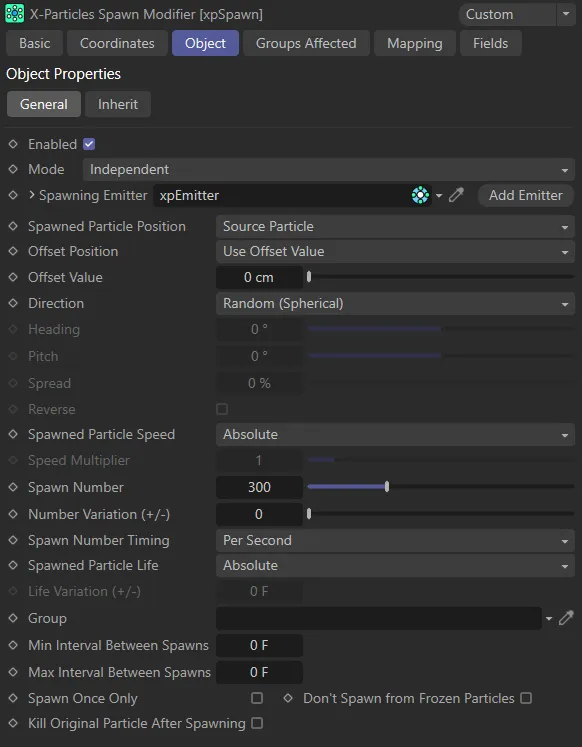
General tab menu.
Enabled
Section titled “Enabled”Checking this box activates xpSpawn.
Set at Independent, by default.
You can change this to Action-Controlled.
Independent Mode
Section titled “Independent Mode”In this mode, particles will be affected if they come into the field of effect of the modifier.
Action-Controlled Mode
Section titled “Action-Controlled Mode”When in the Action-Controlled Mode setting, the modifier will only act on a particle when told to do so by an action.
Spawning Emitter
Section titled “Spawning Emitter”This is the emitter which will generate the spawned particles.
Without an emitter in this field you cannot access any of the other parameters and the modifier will have no effect.
In general, it is recommended that you use a second emitter for this purpose; it has the advantage that you can set the parameters of the spawned particles to be quite different from the source particles.
Spawned Particle Position
Section titled “Spawned Particle Position”Set as Source Particle, by default, this drop-down determines where the particle will be emitted.
The alternative setting is Determined by Emitter.
Source Particle
Section titled “Source Particle”The spawned particles will be emitted from the position of the particle which gave rise to the spawns.
In this mode, the direction of the spawned particles is determined by the Direction setting (see below).
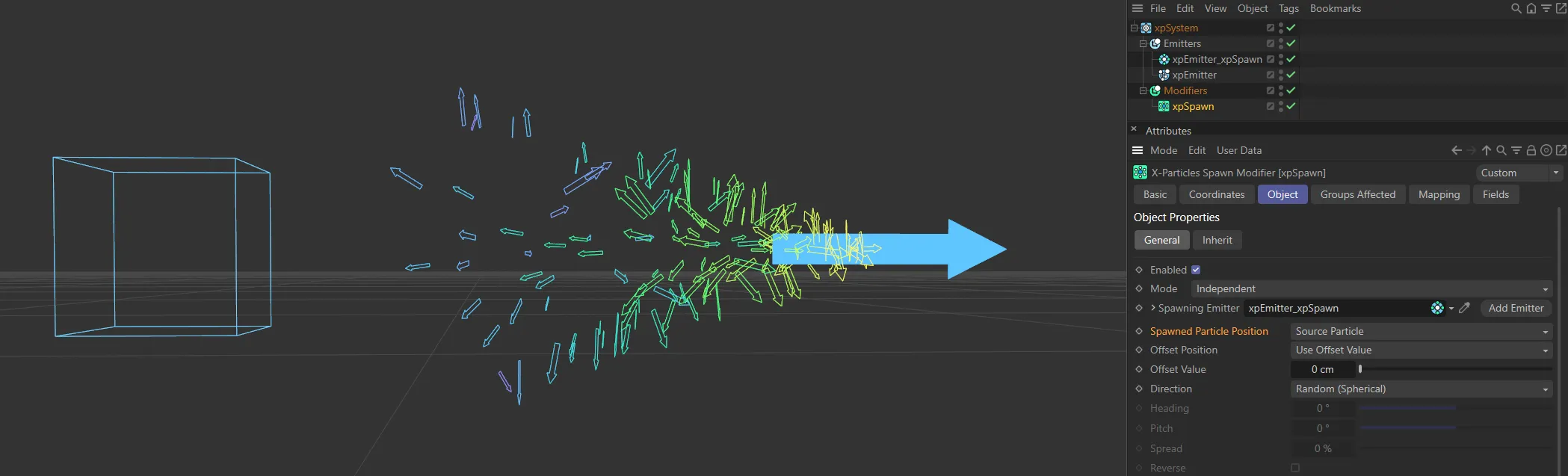
Here, the Spawned Particle Position is set to Source Particle. The associated xpSpawn emitter has a small speed value, so particles are born at the location of the source particle and move outwards based on their direction settings, below.
Determined by Emitter
Section titled “Determined by Emitter”In this mode the spawning emitter decides where the particles are emitted.
You can have the spawning emitter emit particles from an object which may be at a completely different position from where the source particle is located.
The spawning emitter also determines the direction of the spawned particles.
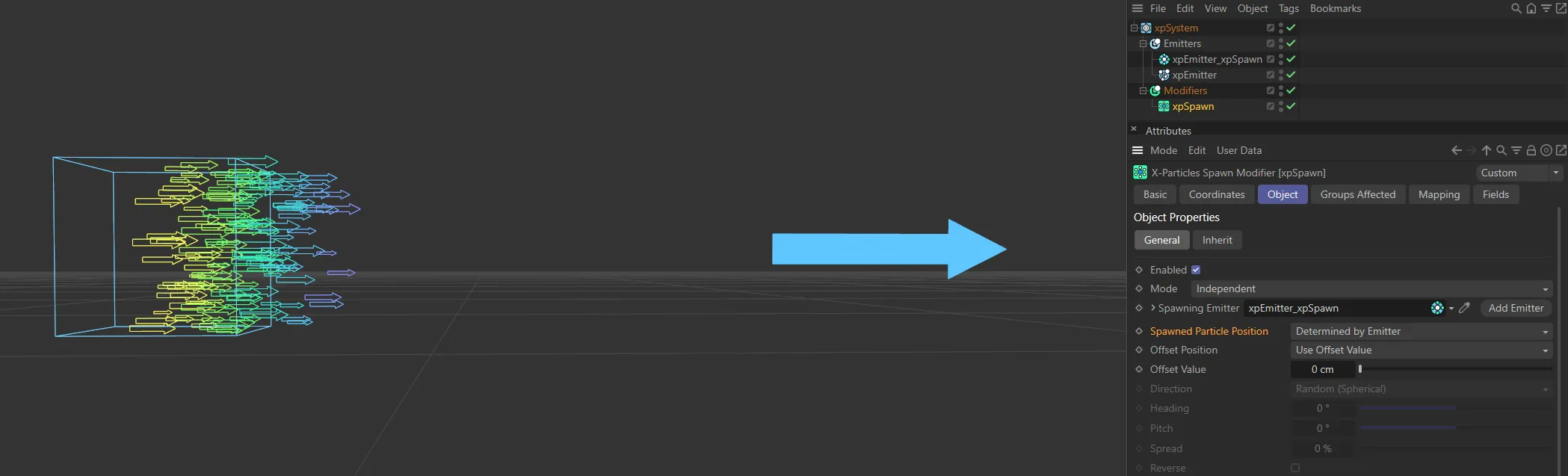
In this image, the Spawned Particle Position is set to Determined by Emitter; this is spawning particles at the emitter’s location.
Offset Position
Section titled “Offset Position”Set as Use Offset Value, by default, this controls the offset of the spawned particles from the source particle.
When spawned particles are created, they can be given a small random offset from the calculated position; this prevents banding in the particle stream.
To apply an offset, either select the default, Use Offset Value, and enter a value other than zero into the Offset Value setting, or choose Use Particle Radius.
Use Offset Value
Section titled “Use Offset Value”This enables you to enter a value into the Offset Value field.
The actual offset applied will be a random value between zero and the value in the Offset Value field.
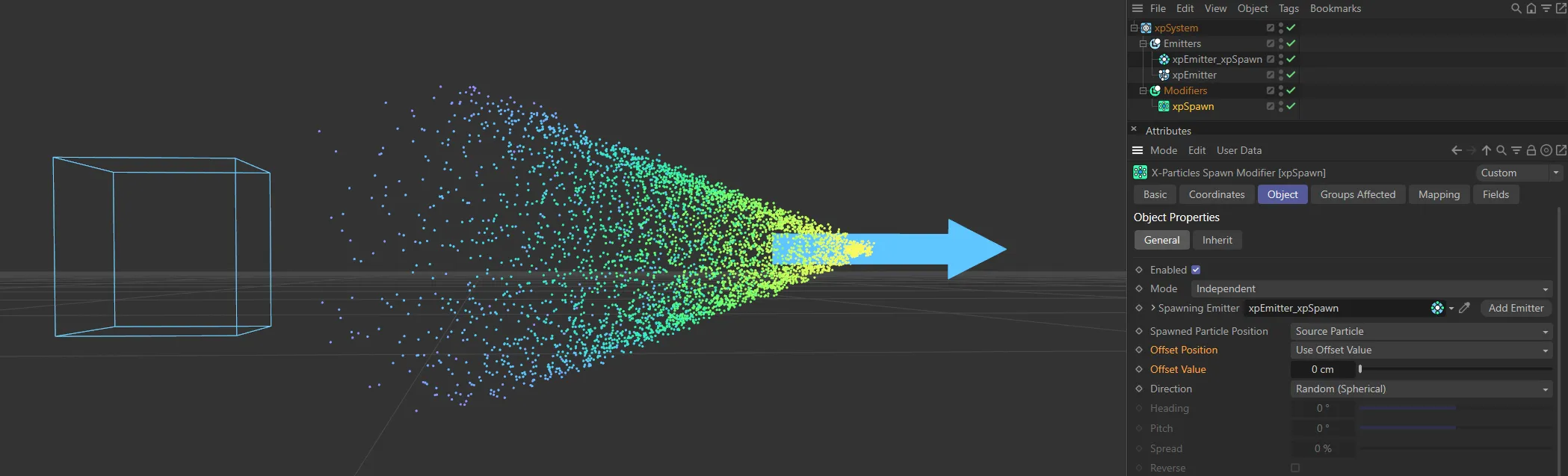
With Offset Position set to Use Offset Value, but no Offset Value set - 0 (zero) cm - this cone-like spawning emission is created.
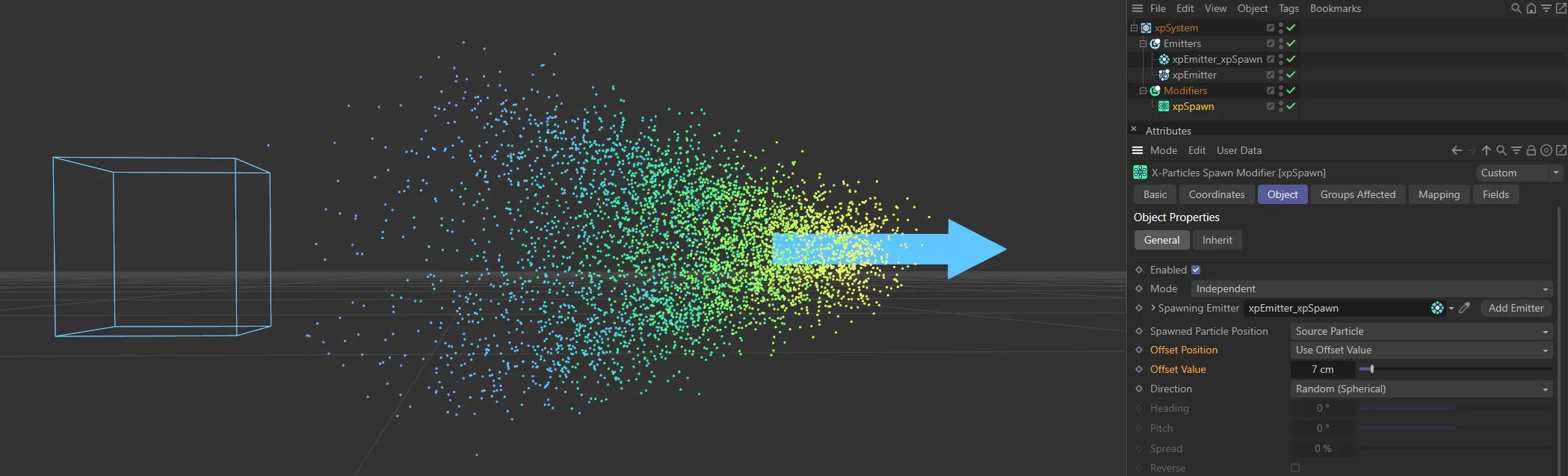
Here, with an Offset Value of 7cm, particles can be born up to 7cm from the source particle, producing more variety in the spawned particle positions.
Use Particle Radius
Section titled “Use Particle Radius”The offset applied will be a random value between zero and radius of the source particle.
Offset Value
Section titled “Offset Value”The value used when Offset Position is set to Use Offset Value.
Direction
Section titled “Direction”Set as Random (Spherical), by default, this is how the direction of the spawned particles is determined.
It is only available if Spawned Particle Position is set to Source Particle.
The other settings are: Relative to Source Particle Direction, Relative to Source Particle Rotation and Custom (Absolute).
Random (Spherical)
Section titled “Random (Spherical)”The direction of the spawned particles is set to a random value which, in practice, means that the spawns adopt a spherical distribution.
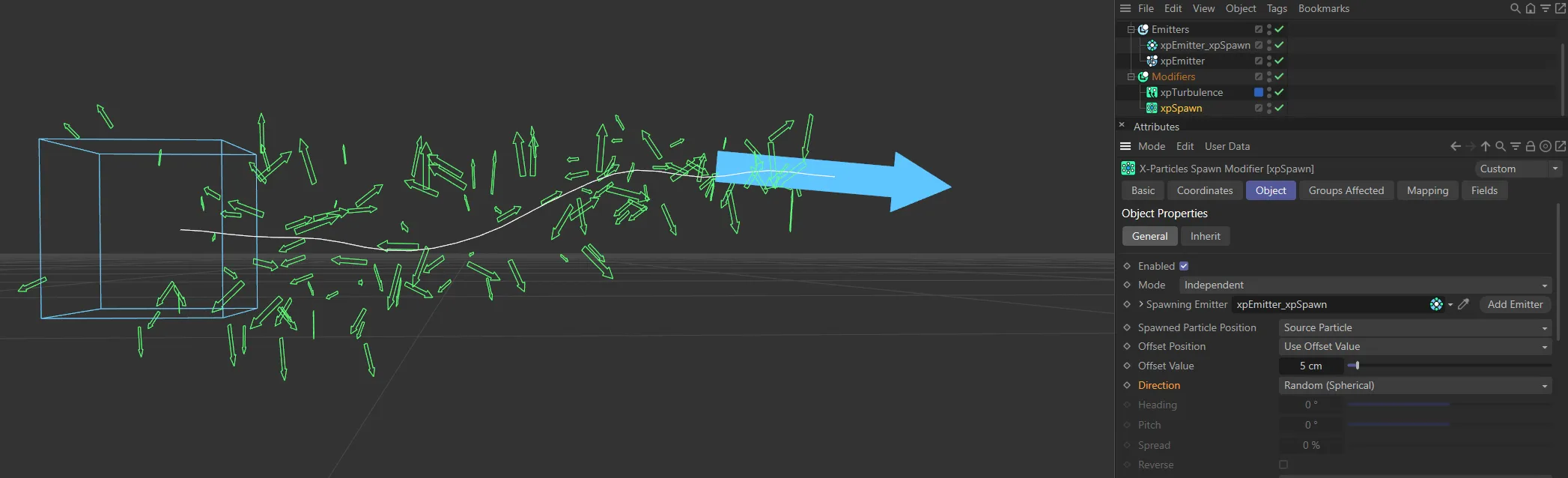
Direction set to Random (Spherical).
Relative to Source Particle Direction
Section titled “Relative to Source Particle Direction”In this mode, the direction of the new particles is the same as the source particle (but can be modified by the Heading, Pitch, Spread and Reverse setting).
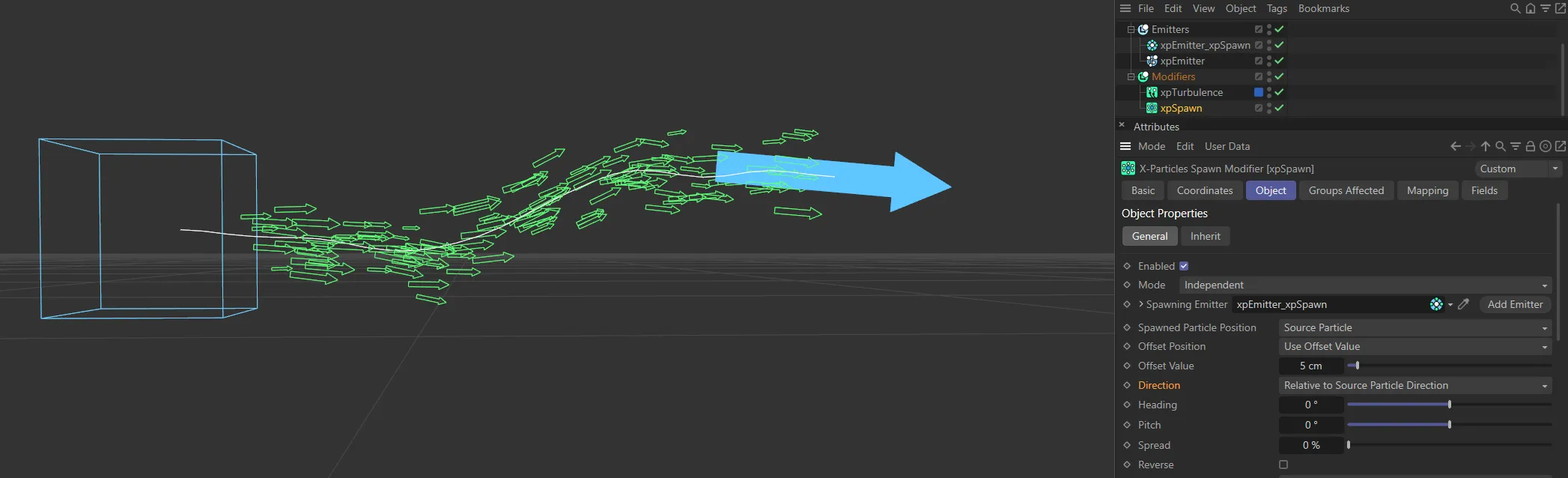
Direction set to Relative to Source Particle Direction, with 0 (zero) degrees of Heading and Pitch and 0 (zero) % Spread set.
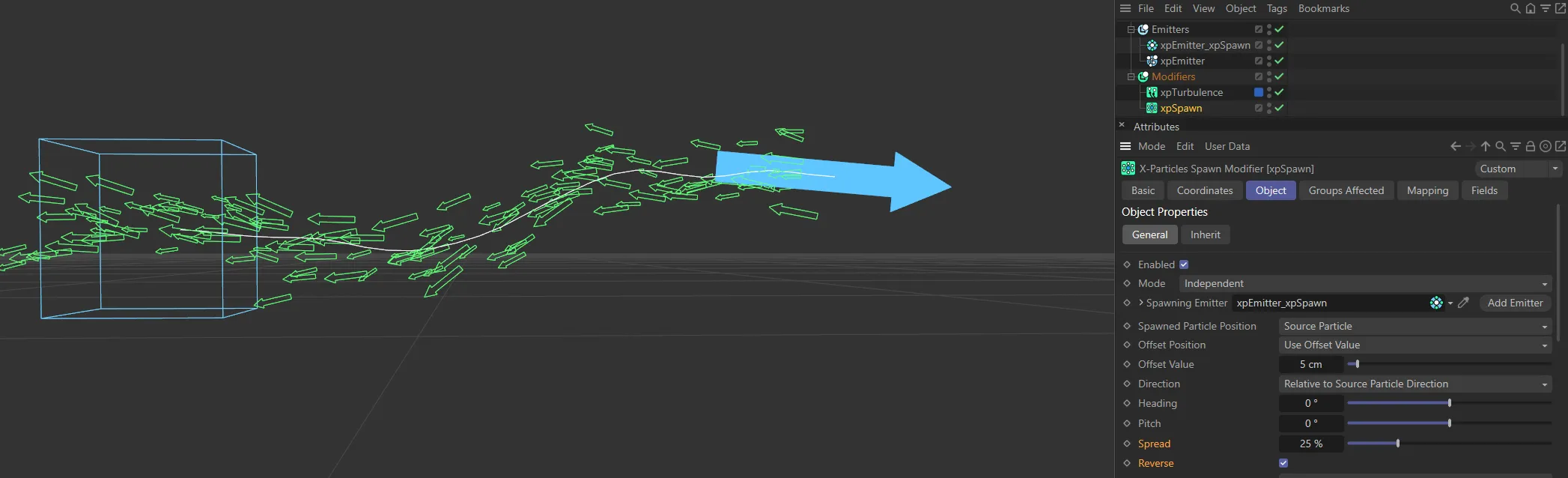
By comparison, here, Reverse is enabled, so particles are facing away from the source particle. There is also a 25% Spread setting, giving some variation to their angles.
Relative to Source Particle Rotation
Section titled “Relative to Source Particle Rotation”The direction of the new particles is relative to the source particle’s rotation.
The source particle direction has no effect; the spawned particle direction is derived from the rotation of the source.
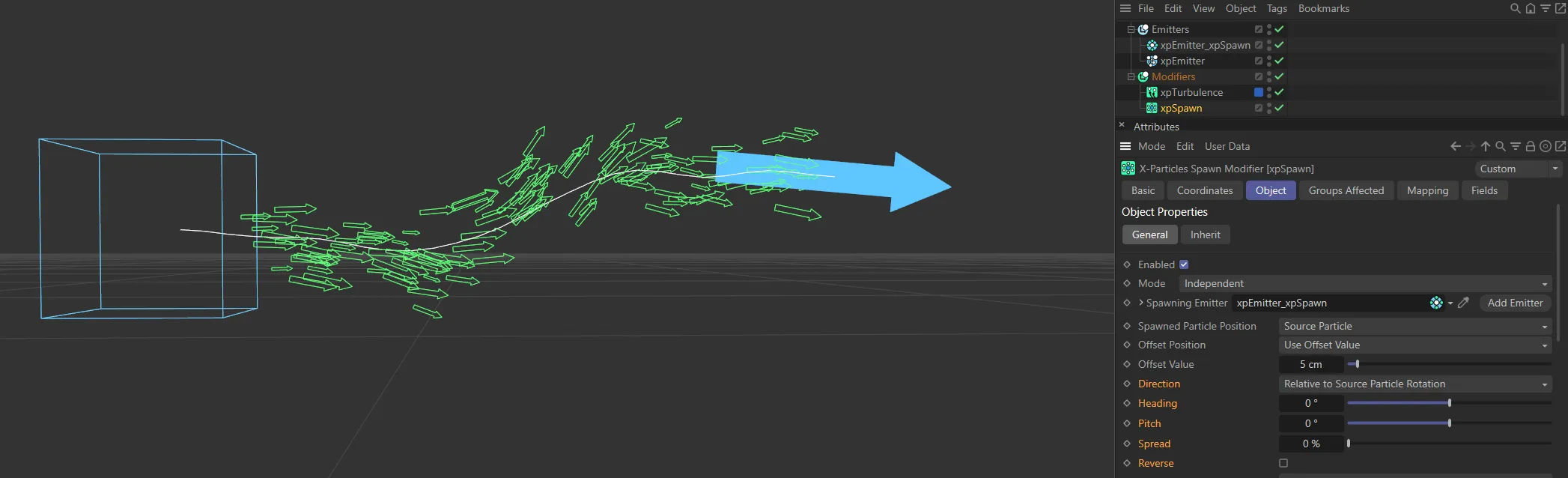
Direction set to Relative to Source Particle Rotation, with 0 (zero) degrees of Heading and Pitch and 0 (zero) % Spread set.
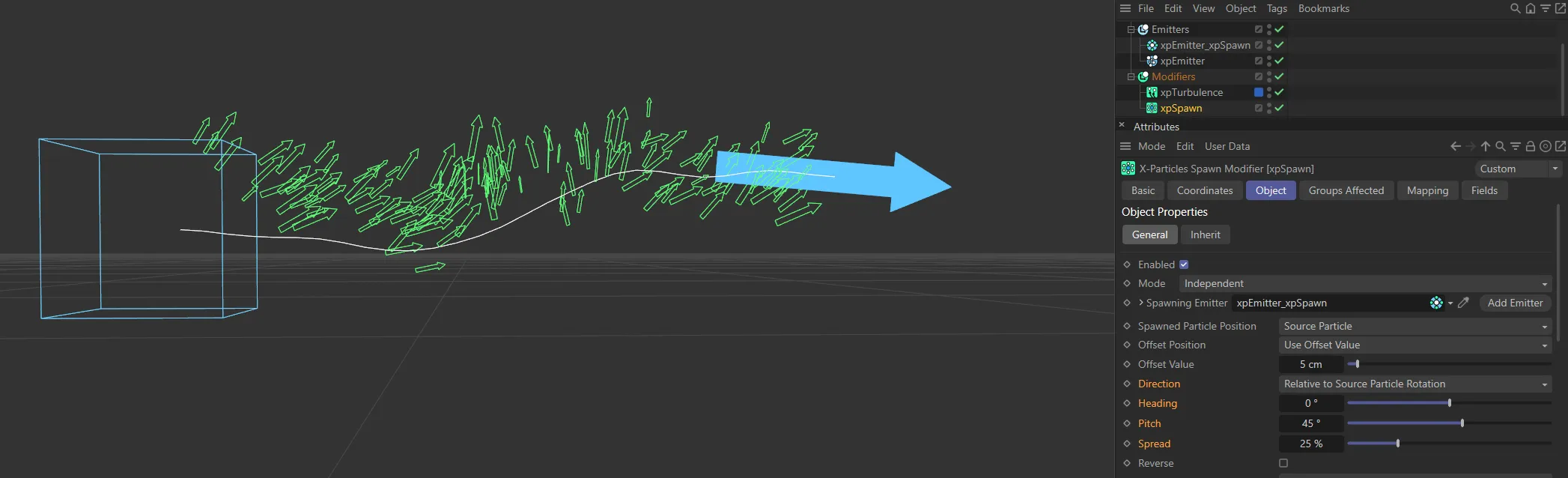
In this image, by comparison, there is 45 degrees of Pitch, with a 25% Spread setting.
Custom (Absolute)
Section titled “Custom (Absolute)”With the Custom mode selected, you can access the Heading and Pitch settings and give the spawned particles any specific direction you like.
The direction is the direction in 3D world space, not object space.
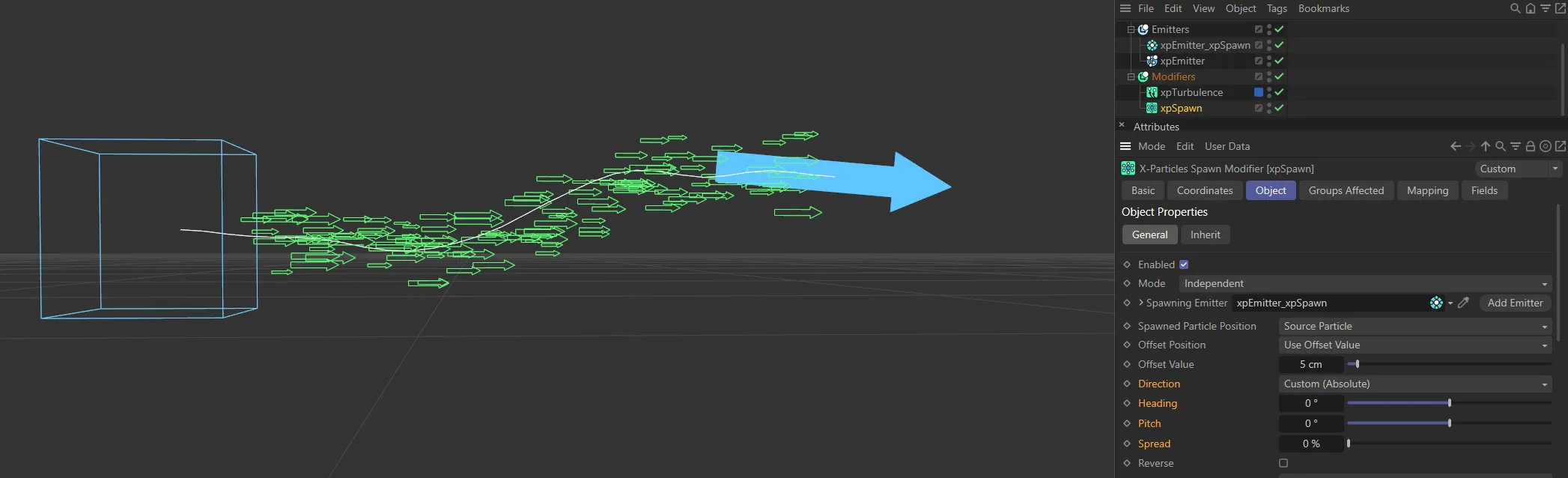
Direction set to Custom (Absolute), with 0 (zero) degrees of Heading and Pitch and 0 (zero) % Spread set.
Heading, Pitch
Section titled “Heading, Pitch”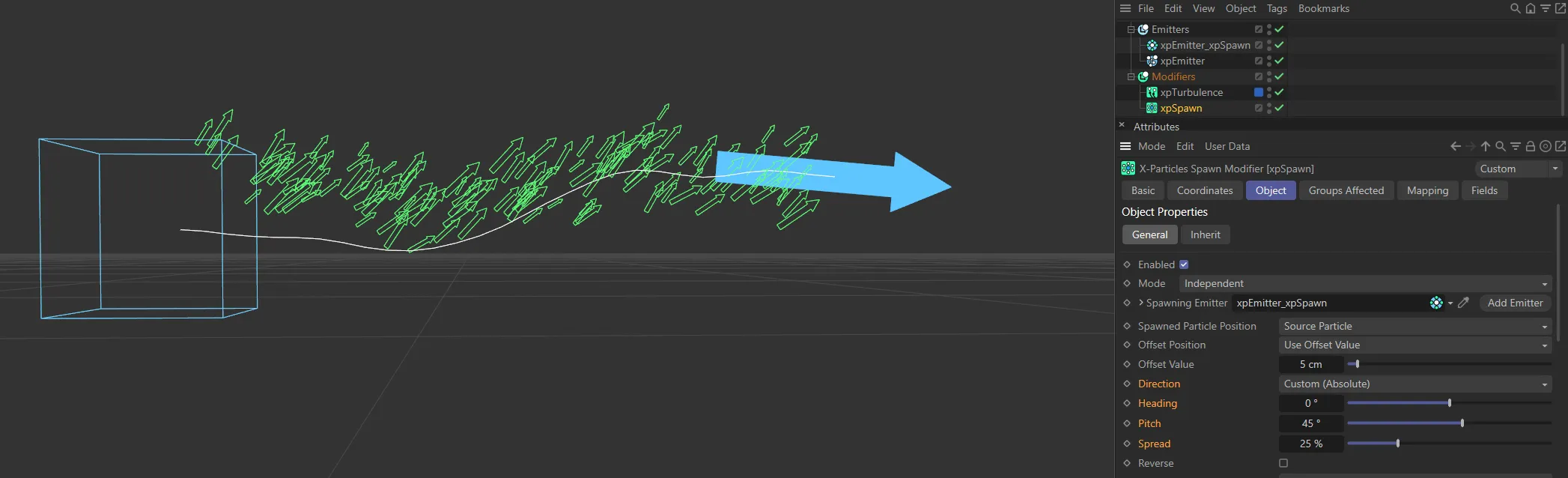
Again, by comparison, here is the same setting, except with 45 degrees of Pitch and a 25% Spread setting.
These settings are only available in Relative or Custom direction modes.
Heading is the particle heading (corresponding to the ‘H’ angle in an object rotation).
Pitch is the particle pitch (corresponding to the ‘P’ angle in an object rotation).
A Bank setting (the ‘B’ angle in an object rotation) is not required to set the direction.
In Relative to Source Particle Direction mode, these angles are deviations from the direction of the source particle.
In Custom (Absolute) mode, they are absolute directions in 3D world space.
Spread, Reverse
Section titled “Spread, Reverse”These parameters are only available if the Spawned Particle Position is set to Source Particle and the Direction parameter is set to Relative to Source Particle or Custom (Absolute).
If Direction is set to Relative to Source Particle, the spawned particles have the same direction as the source particle which spawned them.
You are able to modify the direction with these parameters.
Spread is a deviation to the particle heading, in percentage terms, from the direction of the source particle.
Given a low value of 10%, this causes the spawns to follow a narrow cone along the path of the source particle; set to 100%, you will get a hemisphere of particles.
The Reverse setting, if enabled, will reverse the direction of the spawned particles so that, instead of following along the path of the source particle, they head directly away from it (useful for rocket trails, for example).
Spawned Particle Speed
Section titled “Spawned Particle Speed”Set as Absolute, by default.
The alternatives are: Relative to Source Particle and Inherit.
Absolute
Section titled “Absolute”With this option, the spawned particles will have the speed given in the spawning emitter.
In this animation, with Spawned Particle Speed set to Absolute, the xpSpawn’s emitter has Speed set at 25cm, with 5cm Variation.
Relative to Source Particle
Section titled “Relative to Source Particle”If you select this option, the speed in the spawning emitter is added to the current speed of the source particle.
For example, if the spawning emitter has a speed of 50 and the source particle has a speed of 150, the new particles will have a speed of 200 (150 + 50).
This is a really a convenience function so you don’t have to calculate the speed the spawned particles should have.
Spawned Particle Speed set to Relative to Source Particle, with the source particle’s Speed set to 65cm and the xpSpawn’s emitter set to 25cm, giving the spawned particles a speed of 90cm.
Inherit
Section titled “Inherit”In this mode, the spawned particles will have the same speed as the source particle.
In addition, you can multiply the spawned particle speed by a factor contained in the Speed Multiplier setting.
In this scene, with Spawned Particle Speed set to Inherit, all particles are traveling at 65cm.
Speed Multiplier
Section titled “Speed Multiplier”This is only available if the Spawned Particle Speed parameter is set to Inherit.
The source particle speed will be multiplied by this value to set the spawned particle speed.
For example, if you set the multiplier to 0.5, the spawned particle will have half the speed of the source particle.
Animation showing the same as the above but with the Speed Multiplier set to 0.5, spawned particles are, therefore, traveling at 32.5cm.
Spawn Number
Section titled “Spawn Number”This is the number of particles to be spawned from the source particle.
The actual number spawned is also influenced by the strength of the falloff.
By default, this is the number to be spawned per second.
You can change this to be the number per frame by changing the Spawn Number Timing setting.
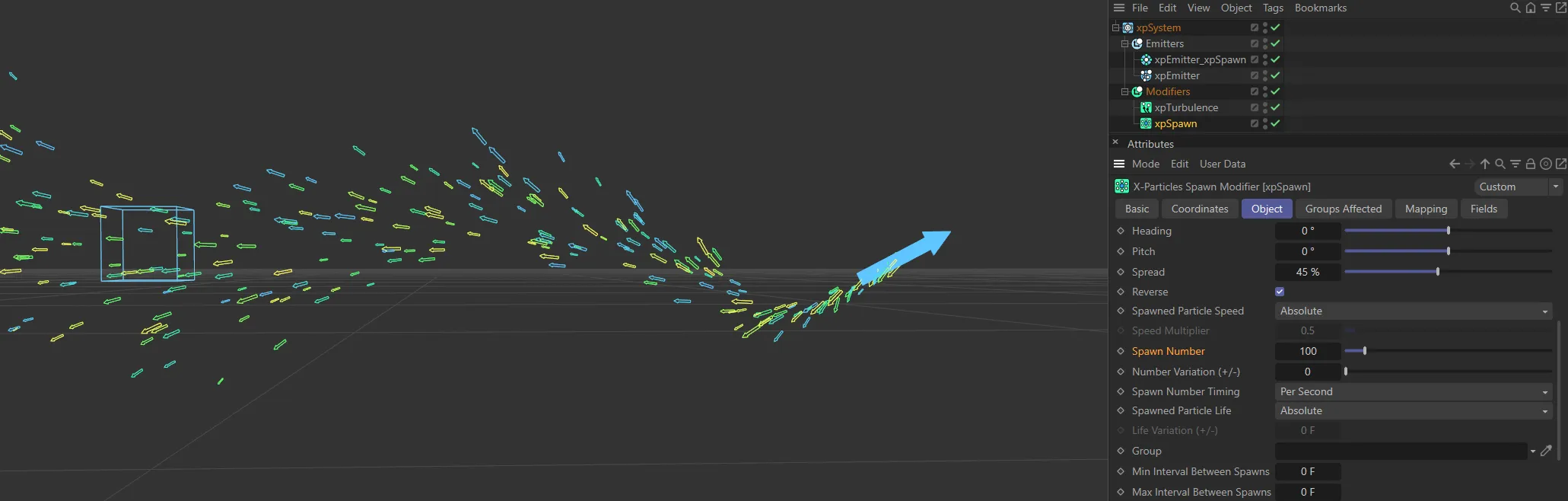
In this image, with Spawn Number Timing set to Per Second, the Spawn Number value is 100.
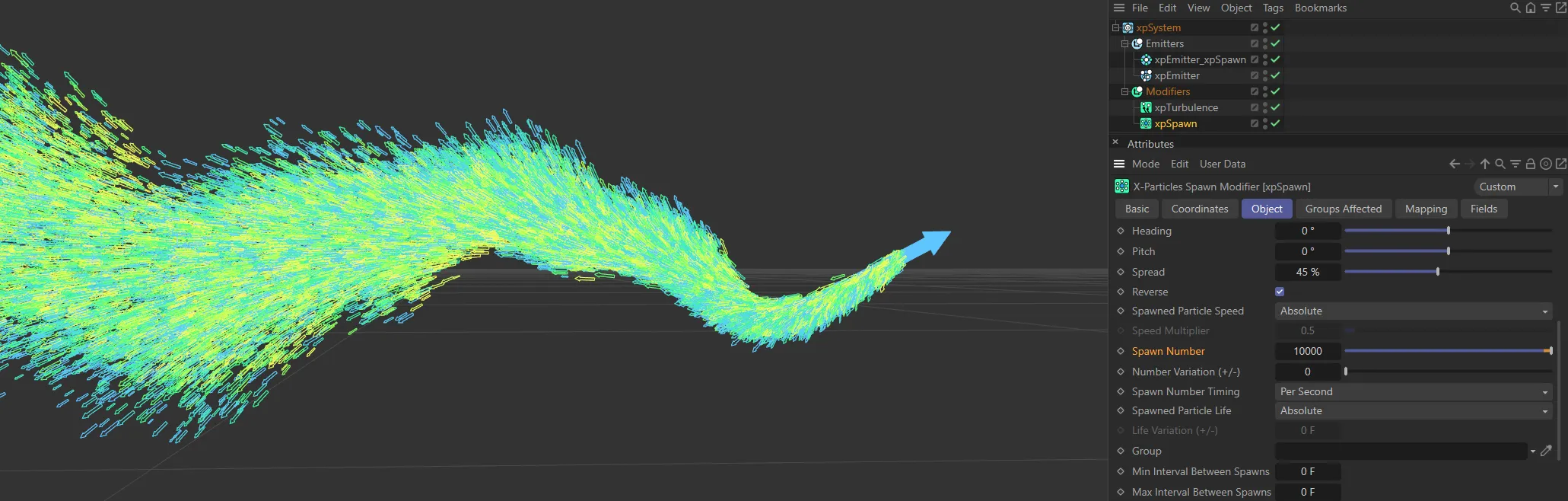
Here, with the same settings, the Spawn Number has been increased to 10000.
Number Variation (+/-)
Section titled “Number Variation (+/-)”A random value will be added to or subtracted from the spawn rate, within a range given by this setting.
For example, if the spawn rate is 30, and the variation is 5, the actual number spawned per second will be somewhere between 25 and 35 (30 +/- 5).
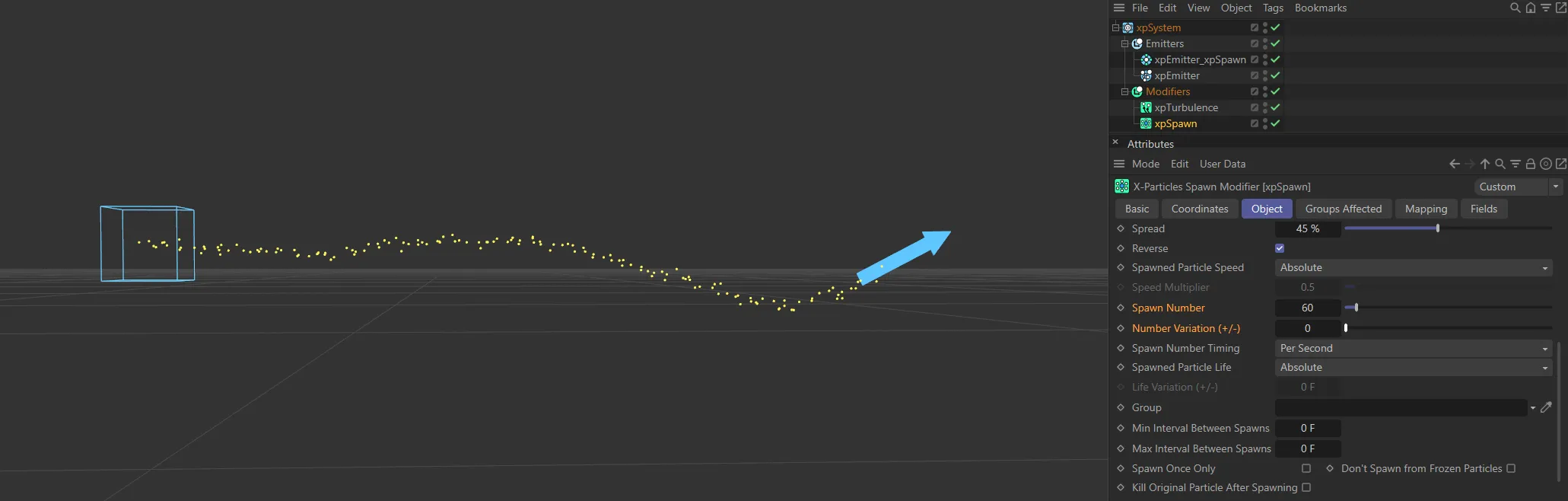
In this first image, with a Spawn Number of 60, there is no Number Variation (+/-) set.
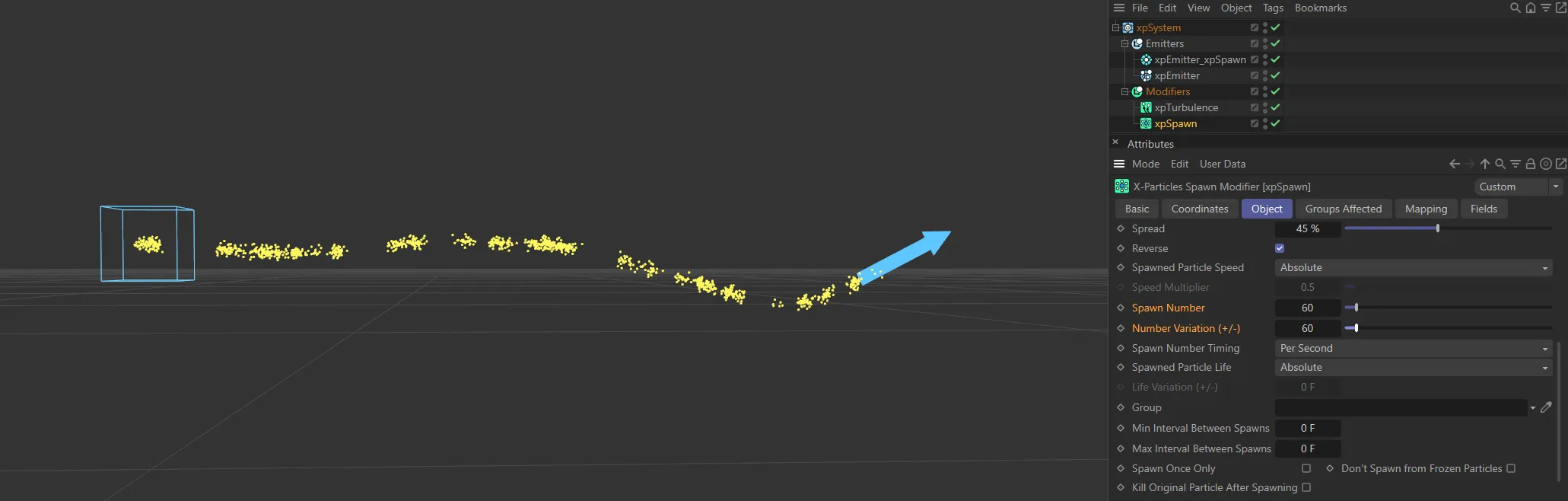
With the same settings, the Number Variation (+/-) is 60, here, giving a full variation.
Spawn Number Timing
Section titled “Spawn Number Timing”Set to Per Second, by default, this drop-down determines whether the number of particles in Spawn Number will be emitted each second or each frame.
The alternative is Per Frame.
Per Second
Section titled “Per Second”The number of particles in Spawn Number will be emitted each second.
So if that number is 300, and the frame rate is 30 frames per second, 10 particles will be emitted each frame.
Per Frame
Section titled “Per Frame”The number of particles in Spawn Number will be emitted each frame.
So if that number is 300, 300 particles will be emitted each frame.
If that is set to Per Frame the spawn modifier will be created with Spawn Number Timing set to Per Frame.
Spawned Particle Life
Section titled “Spawned Particle Life”Set to Absolute, by default.
The alternatives are: Relative to Source Particle and Inherit.
Absolute
Section titled “Absolute”The life of the spawned particles is that given in the spawning emitter.
Animation demonstrating Spawned Particle Life set to Absolute (xpSpawn’s emitter has the Lifespan settings of 35 frames with a Variation of 15 frames).
Relative to Source Particle
Section titled “Relative to Source Particle”The life of the spawned particles will be that of the source particle plus that given in the spawning emitter.
Spawned Particle Life is now set to Relative to Source Particle. xpSpawn’s emitter has the same settings as above, whereas the emitter for the source particle has a Lifespan of 45 frames, with a Variation of 40 frames. This means that each spawned particle has an overall life of 75 frames, with a variation of 15 frames.
Inherit
Section titled “Inherit”The life of the spawned particles will be the same as that of the source particle.
In addition this can be varied using the Life Variation (+/-) value.
Here, Spawned Particle Life is set to Inherit, with no variation; as soon as the source particles die, so do the spawned particles.
With the same setting, but with a Life Variation (+/-) of 35 frames, there is a more natural dissipation of particles.
Life Variation (+/-)
Section titled “Life Variation (+/-)”This is only available when Spawned Particle Life is set to Inherit.
A random value within the range given by this parameter will be added to, or subtracted from, the source particle life.
For example, if the source particle life is 90 frames and this value is set to 20, the spawned particle life will vary between 70 and 110 (90 +/- 20).
This enables you to specify the group to which the spawned particles will belong.
If there is nothing in this field, the group is determined by the spawning emitter.
To specify the group, drag the desired Group object into this field.
This setting is useful if you want to ensure that the spawned particles are, or are not, affected by a specific modifier.
This is crucial because, when using a gradient, the gradient itself has to be initialized and this can only happen if it is present in an emitter’s Groups list.
For any other color mode the group does not need to be in the list.
In this scene, there are two groups for each emitter. Group 2, for the xpSpawn’s emitter, is linked to the xpSpawn modifier and has the particle Editor Display mode set to Circle (Filled). Additionally there is an xpGravity modifier, with -200cm of gravitational force. This modifier is set to only affect Group 2.
Min Interval Between Spawns, Max Interval Between Spawns
Section titled “Min Interval Between Spawns, Max Interval Between Spawns”By default, the xpSpawn modifier will spawn new particles, from the source particle, every frame; this is not always desirable.
You may want new spawns to be produced only every 10th frame, for example.
Using these two fields, you can specify how often spawns are produced.
The default setting for both parameters is zero.
This means that there will be no interval between spawns, so spawning will occur each frame.
If you set both parameters to 10 (for example), spawning will take place every 10th frame.
By setting different values in these two fields, you can introduce a degree of randomness into the spawning interval.
As an example, if you set the minimum interval to 5 and the maximum to 10, spawning will take place somewhere between 5 and 10 frames after the previous episode of spawning, giving a more natural appearance.
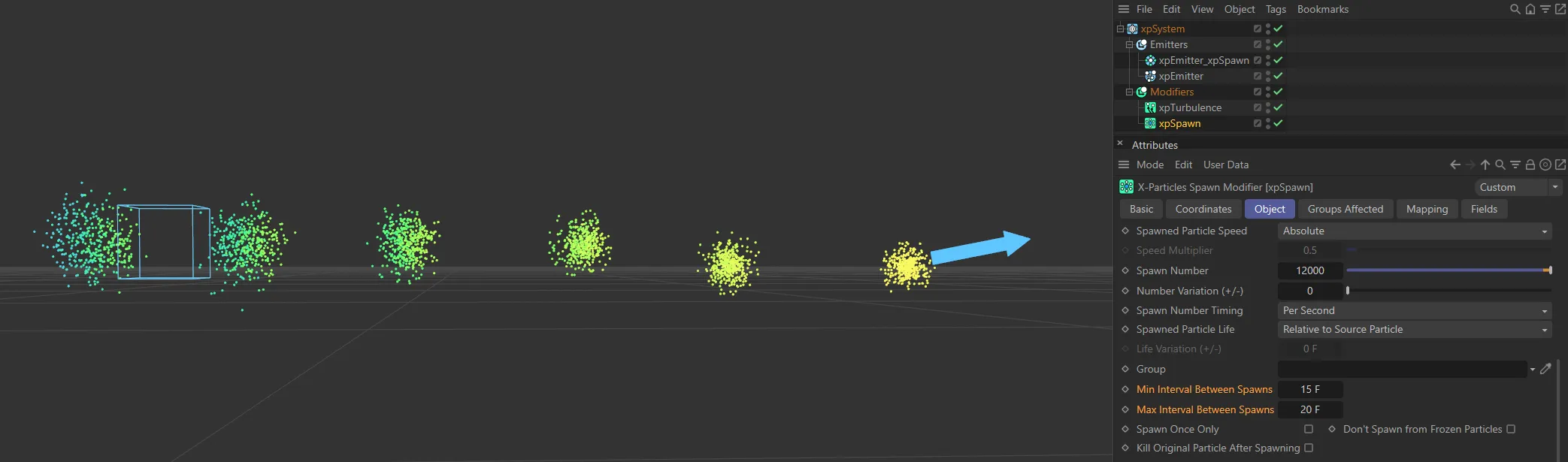
With Min Interval Between Spawns set at 15 frames and Max Interval Between Frames set at 20 frames, spawning emissions occur between every 15 and 20 frames.
Spawn Once Only
Section titled “Spawn Once Only”If this is enabled, the modifier will only spawn once from a specific source particle.
Don’t Spawn from Frozen Particles
Section titled “Don’t Spawn from Frozen Particles”If this is enabled, no spawning will occur from any particle which has been frozen using an xpFreeze modifier or an action.
Kill Original Particle After Spawning
Section titled “Kill Original Particle After Spawning”If enabled, this parameter will remove the source particle from the scene after it has spawned.
This can be used to ensure that each source particle spawns only once.
Inherit tab
Section titled “Inherit tab”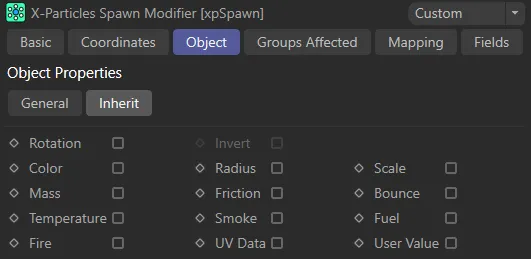
Inherit tab menu.
Rotation
Section titled “Rotation”If this is enabled, the spawned particles will inherit their rotation from the source particle.
Invert
Section titled “Invert”This is only available is Rotation is enabled.
If this is enabled, the spawned particle rotation will be inverted (e.g. if the source particle points along the positive Z axis, the spawned particles will point along the negative Z axis).
In all other cases the particle may seem to point in one direction but actually move in another.
If this is enabled, the spawned particles will have the same color as their source particle.
Animation to demonstrate the effect of enabling Color, in the Inherit tab.
Radius, Scale, Mass, Friction, Bounce
Section titled “Radius, Scale, Mass, Friction, Bounce”If any of these are enabled, the spawned particles will have the same value in that parameter as their source particle.
Temperature, Smoke, Fuel, Fire
Section titled “Temperature, Smoke, Fuel, Fire”If any of these are enabled, the spawned particles will have the same value in that parameter as their source particle.
However, these ‘physical parameters’ which are set in the emitter’s Extended Data tab, Physical Data tab, are a special case.
To avoid adding excess data to the particle if it is not needed, the particle does not contain any of these data items by default.
They will be added either when required by another object which uses them or if you set any of the physical data parameters in the emitter to a value other than the default value.
What this means is that if you try to inherit these values, and there is no data to inherit in the source particle, nothing will happen and the physical data in the spawned particles (if there is any) will not be changed.
UV Data
Section titled “UV Data”If enabled, the spawned particle will inherit UV data from the source particle.
User Value
Section titled “User Value”If enabled, spawned particles will inherit the source particle’s User Value.
Groups Affected tab
Section titled “Groups Affected tab”Groups
Section titled “Groups”To specify the group, drag and drop the desired Group object into this field.
This setting is useful if you want to ensure that the spawned particles are, or are not, affected by xpSpawn.
Mapping tab
Section titled “Mapping tab”The modifier’s settings can be mapped to particle data.
Use the dedicated manual page, below, for instructions on how this works.
Fields tab
Section titled “Fields tab”You can use the Fields options to control where xpSpawn operates.
Copyright © 2026 INSYDIUM LTD. All rights reserved.