
Particles Falloff
This is an additional falloff for the X-Particles particle modifiers.
Most falloffs use a defined area for the falloff, such as the volume of a Cube or Sphere.
The particle falloff, however, treats each particle from an emitter as its own individual falloff.
This enables a modifier to affect particles only when they are within the required distance of a particle from another emitter.
The falloff appears in the Falloff tab of any object in Cinema 4d which can use falloffs, including Fields.
To use it, select xpNoiseFalloff from the Shape drop-down menu in the Falloff tab or the Type menu of a Field object.
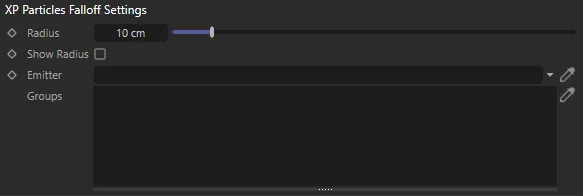
XP Particles Falloff Settings menu.
Radius
Section titled “Radius”This is the sphere, surrounding each particle from the falloff emitter, within which the modifier will have an effect on other particles.
The strength of the effect is determined by how close the particles are.
For example, if the Radius is set to 10 units and the distance between two particles is 9 units, the strength of the effect is multiplied by 0.1 (1.0 - distance/radius is the actual formula used, in this case that is 1.0 - 9/10).
The closer the particles, the stronger the effect, up to 100% strength.
A particle may be within the Radius distance of more than one particle from the falloff emitter.
In this case, the strongest possible effect is the one used (i.e. the closest of all possible particles from the falloff emitter).
Show Radius
Section titled “Show Radius”Check this box for a visual representation of the Radius value around each particle from the falloff emitter.
Emitter
Section titled “Emitter”Drag the emitter, which is to be the source of the falloff particles, in here.
Groups
Section titled “Groups”The Particles Falloff supports particle groups.
If there are no groups in this list, all particles from the emitter are used.
Otherwise, the falloff will return zero for all particles not in one of the groups in the list.
Copyright © 2026 INSYDIUM LTD. All rights reserved.