
Noise Falloff
This is an additional falloff for particle modifiers.
Its use is not restricted to X-Particles; it can also be used elsewhere in Cinema 4D if required.
The falloff appears in the Falloff tab of any object in Cinema 4D which can use falloffs, including Fields.
To use it, select xpNoiseFalloff from the Shape drop-down menu in the Falloff tab or the Type menu of a Field object.
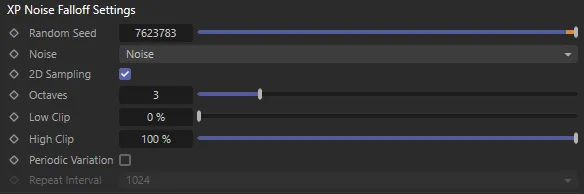
XP Noise Falloff Settings menu.
Random Seed
Section titled “Random Seed”The seed value for the noise.
This drop-down lets you select the noise type to use.
These are the standard noise types you will see elsewhere in Cinema 4D.
2D Sampling
Section titled “2D Sampling”Enable this setting for 2D sampling of the noise.
Disabling it will result in 3D sampling.
Octaves
Section titled “Octaves”This parameter influences the frequency of the turbulence, creating more detail.
Low Clip, High Clip
Section titled “Low Clip, High Clip”These controls clip the maximum and minimum noise levels.
Periodic Variation
Section titled “Periodic Variation”When checked, the turbulence will repeat itself over a period of time.
The time taken to repeat is controlled by the Repeat Interval parameter.
Repeat Interval
Section titled “Repeat Interval”If Periodic Variation is checked, you can select how often the noise repeats with the Repeat Interval drop-down (Turbulence noise type only).
The smaller the number, the shorter the time between repeats.
Copyright © 2026 INSYDIUM LTD. All rights reserved.