
xpVolumeEmit
This object enables you to track whether an emitter (or some other object) is inside or outside the volume of an object and, if so, either emit or stop emitting particles.
Multiple objects can be tested by the same Volume Emission object.
For example, a Sphere or a Cube is fine, but a Plane or a Disc primitive would not work.
Object Properties
Section titled “Object Properties”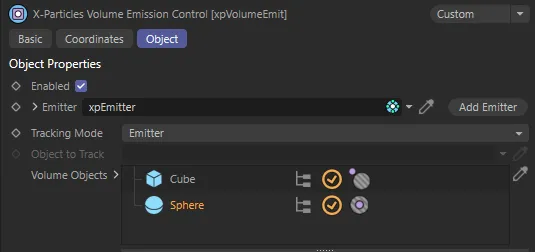
xpVolumeEmit menu settings.
Enabled
Section titled “Enabled”Checked, by default, uncheck this box to stop this object from working.
Emitter
Section titled “Emitter”Drag the emitter you want to track into this link field.
If the field is left empty, nothing will happen.
Add Emitter
Section titled “Add Emitter”Click this button to create an emitter and add it to the Emitter field.
Tracking Mode
Section titled “Tracking Mode”Set to Emitter, by default.
The alternative setting is Object.
Emitter
Section titled “Emitter”In this mode, the emitter is tested directly to determine if it is inside or outside the volume of the objects in the Volume Objects list.
Object
Section titled “Object”In this mode, the emitter itself is not tracked, but some other object is tracked instead; the emitter will emit (or stop emitting) if that object is inside or outside the volume of the objects in the Volume Objects list.
Object to Track
Section titled “Object to Track”Only available if Tracking Mode is set to Object.
Drag the object you want to track into this link field.
Volume Objects
Section titled “Volume Objects”This list contains all the objects whose volume will be tested to determine if the emitter, or other tracked object, is inside or outside the object.
Drag the various objects you want to test into this list.
Each object has a flag which affects the result.
The ‘outside’ flag (shown on the Cube in the image at the top of this page) means that the emitter (or tracked object) must be outside the Cube for particles to be emitted.
The Sphere (in the same image) has the inside flag, so the emitter (or tracked object) must be inside the Sphere for particles to be emitted.
If you have a scene as in the screenshot and the emitter is inside both Cube and Sphere, no particles will be emitted (because the outside flag on the Cube will prevent emission as the emitter is inside the Cube).
Copyright © 2026 INSYDIUM LTD. All rights reserved.