
xpMetaGroup
An xpMetaGroup is a special kind of group because it enables the user to specify the criteria for membership of that group.
With a conventional group, the particle is either a member of it or it is not.
You can use the xpChangeGroup modifier or an action to change from one group to another depending on criteria used in a Question object, but if you have a lot of groups with frequent changes, the scene can become complex, very quickly.
In addition, metagroups have some advantages over conventional groups.
These include:
- a particle can belong to more than one metagroup at a time (or to no metagroup at all)
- particles can be automatically removed from a metagroup if they no longer meet the criteria for membership
- metagroups behave like a particle modifier in the scene and can use falloffs as modifiers do
- each metagroup can specify multiple criteria for membership of the group without using Question objects.
You can use a metagroup almost anywhere you would use a conventional group, such as in the Groups list of modifiers and actions, the Question object, etc.
One thing you cannot do is specify that an emitter should emit particles already in a metagroup, since membership of the group depends on the particle meeting the required criteria.
In both of these scenes, the particles are being emitted in a ring, with a gradient of black to white. The xpGravity Modifier is linked to the xpMetaGroup in its Groups Affected tab. In this first animation, the Criteria has the Parameter set to Color, with increasing color brightness values.
In this second animation, an additional Criteria is added (the Combine Mode is set to AND), with the Parameter setting of Radius, between 3cm and 6cm.
Object Properties
Section titled “Object Properties”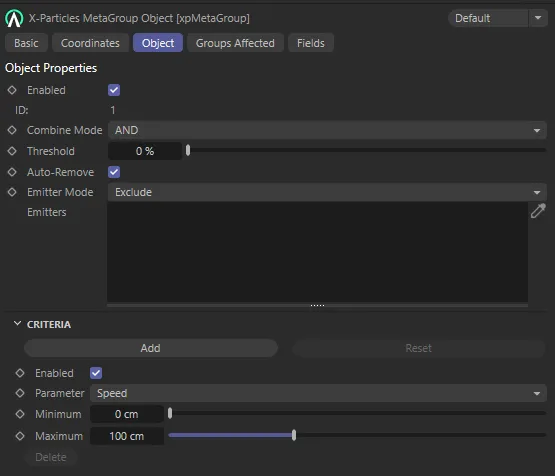
xpMetaGroup, Object tab menu settings.
Enabled
Section titled “Enabled”Uncheck this box to disable the metagroup object.
If it is disabled, particles will no longer be added to or removed from the metagroup so, if they already in the metagroup when it is disabled, they remain in it.
This cannot be changed by the user.
It simply shows the internal ID value of the group; you can have up to 62 metagroups in a scene.
Combine Mode
Section titled “Combine Mode”It is possible to add multiple criteria to the metagroup.
If you do, then this menu controls how they are managed.
The options are: AND (the default), where all the criteria must be met by the particle for it to belong to the metagroup, and OR, where, if any of the criteria are met, the particle will belong to the metagroup.
Threshold
Section titled “Threshold”This setting is used in conjunction with fields, if one is used.
Since membership of the group is a yes/no parameter, the field itself cannot change anything, since it returns a continuous variable from zero to 100%.
The falloff value at the particle position must exceed this setting for it to belong to the metagroup.
Auto-Remove
Section titled “Auto-Remove”If the criterion for membership of the metagroup is that the particle speed must be higher than 150 units and a particle joins the group with a speed higher than this, there are two options.
Either the particle remains in the metagroup anyway (i.e. once joined, it never leaves) or it is removed from the group as it no longer meets the criteria.
If this box is checked (the default setting) then, when a particle no longer meets the criteria for metagroup membership, it is automatically removed from the metagroup.
But if the box is unchecked, once the particle has joined the metagroup, it will not be removed even if it no longer meets the criteria for membership.
Emitter Mode
Section titled “Emitter Mode”Set as Exclude, by default, you can use this option and the Emitters list to exclude or include particles emitted from an emitter in the metagroup.
The alternative setting is Include.
Exclude
Section titled “Exclude”A particle emitted from any emitter in the Emitters list will never be included in the metagroup.
If there are no emitters in the list, no particles will be excluded from the metagroup (i.e they will be added to the metagroup provided they satisfy the criteria).
Include
Section titled “Include”A particle which is not emitted from one of the emitters in the Emitters list will never be included in the metagroup.
If there are no emitters in the list, no particles will be included in the metagroup, even if they otherwise satisfy the criteria.
Emitters
Section titled “Emitters”Drag any emitters you want to be excluded or included in the metagroup into this list.
Criteria
Section titled “Criteria”This section contains a list of one or more requirements that the particle must meet to be included in the metagroup.
You can have as many criteria as you like, but there must always be at least one.
Click this button to add another set of criteria.
Click this button to remove all existing criteria and add a single set with the default values.
You will be asked to confirm that you really want to do this.
If there is only one set of criteria, this button is not available.
Enabled
Section titled “Enabled”If this box is unchecked, this set of criteria will not be used when adding or removing a particle from the metagroup.
This is because there are then no criteria to test, so the particle cannot fulfil them.
If you need to turn off this setting and you only have one set of criteria, but you don’t want particles to be removed from the metagroup if they are already members of it, make sure you uncheck Auto-Remove first.
Parameter
Section titled “Parameter”Set to Speed, by default, this is the parameter to test.
The other options are: Age, Radius, Speed (World), Distance Traveled, Particle ID, Color, Mass, Temperature, Smoke, Fire, Fuel, User Value and Custom Data.
Minimum
Section titled “Minimum”The minimum value the particle must meet.
The units will vary depending on the parameter type.
For example, if Parameter is set to Speed and this value is set to 50 units, the particle must have at least that speed to join the metagroup.
Maximum
Section titled “Maximum”The maximum value the particle cannot exceed if it is to join the metagroup.
The units will vary depending on the parameter type.
For example, if Parameter is set to Speed and this value is set to 150 units, the particle must have no higher than that speed to join the metagroup.
Delete
Section titled “Delete”Click this button to delete the set of criteria.
If there is only one set, this button is not available.
Color additional options
Section titled “Color additional options”If Parameter is set to Color, the Minimum and Maximum values become color fields and the Color Mode parameter becomes available.
Color Mode
Section titled “Color Mode”This controls how the colors are used.
The options are:
The red, green and blue values of the particle color must all fall in the range given in the two color fields.
Red, Green, Blue
Section titled “Red, Green, Blue”Only the red (or green or blue) component of the particle color must fall in the range given in the two color fields.
Greyscale
Section titled “Greyscale”With this option, the actual colors are not used.
The overall brightness of the particle color must then fall into the range given by the brightness of the two color fields.
Custom Data additional options
Section titled “Custom Data additional options”If Parameter is set to Custom Data, three additional settings appear.
Data Type
Section titled “Data Type”Only custom data which are integers, floating point numbers or time values can be used here.
Other types are not supported.
ID, Name
Section titled “ID, Name”The ID and name of the custom data, used to identify the custom data item.
Groups Affected tab
Section titled “Groups Affected tab”Groups
Section titled “Groups”To specify the group, drag and drop the desired Group object into this field.
This setting is useful if you want to ensure that the spawned particles are, or are not, affected by xpMetaGroup.
Fields tab
Section titled “Fields tab”You can use the Fields options to control where xpMetaGroup operates.
Copyright © 2026 INSYDIUM LTD. All rights reserved.