
xpWetMap
xpWetMap gives creative control over vertex maps, presenting options for distance, fading and spread.
To generate a wet map you require three things:
- an emitter: wet maps can be created from any particle interaction (not just fluid particles)
- an object to generate the wet map on
- a wet map tag applied to the object.
To generate the map, apply the tag to the object and drag the emitter, or an X-Particles group, into the Particles list box in the tab.
You can generate a vertex map on the object, which you could then use (for example) as the emission source for another emitter.
To do this, the object must be made editable and a vertex map generated for it.
Drag the vertex map tag into the Vertex Map Out field and uncheck the Render Only box.
If you select the object and switch to Points mode, you can see the vertex map being generated as you play the scene.
You can also shade the wet map if desired, by using an xpWetMapShader (link below).
This will color the surface depending on how ‘wet’ the surface is; the more particles hit the object, the ‘wetter’ it is.
General tab
Section titled “General tab”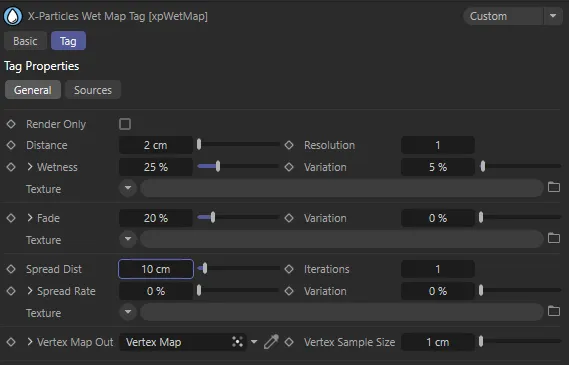
xpWetMap tag General tab menu settings.
Render Only
Section titled “Render Only”If this box is checked, wet maps are created only during rendering.
Uncheck the setting if you need to create wet maps for output to a vertex map within the viewport (e.g. for use as a selection for another emitter).
Distance
Section titled “Distance”This is the falloff distance added to the particle radius, to spread the wetness from a particle onto the wet map.
Resolution
Section titled “Resolution”The number of wet map subdivisions within a polygon.
Each polygon is subdivided to give wet map vertices within each face and this setting controls how many vertices each polygon receives.
Increasing this value will slow wet map generation down, so it is best to have a larger number of polygons and a low resolution, rather than a low polygon count and high resolution.
Wetness
Section titled “Wetness”This setting controls how ‘wet’ a particle makes the wet map (in other words, the strength of its influence).
Variation, Texture
Section titled “Variation, Texture”These settings change how wet the map becomes from the particles, based on either a random variation or a shader (selected in the Texture drop down menu - a Noise shader works well).
Each time the wet map is calculated (when the scene time changes), the current map is faded before any new wetness is applied, which controls how quickly the wet map fades (i.e. dries).
Variation, Texture
Section titled “Variation, Texture”These settings change the fading with either a random variation (Variation field)or a shader (selected in the Texture drop down menu).
Spread Dist
Section titled “Spread Dist”This controls how far each wet map vertex is spread to the surrounding wet map area.
Iterations
Section titled “Iterations”The number of iterations used during the spreading.
Higher values spread (smooth) more but can be slower to calculate.
Spread Rate
Section titled “Spread Rate”This controls how much the wet map spreads (higher values smooth the wet map to the surrounding area).
Variation, Texture
Section titled “Variation, Texture”These settings change the spread rate with either a random variation (Variation field) or a shader from the Texture drop down menu.
Vertex Map Out
Section titled “Vertex Map Out”This field accepts a vertex map tag which should be dragged from the object on which the wet map is to be generated.
The wet map will then be output to that vertex map.
If you need the map in the viewport (e.g. to use it as the emission source for another emitter) you must uncheck Render Only.
Vertex Sample Size
Section titled “Vertex Sample Size”This is the sampling size from the wet map point to the surrounding wet map.
Larger values will smooth out the sampling of the wet map.
Sources tab
Section titled “Sources tab”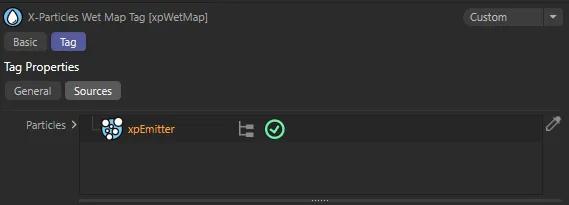
xpWetMap tag Sources tab menu settings.
Particles
Section titled “Particles”Drag any emitter or particle group(s), for which a wet map is required, into this box.
Copyright © 2026 INSYDIUM LTD. All rights reserved.