
xpTrailTip
This tag is specifically designed to do one thing: add a particle to the end of a trail spline generated by the xpTrail object.
This tag is mainly intended to work with an xpTrail object when an xpTendril modifier is being used.
The tendril actually consists of a long stream of particles, which are constantly being created, moved and destroyed.
This makes it impossible to know at any time which particle is at the tip of the tendril.
With this tag, you can add a separate particle to tip of the trail in either xpTendril or standard (unconnected) xpTrail modes.
Tag Properties
Section titled “Tag Properties”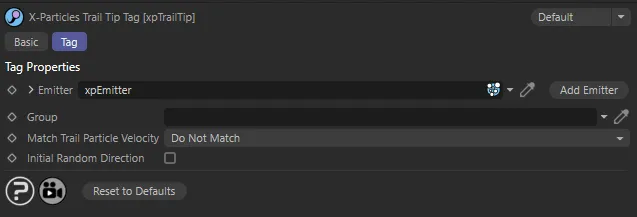
xpTrailTip menu settings.
Emitter
Section titled “Emitter”Drag the emitter which will generate the tip particle into this field.
You can use the same emitter used to create the trail, but the results may be unexpected.
In general, it is more advisable to use a different emitter.
Add Emitter
Section titled “Add Emitter”Click this button to create a new emitter and add it to the Emitter field.
If you drag a particle group object into this field, the tip particles will be put into this group.
Match Trail Particle Velocity
Section titled “Match Trail Particle Velocity”Set as Do Not Match, by default.
When the tip particle is created, it is given a standard speed and direction.
The speed is assigned by the emitter, but the direction is given to the particle by this tag.
As the animation proceeds, the trail may vary in length and direction and this tag will set the new particle’s position to the position of the end of the trail.
The alternative settings are: Match on Creation Only and Match During Animation.
Do Not Match
Section titled “Do Not Match”The tip particle has its own speed and direction, set in the emitter and by this tag on creation.
This is retained so, if the trail is destroyed, the tip particle will move with the velocity originally assigned to it.
If you would like the initial direction to be a random one, check the Initial Random Direction box.
Match on Creation Only
Section titled “Match on Creation Only”The tip particle will inherit the speed and direction of the trail particle when the tip particle is created.
After that, it will not change (unless you deliberately change it with a modifier or action).
Match During Animation
Section titled “Match During Animation”The tip particle’s velocity will be constantly updated from the trail particle’s velocity during the animation.
Initial Random Direction
Section titled “Initial Random Direction”The tip particle’s direction is assigned to it by this tag, when the particle is created.
By default, that direction is along the positive Z-axis.
By checking this box, you can assign a random direction on creation.
Copyright © 2026 INSYDIUM LTD. All rights reserved.