
xpLight
The xpLight tag enables you to control individual lights when using an X-Particles material to render the particles.
It must be applied to the light you wish to control.
Tag Properties
Section titled “Tag Properties”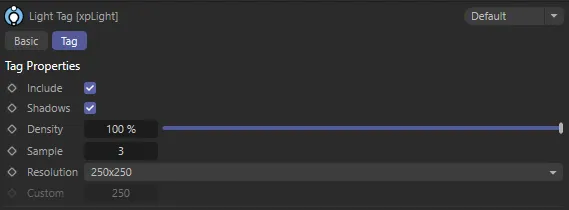
xpLight tag menu settings
Include
Section titled “Include”If this box is checked, the light will be used to illuminate the particles.
If unchecked, the light will continue to illuminate other scene objects, but not the particles.
Shadows
Section titled “Shadows”If the light casts shadows, you can turn them off for the particles only by unchecking this box.
Density
Section titled “Density”Shadow density, as in the Cinema 4D Light object Shadows tab.
Sample, Resolution, Custom
Section titled “Sample, Resolution, Custom”Resolution is the same as in the Cinema 4D Light object Shadows tab.
You can choose Custom from the Resolution drop-down menu and then set the custom shadow map size in the Custom field.
A low resolution will produce soft, fuzzy shadows.
If you then increase the resolution, you will get harder-edged shadows.
To make them soft again, while maintaining the resolution, increase the Sample setting.
If Sample is set too high, your shadows may be so soft they disappear altogether.
Copyright © 2026 INSYDIUM LTD. All rights reserved.