
Colliders tab
This tab allows you to set collision rules for your scene.
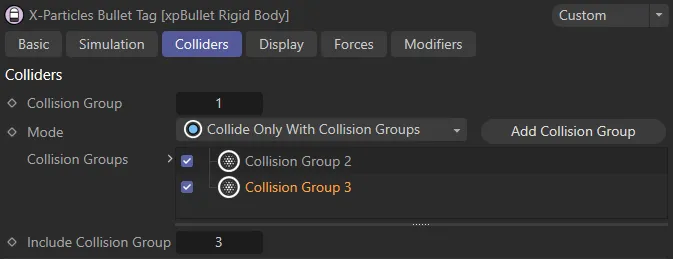
The Colliders tab menu settings, which have identical parameters for all xpBullet tags. In this set up, Collision Group is set to 1, allocating it to the dynamic object. It is now possible, with the Mode set to Collide Only With Collision Groups, to this dynamic object only collides with all objects in those two groups.
Collision Group
Section titled “Collision Group”Allows you to allocate a collision group to an xpBullet dynamic object.
Set as Do Not Collide With Collision Groups, by default, this establishes the rule within the scene.
The alternative is Only Collide With Collision Groups.
Depending on which option you select, either the Include Collision Group or Exclude Collision Group parameter will be available, so that you can avoid collisions or ensure specific collisions in your scene.
Add Collision Group
Section titled “Add Collision Group”Clicking this button will add a collision group to the Collision Groups list.
Collision Groups
Section titled “Collision Groups”This list contains all the individual collision groups in your scene.
Groups can be activated or deactivated by checking (or unchecking) the check box.
Include Collision Group, Exclude Collision Group
Section titled “Include Collision Group, Exclude Collision Group”This parameter will depend on the Mode setting; when the Mode is Collide Only With Collision Groups, this will be shown as Include Collision Group.
When Mode is set as Do Not Collide With Collision Groups, this parameter will change to Exclude Collision Group.
The group that you input will be the group that you want objects to ‘only’ collide with or not to collide with at all.
This scene gives an illustration of the above parameters. With the collision croup added, highlighted and set in the Collision Group parameter, you can select which objects are excluded from collisions with this group. In this example, the two Cubes when Exclude Collision Group is set to 2, or the Floor, when the Exclude Collision Group is changed to 3.
Copyright © 2026 INSYDIUM LTD. All rights reserved.