
xpSheeter
xpSheeter is intended for the production of thin sheets or films of fluid particles, which it does by adding particles to fill holes in a sheet of existing particles.
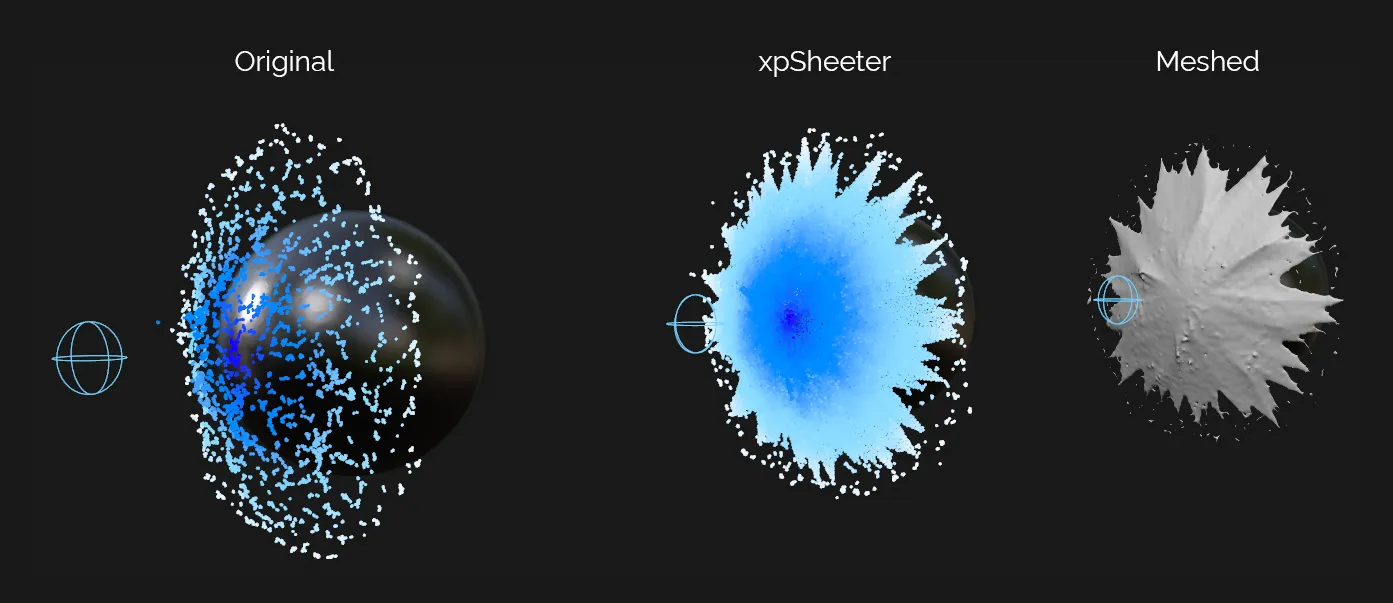
Image presenting the steps to create a meshed, fluid-like sheet. The original, on the left, shows particles colliding with a sphere. In the middle, xpSheeter is used to fill in the gaps between particles, creating a fluid-like sheet. The right-hand image shows the end result, when meshed with xpOpenVDBMesher.
Object Properties
Section titled “Object Properties”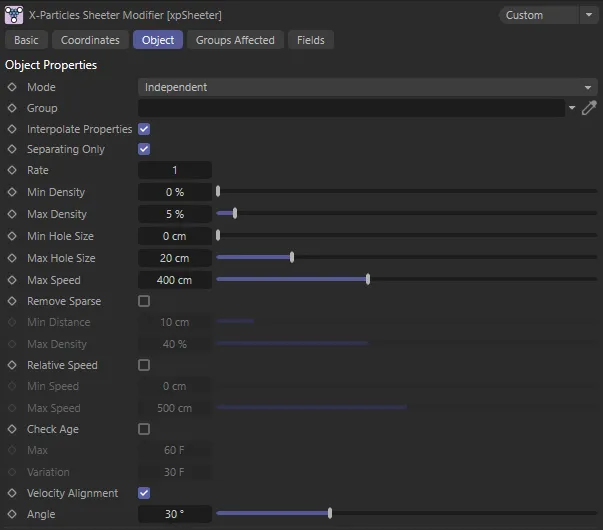
xpSheeter Object tab menu settings.
Set as Independent, by default, at its core, this object is a particle modifier.
Therefore, like other modifiers in X-Particles, it can be controlled with actions and can be switched between independent and action-controlled modes.
Independent
Section titled “Independent”In this mode, the object will work in the same way as any other modifier: particles will be affected if they come into the field of effect of the object.
X-Particle actions have no effect on the object in this mode.
Action-Controlled
Section titled “Action-Controlled”In this mode, the object will only act on a particle when told to do so by an action.
Until that point, the particle will not be affected but, once activated for a particular particle, the object will continue to influence it as long as it is in the field of effect of the object.
The object’s effect on a particle can be halted by means of another action, if desired.
If a Group object is present in this link field, newly-generated particles will be added to this group.
The particle velocity is always set by the xpSheeter object, so the group speed setting has no effect.
If Interpolate Properties is enabled, xpSheeter will set the following properties by blending the same parameters from nearby existing particles: Color, Radius, Mass, Temperature, Smoke, Fuel and Fire.
This means that you may set a color in the Group object but the particle color in the viewport may be the same as the original particles from the emitter.
Physical properties (temperature, mass, friction etc.) are only set from the group parameters if the Group mode is set to Extended; the radius, speed and scale are only set from the group if the Group mode is set to Extended or Standard.
If the group Color Mode is set to Gradient (Parameter), this is ignored due to a limitation in the system when setting groups other than from the emitter itself.
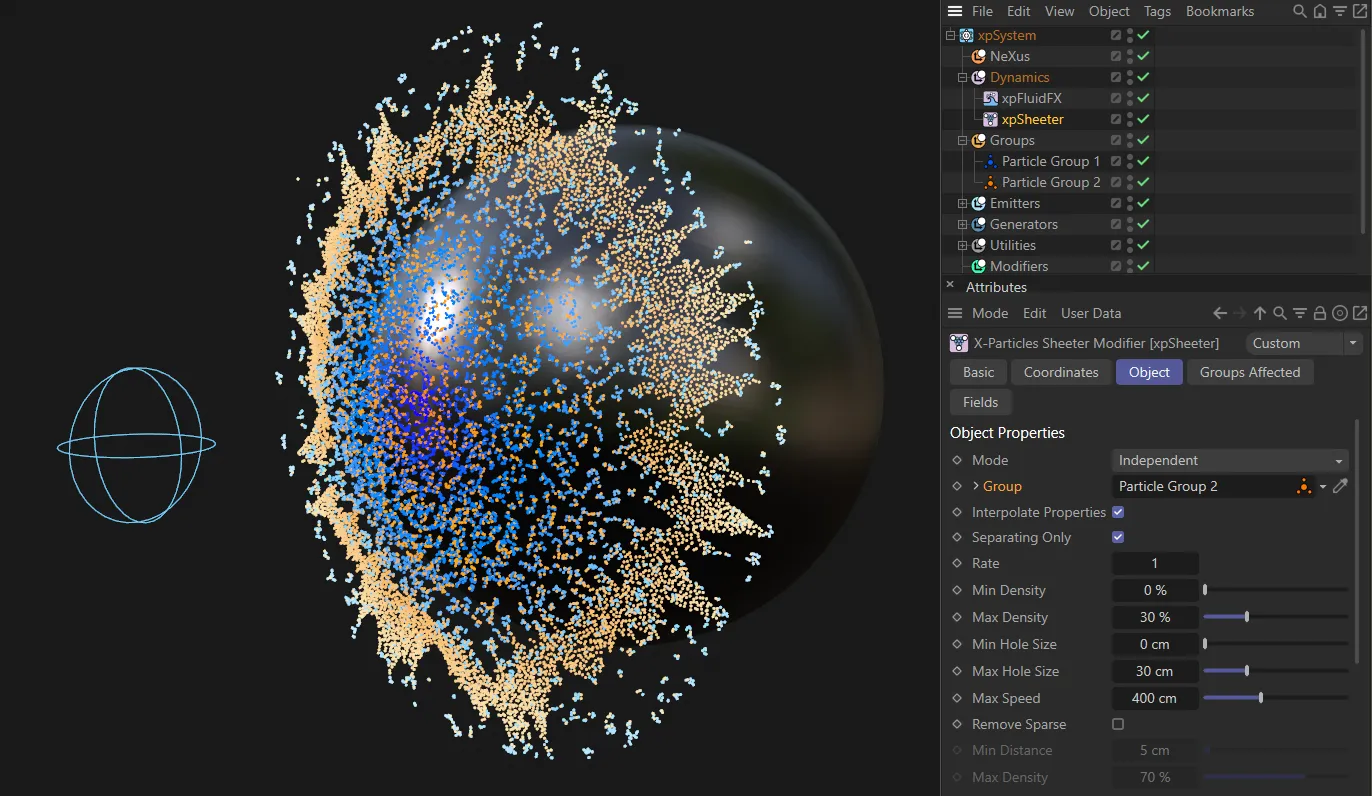
In this image, xpSheeter is only working on Particle Group 2, the yellow/orange particles, which have been dropped into the Group field.
Interpolate Properties
Section titled “Interpolate Properties”If this setting is enabled, several properties of the new particles are set by blending the same parameters from nearby existing particles - see the Group section above for details.
If it is disabled, the particle properties are simply set from a particle group object, if there is one in the Group link field, or the settings from the emitter, if there is no group.
Separating Only
Section titled “Separating Only”If this is enabled, sheet particles will only be created if the particles which create a hole are moving away from each other.
This is the rate at which sheet particles are created from a pair of the original particles.
Do not set this too high, as the number of new (sheet) particles can get very large, very quickly.
Min Density, Max Density
Section titled “Min Density, Max Density”Sheet particles will only be created when the current particle density is between these two values.
If the density is below the minimum density, or higher than the maximum density, sheet particles will not be created.
Max Density is at 5%, in the left-hand scene. Once raised to 45% (on the right), more sheet particles are created as the density range has been increased.
Min Hole Size, Max Hole Size
Section titled “Min Hole Size, Max Hole Size”Holes in the particle film will only be filled in with sheet particles if the size of the hole is between these two values.
If the hole size is smaller than the minimum size, or larger than the maximum size, sheet particles will not be created.
In the left-hand animation, the Min Hole Size is 0 (zero) cm and the Max Hole Size is 12cm. With the Max Hole Size value increased to 20cm, in the right-hand animation, more holes are filled by sheet particles, as holes between 0 (zero) and 20cm are now viable for xpSheeter to fill.
Max Speed
Section titled “Max Speed”For particles which are creating a hole, sheet particles will not be added if the speed difference between the hole particles is greater than this speed.
This is because the liquid film is then pulling apart too fast to allow the hole to be filled in.
In the first animation, the Max Speed is set at 400cm, particles traveling faster than this speed, at the point of contact with the Sphere, are not being filled in. Reduced to 25cm in the second animation, fewer particles are now traveling between 0 (zero) and 25cm and are therefore not viable for xpSheeter to fill.
Remove Sparse
Section titled “Remove Sparse”In some circumstances the sheet particles may be added only very sparsely.
You can remove these isolated particles by enabling this setting and setting the Min Distance and Max Density values.
Min Distance
Section titled “Min Distance”if Remove Sparse is enabled and there are no other particles within this distance of a sheet particle, the sheet particle will be removed.
Max Density
Section titled “Max Density”if Remove Sparse is enabled and the particle density around the sparse particle is greater than this value, the sparse particle will be removed.
This will help to limit the density of sparse particles.
Relative Speed
Section titled “Relative Speed”If this is enabled, only particles with a speed in the range between Min Speed and Max Speed will be used when creating sheet particles.
Min Speed, Max Speed
Section titled “Min Speed, Max Speed”The range of speeds to use when Relative Speed is enabled.
Check Age
Section titled “Check Age”If enabled, only particles whose age is below the Max value (including any variation) will be used when creating sheet particles.
Max, Variation
Section titled “Max, Variation”The maximum age to use when Check Age is enabled.
Variation can be added to this with the Variation parameter.
Velocity Alignment
Section titled “Velocity Alignment”When there are two particles moving in a scene, there is an angle between the direction of travel of the first particle and the second particle.
If this setting is enabled, and the angle between the two particles is less than the value in the Angle setting, sheeter particles will be created between the two particles.
Velocity Alignment is enabled in these scenes, with the Angle value of 10 degrees (in the first animation) raised to 45 degrees (in the second). The larger angle set between the paths that the particles are traveling allows a greater area to be filled by xpSheeter.
The angle to use if Velocity Alignment is enabled.
Groups Affected tab
Section titled “Groups Affected tab”Groups
Section titled “Groups”To specify the group, drag and drop the desired Group object into this field.
This setting is useful if you want to ensure that the spawned particles are, or are not, affected by xpSheeter.
Fields tab
Section titled “Fields tab”You can use the Fields options to control where xpSheeter operates.
Copyright © 2026 INSYDIUM LTD. All rights reserved.