
xpPPCollisions
This object simulates collisions between particles. Collisions can be used for particle to particle interactions and to trigger effects like spawning.
Object Properties
Section titled “Object Properties”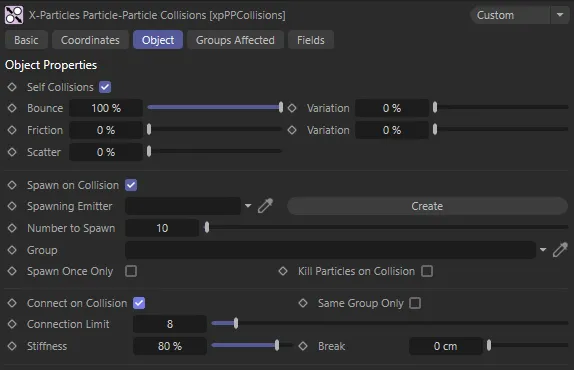
xpPPCollisions Object tab menu settings.
Self Collisions
Section titled “Self Collisions”If enabled, particles will collide with other particles from the same emitter.
xpPPCollisions is disabled on the left and enabled on the right, where particle to particle collisions can be seen.
Bounce, Variation
Section titled “Bounce, Variation”The bounce controls the speed with which the particle will rebound from the object.
A bounce of 100% means that the speed after hitting the object is the same as before hitting it.
Friction, Variation
Section titled “Friction, Variation”These settings add friction between the particle and colliding surface.
Friction will cause rolling particles to come to a halt.
The higher the setting, the more quickly they stop.
You can add some random variation to the amount of friction with the Variation setting.
Scatter
Section titled “Scatter”When bouncing from flat surface, the particles will rebound at a reflected angle which is correct for the angle at which the particle strikes the surface.
For example, if the particle hits the surface at an angle of 90 degrees to it, the particle will bounce back in a direction which is the exact reverse of its original course.
This is geometrically correct but not necessarily realistic.
Scatter does exactly that - causes a degree or spread or scatter when the particle stream rebounds from a surface.
Spawn on Collision
Section titled “Spawn on Collision”Enable this parameter to spawn new particles when two particles collide.
This animation demonstrates Spawn on Collision, enabled here, with Number to Spawn set at 100. This is producing 100 particles from the xpEmitter in the Spawning Emitter field when particles from the base emitter collide. Kill Particles on Collision is also enabled, which is killing the colliding particles upon collision.
Spawning Emitter
Section titled “Spawning Emitter”Drag an emitter into this field; this emitter will be used to generate the new particles.
When you drag an emitter into this field, the Emitter Only Spawns setting in that emitter will be turned on automatically.
If you really need it turned off, you can do so manually.
Create
Section titled “Create”Click this button to create a new spawning emitter and add it to the link field.
Number to Spawn
Section titled “Number to Spawn”This is the number of particles to be spawned on collision.
This enables you to specify the group to which the spawned particles will belong.
If there is nothing in this field, the group is determined by the spawning emitter.
To specify the group, drag the desired Group object into this field.
This setting is useful if you want to ensure that the spawned particles are, or are not, affected by a specific modifier, for example.
Spawn Only Once
Section titled “Spawn Only Once”If this setting is enabled, the emitter will only spawn once from a collision between two specific particles.
After that, neither particle will spawn again unless in collision with another particle which hasn’t yet spawned.
Kill Particles on Collision
Section titled “Kill Particles on Collision”If this setting is enabled, both the colliding particles will be removed from the scene (this doesn’t stop you from spawning new particles from the collision).
Connect on Collision
Section titled “Connect on Collision”If this is enabled, when two particles collide, a connection will be made between them.
You can see these if you turn on Display Constraints in the Display tab of the xpEmitter.
Connect on Collision enabled, resulting in connections between up to 8 particles, as set in the Connection Limit parameter, upon collision between particles. There is a Stiffness of 1% set also.
Same Group Only
Section titled “Same Group Only”If this is enabled, particles will only connect with particles they have collided with if both particles are in the same group.
Connection Limit
Section titled “Connection Limit”This is a limit on the number of connections each particle can make.
Too many connections can dramatically slowdown playback in the scene.
Stiffness
Section titled “Stiffness”This is a measure of how ‘strong’ the connection is.
A measure of how much the connection can stretch before it breaks.
The connection will break if its length exceeds the value in this setting.
A value of 0 (zero) means that the connection will never break.
Groups Affected tab
Section titled “Groups Affected tab”Groups
Section titled “Groups”To specify the group, drag and drop the desired Group object into this field.
This setting is useful if you want to ensure that the spawned particles are, or are not, affected by xpPPCollisions.
Fields tab
Section titled “Fields tab”You can use the Fields options to control where xpPPCollisions operates.
Copyright © 2026 INSYDIUM LTD. All rights reserved.