
xpFoam
xpFoam generates foam particles from live or cached fluid simulations.
Emission
Section titled “Emission”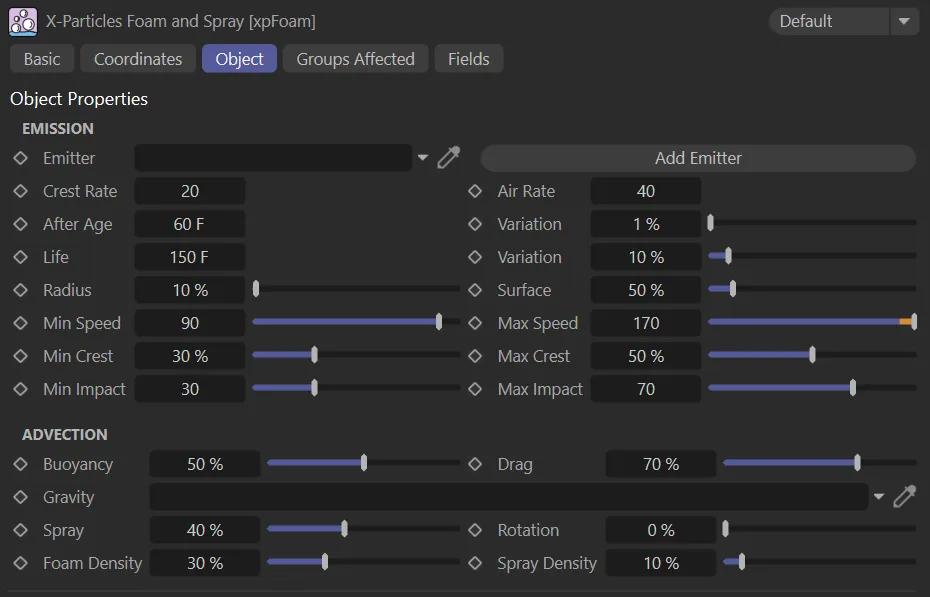
Object tab menu for xpFoam.
Emitter
Section titled “Emitter”Drag and drop an xpEmitter into this field to spawn foam particles.
Add Emitter
Section titled “Add Emitter”Click this button to create a new spawning xpEmitter and add it to the Emitter link field.
This emitter will be used to create the foam particles.
Crest Rate
Section titled “Crest Rate”This is the spawn rate (which can be fractional) for particles created at the crest of waves, using the Min Crest and Max Crest settings.
Animation to demonstrate a Crest Rate setting of 20, with a Min Crest value of 40% and a Max Crest of 100%, resulting in limited crest foam particles.
By comparison, in this animation, the Crest Rate value is increased to 85, with the same Min Crest and Max Crest settings. The result is increased crest foam particles.
Air Rate
Section titled “Air Rate”The spawn rate for foam particles created as trapped air between colliding fluid particles (controlled with the Min Impact and Max Impact settings).
This animation demonstrates an Air Rate value of 20, with Min Impact set at 0 (zero) and Max Impact at 1.
With the same Min Impact and Max Impact settings, this animation demonstrates the effect of raising the Air Rate value to 85; generating more foam particles than with the lower setting.
After Age
Section titled “After Age”Only those fluid particles which are older than this setting will create foam particles.
This enables an xpEmitter, to fill or flow, before creating the foam particles (otherwise, on emission, foam particles would be created immediately).
Variation
Section titled “Variation”Adds some variation to the After Age setting for each particle so that not all foam is created at the same time.
The maximum lifespan of the foam particles.
In this animation, the particles have a lifespan of 30 frames, as instructed by the Life setting.
Variation
Section titled “Variation”Adds some variation to the life of the foam particles so that they don’t all disappear at once.
Radius
Section titled “Radius”This parameter controls the spawning radius, the radius of the sphere around each fluid particle that creates foam.
It gives more control over the offset of the foam from the fluid surface.
Surface
Section titled “Surface”This parameter controls the smoothing radius used to calculate the fluid surface.
At 100%, it matches that used by the fluid solver, but at this value the foam may be located too far away from the meshed surface.
At around 50%, the fluid surface is closer to the mesh and gives better results for the foam offset from the surface.
Min Speed/Max Speed
Section titled “Min Speed/Max Speed”The speed range needed by the fluid particles to create the foam particles.
The highest speed (most energetic) fluid particles of your simulation should be set to create foam particles.
The foam particles, in this animation, are created by the speed range, between the Min Speed setting of 5 and the Max Speed of 200.
Min Crest/Max Crest
Section titled “Min Crest/Max Crest”These settings represent the curvature of the wave crest needed to create foam particles.
A low value implies something flat (which would not realistically create spray) and high values, something like a wave curving back on itself.
Mid-range values are more natural.
Min Impact/Max Impact
Section titled “Min Impact/Max Impact”The impact speeds between particles needed to trap air and generate foam.
Advection
Section titled “Advection”Buoyancy
Section titled “Buoyancy”The Buoyancy setting is the force with which the particles resist the effect of gravity.
The lower this value, the more likely it is that particles will sink below the surface of the fluid.
This controls how much the fluid drags the foam/air particles, but does not affect spray.
Gravity
Section titled “Gravity”Drag and drop an xpGravity modifier into this link to specify which modifier to use.
Otherwise the fluid object will use the first gravity modifier it finds when evaluating modifiers for the foam emitter.
On creation of the foam particles, this controls how much random velocity is given to them to spray them away from the creation point.
Rotation
Section titled “Rotation”If this is set, the foam particles are given a rotation which is then aligned (Y axis) to the fluid surface (when near the surface).
Foam Density/Spray Density
Section titled “Foam Density/Spray Density”The surrounding fluid density below which particles are considered to be spray or foam.
Groups Affected tab
Section titled “Groups Affected tab”Groups
Section titled “Groups”To specify the group, drag and drop the desired Group object into this field.
This setting is useful if you want to ensure that the spawned particles are, or are not, affected by xpFoam.
Fields tab
Section titled “Fields tab”You can use the Fields options to control where xpFoam operates.
Copyright © 2026 INSYDIUM LTD. All rights reserved.