
Forces
This layer creates forces of repulsion and attraction between particles.
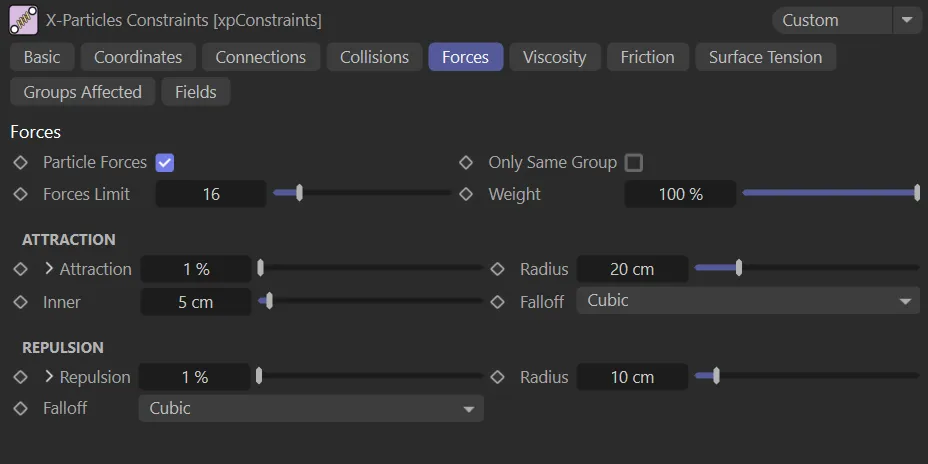
Forces tab menu.
Particle Forces
Section titled “Particle Forces”Check this box to enable particle forces.
Only Same Group
Section titled “Only Same Group”If enabled, connections will only be made between particles in the same group.
Forces Limit
Section titled “Forces Limit”This value represents the number of particles any one particle can affect by its forces of attraction and repulsion.
The more particles, the longer it takes and the more iterations are needed to complete the solution.
Animation to demonstrate the effect of the Forces Limit parameter, with the value raised from 1 to 30.
Weight
Section titled “Weight”This setting alters the influence each constraint type provides to the overall solution.
Attraction
Section titled “Attraction”Particles will attract one another, but only if the distance between them is less than the Radius value.
The strength of attraction is controlled in this setting.
The Attraction setting can be expanded by clicking the down arrow to display a control spline and other settings.
This spline acts to control attraction in exactly the same way as the Stiffness parameter in the Connections tab.
This animation shows the Attraction percentage value being raised up to 70%, with particles being more and more attracted to each other.
Radius
Section titled “Radius”For attraction to take place, the distance between two particles must be less than this value.
In this animation, as the Radius value is increased, the particle groups grow as they start to fall within this distance of each other.
This limits the force so it only applies if the particles are farther apart than this value, which prevents them from completely collapsing.
Falloff
Section titled “Falloff”Set as Cubic, by default. The alternatives are: Flat, Linear, Quadratic or Custom.
Selecting Custom will open up a control spline for falloff, which can be manipulated as desired.
Repulsion
Section titled “Repulsion”The strength of repulsion is given in this setting.
The Repulsion setting can be expanded by clicking the down arrow to show a control spline and other settings.
This spline acts to control repulsion in exactly the same way as the Stiffness parameter in the Connections tab.
The Repulsion value is increased throughout this video, forcing the particles further and further away from each other.
Radius/Falloff
Section titled “Radius/Falloff”These settings are identical to those above.
Copyright © 2026 INSYDIUM LTD. All rights reserved.