
Connections Birth
Connection constraints are springs which are generated between particles. The springs can stretch, compress, and even break, and affect how the particles move.
This page deals with connections that are generated once, at particle birth.
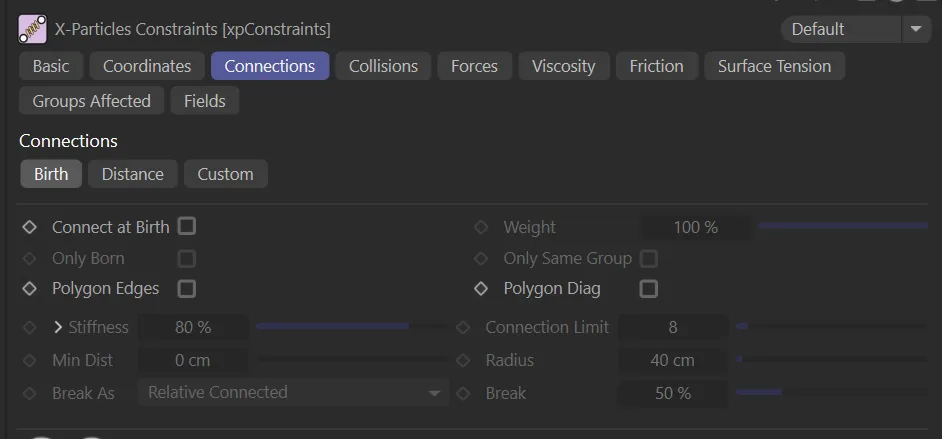
Birth tab menu settings.
Connect at Birth
Section titled “Connect at Birth”If enabled, this makes a connection between a particle when it is born and any other particle, subject to the settings such as Connection Limit and Radius.
In this animation, Connect at Birth is enabled, so particles are born connected to a maximum of 6 other particles, as per the Connection Limit setting.
Weight
Section titled “Weight”This setting alters the influence each constraint type provides to the overall solution.
Only Born
Section titled “Only Born”If enabled, this only makes connections between particles born at the same time.
Here, Only Born is enabled, with the same settings as above, so only particles born at the same time are connected.
Only Same Group
Section titled “Only Same Group”Connections will only be made between particles in the same group.
Polygon Edges
Section titled “Polygon Edges”Enabling this will allow the formation of constraints along edges of scene polygons.
Polygon Diag
Section titled “Polygon Diag”Enabling this will allow the formation of constraints along diagonals of scene polygons.
Stiffness
Section titled “Stiffness”This parameter is a measure of how strong the connection is.
These settings can be expanded by clicking the down arrow, to give additional options.
Map to Param
Section titled “Map to Param”The value from the Map spline is mapped to the parameter chosen from this drop-down.
This is a percentage value, which is then multiplied with the Stiffness setting to produce the final result.
The parameters which can be mapped are: Temperature, Mass, Age, Radius and Speed.
Min/Max
Section titled “Min/Max”These are the minimum and maximum values from the mapped parameter.
If Radius is mapped then a minimum value of zero means that particles with a radius of zero take the mapped value from the extreme left of the spline, while particles with a radius of 100 or more take the spline value from the extreme right of the spline.
The control spline to which the selected parameter is mapped.
Connection Limit
Section titled “Connection Limit”This is a limit on the number of connections each particle can make.
Keep this as low as possible, as too many connections can dramatically slowdown playback in the scene.
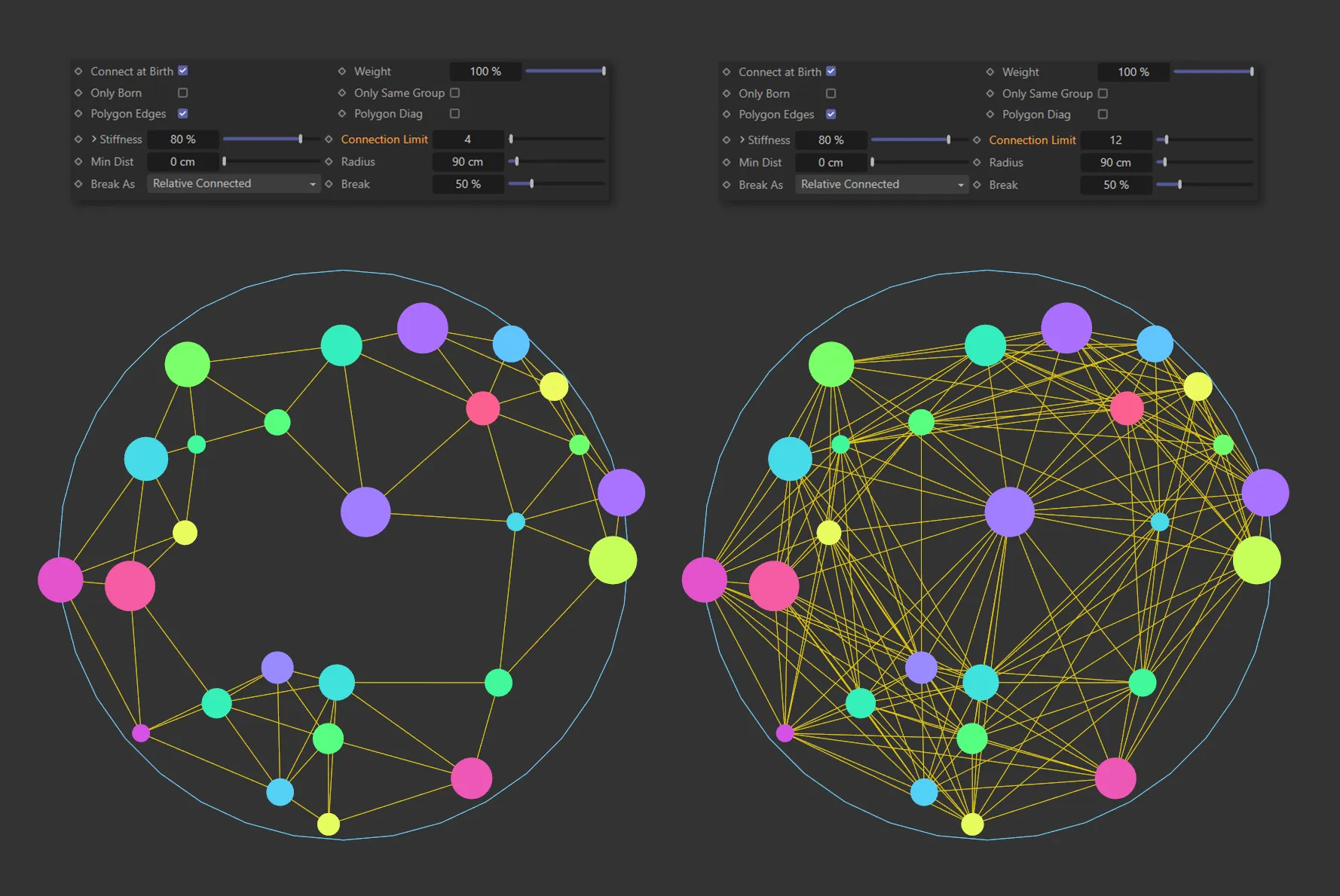
The image on the left has a Connection Limit of 4; this is raised to 12 on the right, resulting in a higher number of connections between particles.
Min Dist
Section titled “Min Dist”This setting limits the connections made to particles which are further away than this distance.
This helps to control clumping so that particles don’t just connect to the very closest ones.
Radius
Section titled “Radius”The distance between particles must be less than this value for a connection to be made.
Break As
Section titled “Break As”Set as Relative Connected, by default.
The other options are: None, Relative Radius and Absolute.
Connections will not break if this option is selected.
Relative Connected
Section titled “Relative Connected”The value in Break is a percentage value of the distance when the particles were originally connected.
The Break value starts at 300%, in this animation, and is reduced throughout, with Break As set as Relative Connected, causing the connection with highest stretch to break.
Relative Radius
Section titled “Relative Radius”The value in Break is a percentage value of the distance in Radius.
This animation shows Break As set at Relative Radius, with a Radius value of 50cm combining with the Break setting to determine the breaking point of the constraints.
Absolute
Section titled “Absolute”Break is an absolute distance setting and connections will break when they are longer than the Break Above value.
Animation to demonstrate the effect of Break As set to Absolute, with connections breaking once they are longer than the Break Above setting.
Break/Break Above
Section titled “Break/Break Above”A measure of how much the connection can stretch before it breaks.
0 (zero) % means that the connection will never break.
50% means that it will break when it has been stretched by 50% of its original length.
When Break As is set to Absolute this parameter changes to a distance measurement, Break Above, rather than a percentage.
In this case, the connection will break when it is longer than this value.
For example, a particle with a radius of 10 units will make a connection that is 10 units long but for a particle with a radius of 2 units the connection will be 2 units long.
This can then be stretched if the particle moves away from the surface and will break when stretched more than the percentage given in the Break setting.
Copyright © 2026 INSYDIUM LTD. All rights reserved.