
Plant Layers
Plant layers are the independent building blocks, which are used to create your plant.
They are organized within a hierarchy in the Objects field.
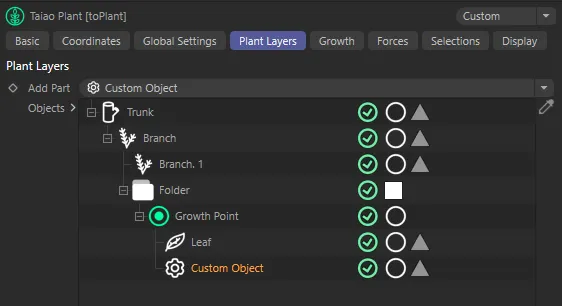
The Plant Layers tab, with a hierarchy of layers building the plant.
Plant Layers
Section titled “Plant Layers”Add Part
Section titled “Add Part”Clicking on the drop-down arrow to the right side of the Add Part menu box allows you to add the following objects **(layers): Growth Point, Trunk, Branch, Leaf and Custom Object.
Each one of these comes with its own range of attribute settings, which are explored in the pages below.
Objects
Section titled “Objects”Any layer that you add from the Add Part menu will automatically be added to the Objects list.
Layers are then enabled, by default, but can be disabled by clicking the green check mark, turning it into a red cross.
Next to this is a white circle, which, when clicked, becomes a green circle, containing a letter ‘S’.
This option will ‘solo’ that particular layer, removing all other layers from the viewport.
Finally, there is a triangle, which generates per-layer selection tags.
Plant Layer Settings
Section titled “Plant Layer Settings”Copyright © 2026 INSYDIUM LTD. All rights reserved.