
Sequencer driver utility
The sequencer driver utility can contain any number of drivers as children.
Its purpose is to attach a timeline to each driver, and execute these in that set order.
Object Properties
Section titled “Object Properties”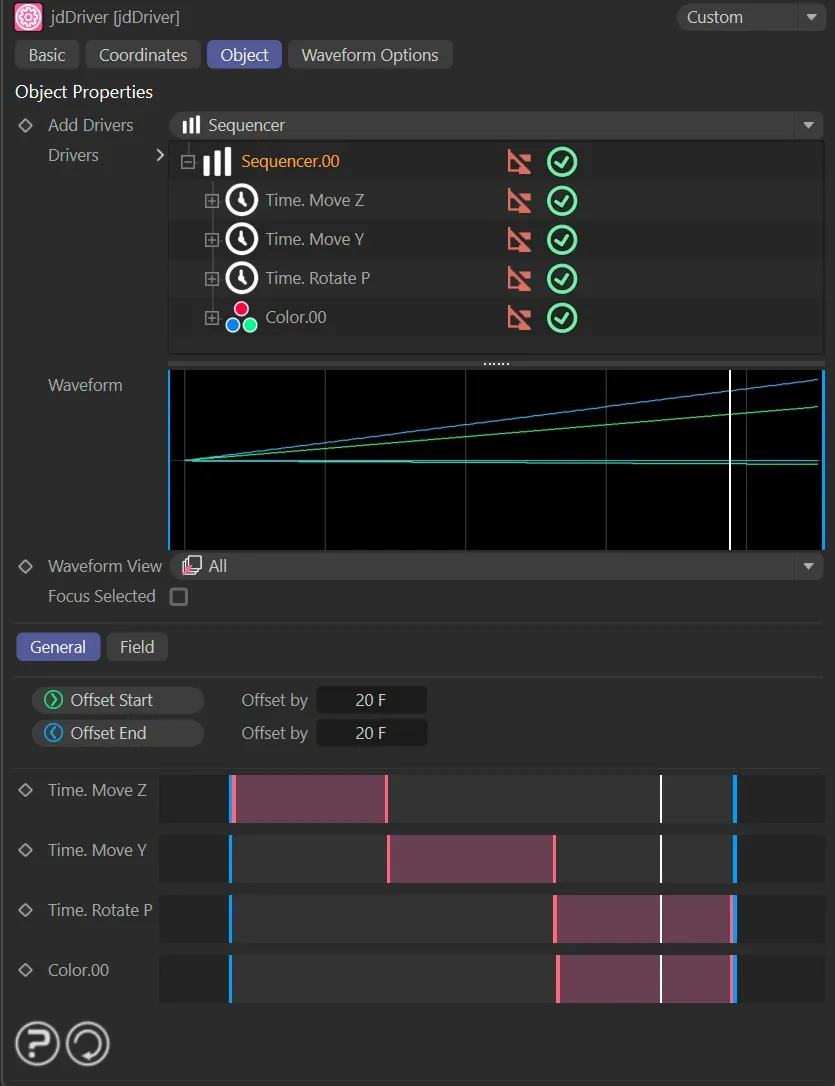
The Sequencer driver settings.
Offset Start
Section titled “Offset Start”Use this button to modify the start frame of all sequence offsets by the number of frames specified in the Offset by setting.
Offset End
Section titled “Offset End”Modify the end frame of all sequence offsets by the number of frames specified in the Offset by setting.
Offset by
Section titled “Offset by”Here the user can enter the number of frames to be used when modifying the start and end bars.
Each driver parameter has an offset bar, which is used to set the offset in the Sequencer driver.

Default layout for an offset bar.
The solid blue vertical lines show the start and end frames of the timeline.
The white vertical line denotes the current frame, in order to follow its position in the offset.
The solid pink vertical lines show the start and end frames of the offset.
The pink shaded-in rectangle represents the activation offset for this driver/sequence; this bar is moveable.
Copyright © 2026 INSYDIUM LTD. All rights reserved.