
Noise driver
The Noise driver adjusts parameters using a noise value, determined by the driver’s settings.
Object Properties
Section titled “Object Properties”
The Noise driver acting on a Cube, in conjunction with the Position and Rotation parameters.
![NoiseDriverSettings_01].jpg](Noise%20driver/NoiseDriverSettings_01.jpg)
The Noise driver settings.
Noise Type
Section titled “Noise Type”Set as the standard Noise, by default, this allows the user to change the type of noise used for the driver.
The alternative options are: Turbulence, Wavy Turbulence or Fractal Brownian Motion.
These all configure the noise that the driver uses to manipulate parameters.
Some of the options will present additional parameter options; these are indicated below.
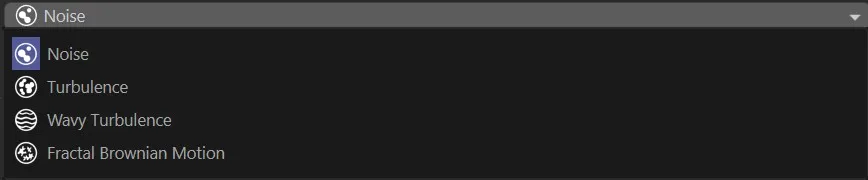
Noise options, in the drop-down menu.
Noise settings
Section titled “Noise settings”Separate Seeds
Section titled “Separate Seeds”When checked, the noise generation will use a different seed for each parameter.
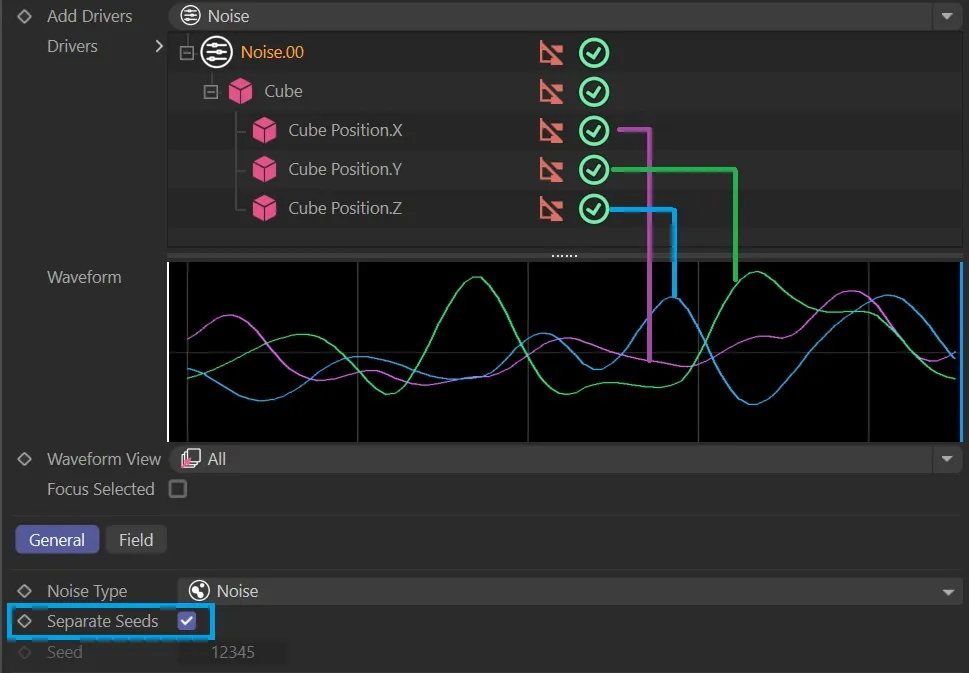
Separate Seeds enabled, giving each driven parameter a noise seed.
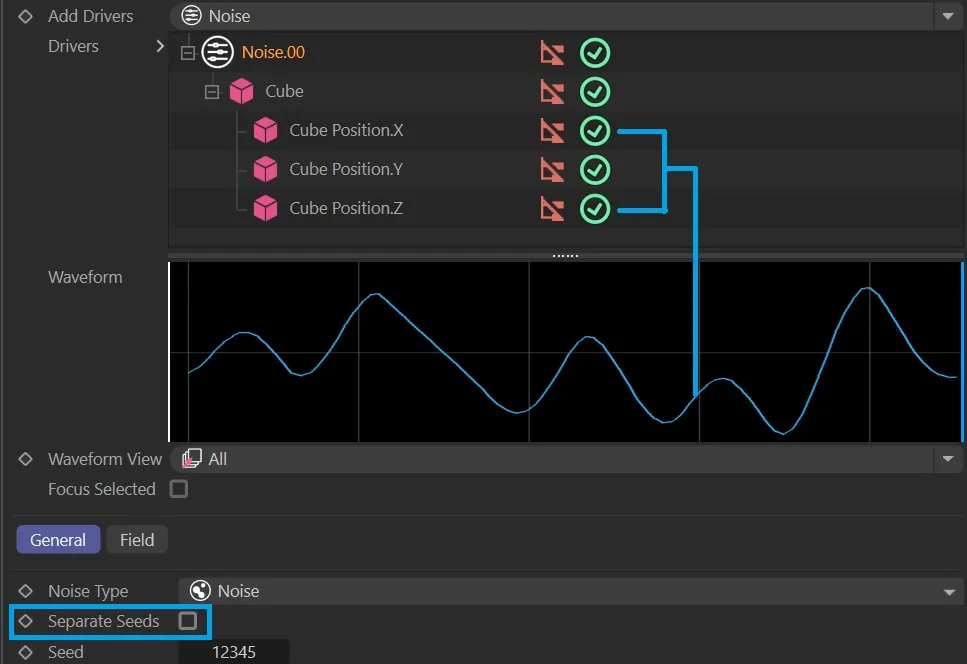
Separate Seeds disabled, with each driven parameter having the same noise seed.
The seed used to generate the noise (if Separate Seeds is unchecked).
Animation to demonstrate the effect of changing the Seed value on the noise seed itself.
Detail
Section titled “Detail”Level of detail for the noise generation.
Output Scale
Section titled “Output Scale”Multiplies the driver’s output value.
Noise Amplitude
Section titled “Noise Amplitude”The magnitude of the variations or fluctuations present in the noise.
Relative
Section titled “Relative”When checked, the resulting noise will be relative to the original value of the driven parameter.
Blend Loop
Section titled “Blend Loop”Blends the noise value towards the end of the timeline to loop seamlessly, when enabled.
Auto Time
Section titled “Auto Time”This sets the loop time to the timeline length and disables the option to change the loop time.
Loop Time
Section titled “Loop Time”User-defined time in which to loop the noise generation.
Turbulence and Fractal Brownian Motion
Section titled “Turbulence and Fractal Brownian Motion”There is an additional parameter option for these two Noise Type settings.
Octaves
Section titled “Octaves”The number of octaves used in the noise generation.
Animation demonstrating the effect of the different Octaves settings.
Wavy Turbulence
Section titled “Wavy Turbulence”There are two additional parameter options for this Noise Type setting.
Wave Repeats
Section titled “Wave Repeats”The number of times the sine wave should loop within the timeline.
Here, the Wave Repeats slider is increased, resulting in more loops within the timeline.
This setting moves the wave, which modulates the intensity of the turbulence, by a degree setting.
- 0 or 180 degrees, the turbulence will start at a medium intensity
- 90 degrees, turbulence will start at its peak intensity
- 90 or 270 degrees: turbulence will start at its most subtle.
Copyright © 2026 INSYDIUM LTD. All rights reserved.