

nxSpawn Beta 3
nxSpawn makes living particles give birth to new particles. Each layer sets when a parent spawns, how many children it makes and where they head.
Add it from Add ▸ INSYDIUM NeXus ▸ Modifiers ▸ nxSpawn. It arrives as an empty with an empty Spawn Layers list. Add a layer, then set its Trigger and Mode. A Sub Layer spawns from the children of the layer above it, so a spark can split into sparks that split again. All of its settings live in Properties ▸ Physics.
The particles nxSpawn affects are the parents. Use the Groups Affected and Falloff tabs to choose them. The children can go to their own nxEmitter and nxGroup, so other modifiers and generators can treat them apart from their parents.
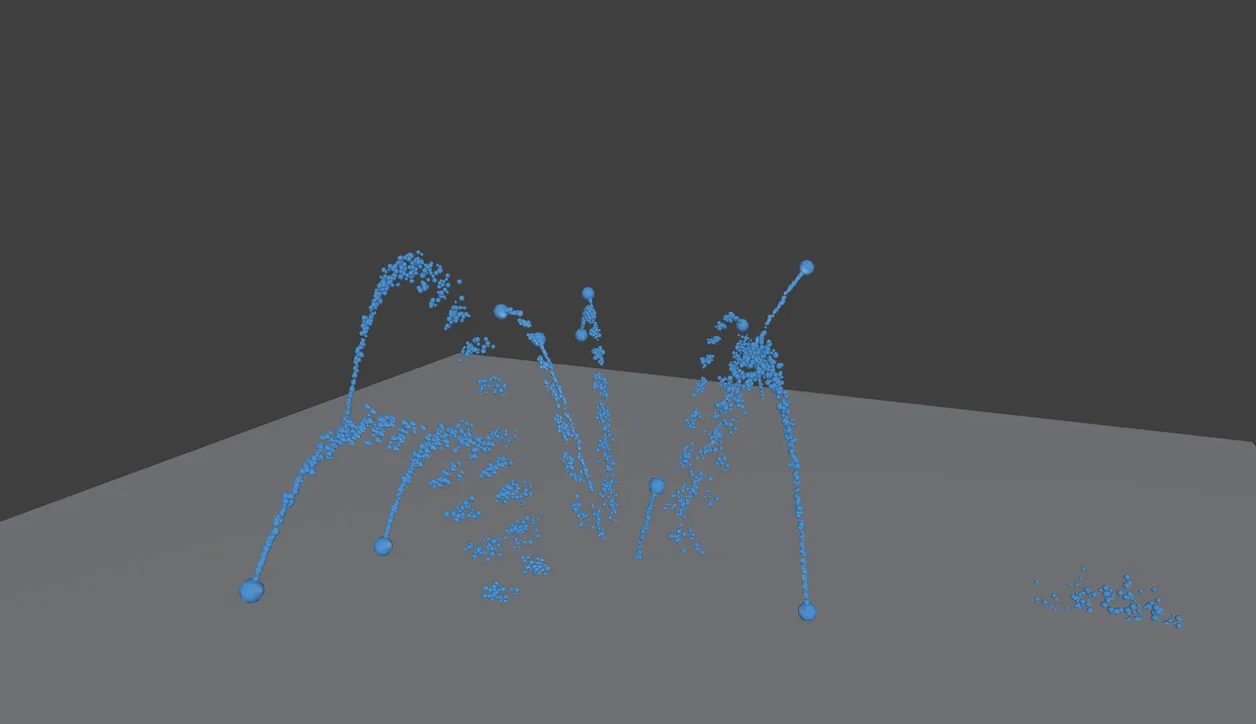
Each parent spawns children as it flies, set by one Spawn Layer in Rate mode.
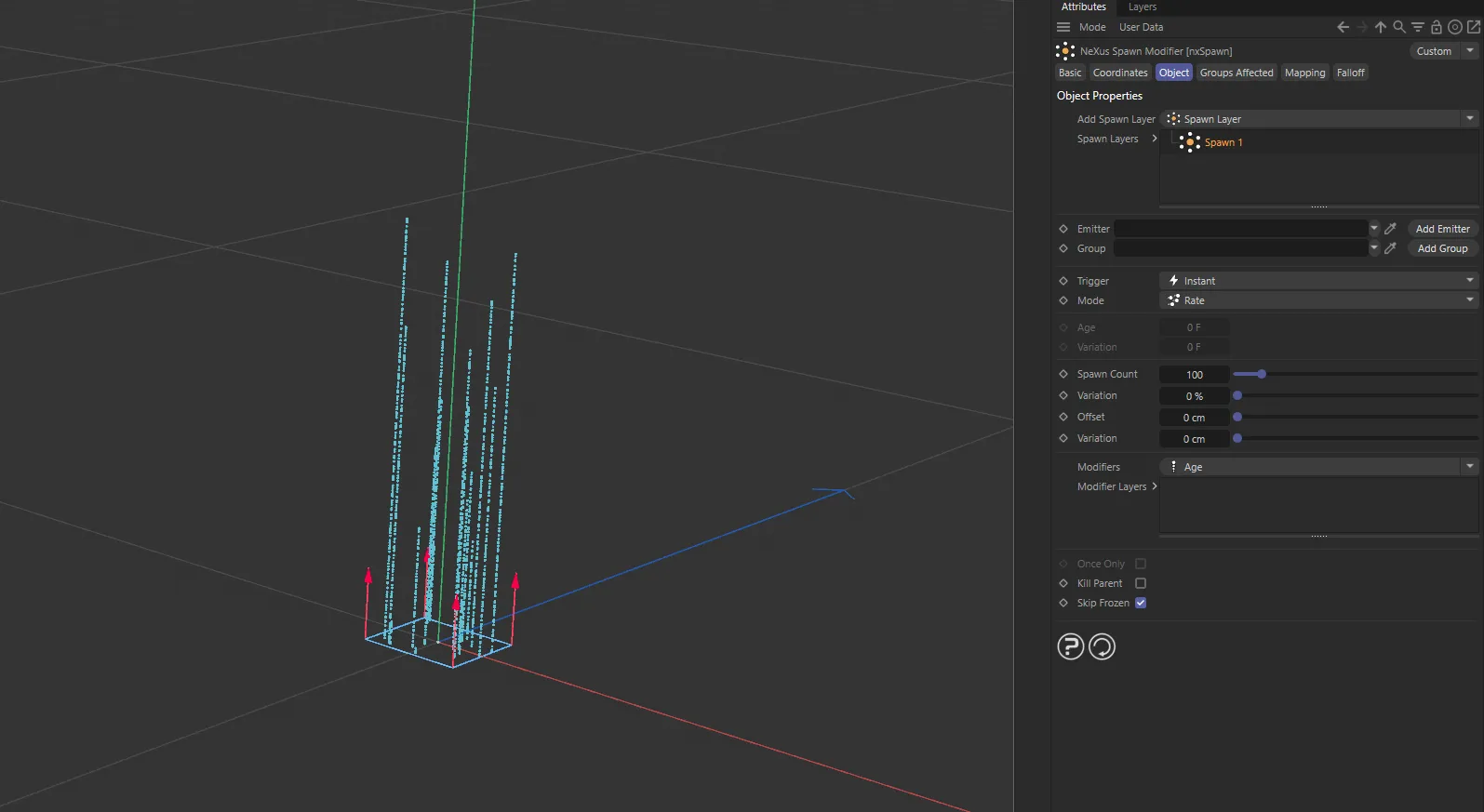
nxSpawn in Cinema 4D. Each parent spawns a stream of children, set up in the Attribute Manager.
Object Properties
Section titled “Object Properties”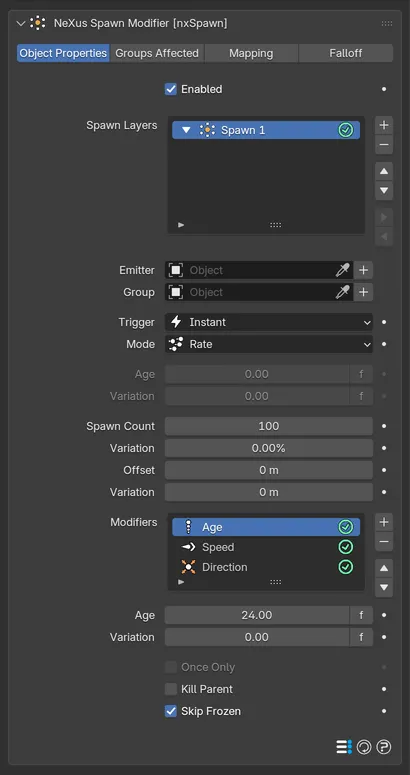
The layer settings show below the Spawn Layers list.
Enabled
Section titled “Enabled”Turns nxSpawn on or off.
Spawn Layers
Section titled “Spawn Layers”The list of layers. Each layer spawns children on its own. The add menu offers two kinds:
- Spawn Layer: spawns from the particles this modifier affects. Added with a layer selected, it goes beside that layer.
- Sub Layer: spawns from the children the selected layer makes. It sits under that layer in the list.
A new layer is named Spawn 1, Spawn 2 and so on. Each row has an enable toggle on the right, so you can switch a layer off without deleting it. Select a layer to show its settings below the list.
You can add up to 8 layers. A note under the list says so when you reach the limit.
Layer settings
Section titled “Layer settings”These settings apply to the layer selected in the list.
Emitter
Section titled “Emitter”The nxEmitter that receives the children. The children also take that emitter’s look and its birth values: its display, group, radius, speed and life. Leave it empty and the children stay in their parent’s emitter and take the parent’s radius and life. They also start at rest, unless a Speed modifier gives them a speed. The button beside the field makes a new nxEmitter and links it in one step.
Children keep their parent’s color, unless a Color modifier sets it or the linked emitter colors its particles by gradient.
The nxGroup the children join. Leave it empty and they join the linked emitter’s group, or the parent’s group when no emitter is linked. The button beside the field makes a new nxGroup and links it.
Trigger
Section titled “Trigger”When a parent starts spawning. Set as Instant, by default. The other options are At Age, On Collision and On Death.
- Instant: starts when the parent is born.
- At Age: starts when the parent reaches the Age below.
- On Collision: starts when the parent collides.
- On Death: starts when the parent dies. Death layers run after the others, so a parent another layer kills still spawns here.
What a parent does once its trigger starts it. Set as Rate, by default. The other options are Burst and Pulse.
- Rate: makes Spawn Count children every second from then on. The children are born all along the step the parent just moved, so a trail reads as a line, not a row of dashes.
- Burst: makes Spawn Count children at once each time the trigger fires.
- Pulse: makes Spawn Count children at once, then again every Interval.
Interval
Section titled “Interval”Pulse only. The time from one burst to the next. Defaults to 10 frames.
Variation
Section titled “Variation”Pulse only. A random change to the Interval, drawn once for each parent. Defaults to 0.
At Age only. The parent age that starts the spawn. Defaults to 0. It is grayed out for the other triggers.
Variation
Section titled “Variation”At Age only. A random change to that age, drawn once for each parent. Defaults to 0.
Spawn Count
Section titled “Spawn Count”How many children a parent makes: per second in Rate mode, or per burst in Burst and Pulse mode. Defaults to 100. The range is 0 to 100,000.
Variation
Section titled “Variation”A random change to the count, from 0 to 100%. Defaults to 0%.
Offset
Section titled “Offset”How far from the parent each child is born, in a random direction. Defaults to 0m, which births them on the parent.
Variation
Section titled “Variation”A random change to the offset. Defaults to 0m.
Once Only
Section titled “Once Only”Burst only. Bursts only the first time the trigger fires. Off by default. It is grayed out in the other modes. An On Death burst only ever fires once anyway.
Kill Parent
Section titled “Kill Parent”Kills the parent once it has spawned. Off by default. In Rate mode the parent dies after its first step of children. In Burst mode it dies once the burst is complete. It is grayed out in Pulse mode, since a pulse needs its parent alive to pulse again.
Skip Frozen
Section titled “Skip Frozen”Parents that are frozen or stuck do not spawn. On by default.
Modifiers
Section titled “Modifiers”Each layer has its own Modifiers list, which sets values on the children as they are born. Add a modifier from the list’s add menu, then select it to show its settings. Each row has an enable toggle on the right.
Each type can be added once per layer. Adding a type the layer already has switches the existing one back on instead.
Without a modifier, a child takes its life, radius and speed from the linked Emitter and heads off in a random direction. With no emitter linked it takes its parent’s life and radius and starts at rest. Children always copy their parent’s mass, scale and rotation.
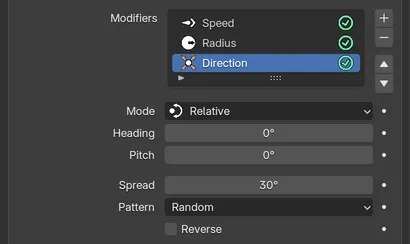
The Direction modifier in Relative mode.
Sets the children’s life.
How long each child lives. Defaults to 1 second.
Variation
Section titled “Variation”A random change to the life. Defaults to 0.
Sets the children’s starting speed.
The speed each child starts with, along its direction. Defaults to 0.5m/s. A negative value sends the children backward, the opposite way to their aim. That pairs well with a Direction modifier, for example to fire sparks back along the parent’s flight.
Variation
Section titled “Variation”A random change to the speed. Defaults to 0m/s. The variation never flips the sign of the speed.
Radius
Section titled “Radius”Sets the children’s radius.
Radius
Section titled “Radius”The radius each child starts with. Defaults to 0.01m.
Variation
Section titled “Variation”A random change to the radius. Defaults to 0m.
Sets the children’s color.
The color of each child. Defaults to white.
Variation
Section titled “Variation”A random change to the brightness of the color, from 0 to 100%. Defaults to 0%.
Direction
Section titled “Direction”Sets where the children head.
Where the children aim. Set as Relative, by default. The other options are Random, Absolute, Parent Rotation, Ring, Circular, Away From Object and Noise Flow. Each mode shows its own settings below it.
- Random: any direction.
- Relative: turned off the parent’s flight by Heading and Pitch, measured in the parent’s own frame. Heading turns left or right. Pitch turns up or down, from -90° to 90°. Both default to 0°, which keeps the children on the parent’s line of flight.
- Absolute: a fixed world direction. Heading turns around the world up axis and defaults to 0°. Pitch tilts up from level, from -90° to 90°. It defaults to 45°.
- Parent Rotation: along one Axis of the parent’s rotation, X, Y or Z. Set as Z, by default.
- Ring: out in a ring around the Ring Axis. Set as Path, the parent’s flight, by default. The other options are the world X, Y and Z axes. Tilt leans the ring along its axis, from -90° to 90°. It defaults to 0°.
- Circular: out to the side, turning as the parent ages. Step Per Frame sets how far the direction turns each frame and defaults to 15°.
- Away From Object: away from the Object you pick. Leave it empty to head away from the nxSpawn object itself.
- Noise Flow: along a noise flow at the parent. Noise Scale sets the size of the flow and defaults to 1m. Noise Speed sets how fast the flow changes and defaults to 0.5.
Spread
Section titled “Spread”Widens each direction into a cone, from 0° to 180°. Defaults to 30°. Hidden in Random mode. In Ring mode it thickens the ring.
Pattern
Section titled “Pattern”How the children fill the cone. Set as Random, by default. The alternative is Even, which spaces the children evenly, on a spiral for a burst and along an even sequence for a Rate parent. In Ring mode the pattern spaces the spokes around the ring.
Reverse
Section titled “Reverse”Flips every direction. Off by default. Hidden in Random mode.
Groups Affected
Section titled “Groups Affected”Use the Groups Affected tab to restrict nxSpawn to parents in specific nxGroup groups, rather than every particle. It picks the parents of the top layers only. A Sub Layer always spawns from the children of its own layer, whatever group they joined.
Mapping
Section titled “Mapping”nxSpawn has a Mapping tab, but none of its settings can be mapped yet, so the tab shows No mappable parameters. See Mapping for how mapping works on other modifiers.
Falloff
Section titled “Falloff”Use the Falloff tab to limit where parents spawn. Add one or more nxFalloff objects to the list and blend them, so only parents inside the falloff region spawn children. The falloff applies to the children of a layer too, when a Sub Layer spawns from them.
In Cinema 4D
Section titled “In Cinema 4D”Add it from INSYDIUM ▸ NeXus ▸ Modifiers ▸ nxSpawn. The layer and modifier lists and their settings sit on the Object tab. Add Spawn Layer adds a layer and the Modifiers button adds a modifier to the selected layer. The Emitter and Group fields have Add Emitter and Add Group buttons beside them. Settings that do not apply to the current Trigger or Mode are grayed out. The Pulse and Direction settings that do not apply are hidden, as in Blender. Lengths are in cm, so the Speed modifier defaults to 50cm, the Radius modifier to 1cm and Noise Scale to 100cm.
Copyright © 2026 INSYDIUM LTD. All Rights Reserved.