

Variable
A Variable stores a named value that Questions and Scripts can test against and that Actions and Scripts can write to.
Add a Variable, give it a name, then reference that name from a Math Question, a Script or a Set Variable Action.
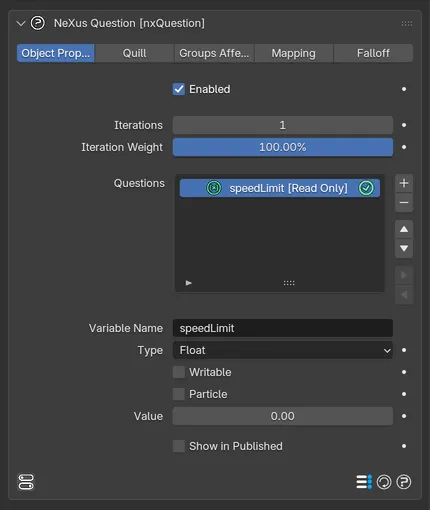
A Variable selected in the Questions list, with its Variable Name, Type, Writable, Particle, Value and Show in Published settings.
Variable Name
Section titled “Variable Name”The name of the variable. Keep it unique within the nxQuestion object to avoid errors, since questions and scripts refer to it by name.
The kind of value stored. The options are Float, Integer, Vector and User Data.
- Float: a decimal number, for example 13.253.
- Integer: a whole number, for example 65.
- Vector: three components (X, Y, Z).
- User Data: an integer user-data value, used by scripts.
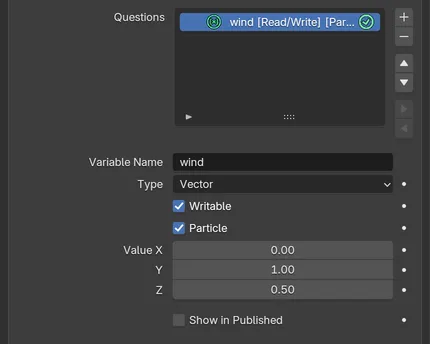
A Vector variable named wind, Writable and stored per Particle, with its starting Value in X, Y and Z.
Writable
Section titled “Writable”Allows the variable to be written to during the simulation. Off by default, which makes the variable a fixed value. Enable it when an action or script needs to change the value.
Particle
Section titled “Particle”When enabled, the value is stored per particle rather than once globally.
The starting value of the variable. The field matches the Type: a single number for Float or Integer and three components for Vector.
Show in Published
Section titled “Show in Published”Exposes this variable in the nxQuestion object’s Published view, so it appears as a knob when the node tree is hidden. See nxQuestion for the Published toggle.
Copyright © 2026 INSYDIUM LTD. All Rights Reserved.