

nxFluids - FLIP/APIC solver parameters
The FLIP and APIC solvers are grid-based fluid solvers that transfer particle data to and from a background voxel grid each frame, for large-scale, high-detail simulations.
FLIP (Fluid-Implicit-Particle) blends grid-based and particle-based velocity updates, with the blend controlled by the FLIP Fraction parameter. APIC (Affine Particle-In-Cell) uses an affine velocity transfer that preserves more angular momentum, generally producing a more energetic, swirling result.
Both solvers share the same parameters, except for FLIP Fraction, which is only available for FLIP. Selecting either from the Solver dropdown adds a Display tab to the panel and splits the Object Properties tab into a Domain and a Solver Accuracy section.
FLIP
APIC
A body of liquid solved on the grid, with Suzanne emerging from the surface. Both solvers hold a smooth, detailed volume of fluid.
Object Properties
Section titled “Object Properties”The Object Properties tab has a button row that switches between the Domain and Solver Accuracy sections.
Domain
Section titled “Domain”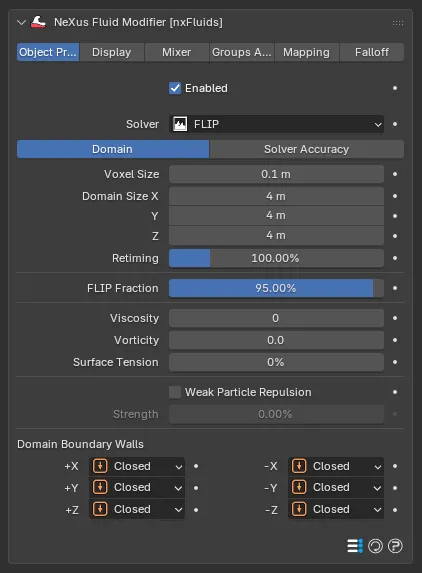
The FLIP Domain section. The FLIP Fraction control is only shown for the FLIP solver.
Resolution Beta
Section titled “Resolution Beta”The number of voxels along the longest side of the domain. Higher values give a finer grid. Resolution and Voxel Size are two views of the same setting: changing one updates the other. With the default Domain Size and Voxel Size it reads 40. A liquid emitter feeding this domain shows the same value as its own Resolution.
Voxel Size
Section titled “Voxel Size”The size of each voxel in the simulation grid. Defaults to 0.1m.
Smaller values produce a finer grid with more detail. Larger values produce a coarser grid that simulates faster.
Domain Size
Section titled “Domain Size”The size of the simulation domain on each axis. Defaults to 4m on X, Y and Z. Particles that leave the domain are handled by the Domain Boundary Walls settings. You can resize the domain interactively with the gizmo handles in the viewport.
Retiming
Section titled “Retiming”Scales the simulation time step, as a percentage. Defaults to 100%, which runs at normal speed. Lower values slow the simulation, higher values speed it up. Values above 100% are allowed.
FLIP Fraction
Section titled “FLIP Fraction”Blends between a pure PIC and a pure FLIP velocity update. Defaults to 95%.
A value of 100% uses the full FLIP update, which is more energetic but can introduce noise. Lower values add more PIC damping, which reduces noise but dissipates energy.
Viscosity
Section titled “Viscosity”The viscosity of the fluid. Defaults to 0.
Higher values produce a thicker, more resistant fluid. A value of 0 produces an inviscid fluid.
Flow Index Beta
Section titled “Flow Index Beta”Makes the liquid non-Newtonian, so its viscosity changes with how hard it is pushed. Defaults to 1.0, an ordinary liquid. Below 1.0 the liquid thins the harder it is pushed, like paint or ketchup. Above 1.0 it stiffens when pushed, like a cornstarch mix.
Yield Stress Beta
Section titled “Yield Stress Beta”How hard the liquid resists before it starts to flow. Defaults to 0, so it always flows. Raise it for a material such as toothpaste or mud that holds its shape until enough force moves it.
Vorticity
Section titled “Vorticity”The strength of vorticity confinement applied to the velocity field. Defaults to 0. This adds rotational energy, producing more swirling and turbulent behavior.
Surface Tension
Section titled “Surface Tension”The surface tension of the fluid. Defaults to 0%. Higher values make the surface resist deformation and pull toward a minimal area.
Ocean Beta 2
Section titled “Ocean Beta 2”Links an nxOcean to drive the domain’s boundary, so the liquid blends into the sea. Below the ocean’s waterline, the walls set to Open take the ocean’s flow. The domain receives the ocean’s flow whether or not Output Velocity is on in the nxOcean. Leave it empty for an ordinary domain. The controls below are shown once an ocean is linked.
Ocean Strength Beta 2
Section titled “Ocean Strength Beta 2”How strongly the linked ocean drives the domain boundary. Defaults to 1.0. A value of 0 turns the coupling off.
Ocean Band Beta 2
Section titled “Ocean Band Beta 2”The width of the coupling band along the Open walls, as a fraction of the domain. Defaults to 0.1. Larger values blend the ocean over more of the domain.
Ocean Crossover Beta 2
Section titled “Ocean Crossover Beta 2”The shortest sea wave this domain carries, as a scale on a wavelength of 2π voxels. Defaults to 1.0. An nxMesher blending this liquid into the sea takes the waves shorter than this from the drawn sea over calm water. A value of 0 leaves every wave to the fluid.
Open Walls to Ocean Beta 2
Section titled “Open Walls to Ocean Beta 2”A button that sets up the domain for the linked ocean in one click. It sets the four side walls and the floor wall to Open (-Z in Blender, -Y in Cinema 4D), lowers the domain floor below the sea’s deepest troughs and sets any Liquid Fill emitter feeding this domain to fill up to the still sea level. Any nxMesher surfacing this liquid then blends its surface into the drawn sea.
Weak Particle Repulsion
Section titled “Weak Particle Repulsion”Applies a weak repulsion force between nearby particles. Off by default. It helps keep a uniform particle distribution and reduces clustering artifacts.
Strength
Section titled “Strength”The strength of the weak particle repulsion. Defaults to 0%. Available when Weak Particle Repulsion is on.
Domain Boundary Walls
Section titled “Domain Boundary Walls”Sets how each face of the domain boundary behaves when particles reach it. Each of the six walls (+X, -X, +Y, -Y, +Z, -Z) is set independently. Set as Closed, by default. The alternatives are Open and Kill.
- Closed: the boundary acts as a solid wall. Particles are reflected back into the domain.
- Open: the boundary is open. Particles can pass through and exit the domain.
- Kill: particles that reach this boundary are deleted.
Wall Friction Beta
Section titled “Wall Friction Beta”How strongly the liquid grips the domain walls. Defaults to 0%, which is free-slip: the liquid slides freely along the walls. At 100% it is no-slip. The liquid is held against the walls. It works whether or not the liquid has Viscosity.
Solver Accuracy
Section titled “Solver Accuracy”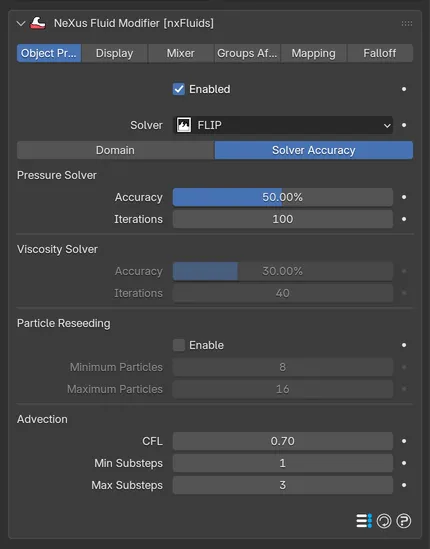
The FLIP Solver Accuracy section, holding the pressure and viscosity solver settings, particle reseeding and advection.
Pressure Solver: Accuracy
Section titled “Pressure Solver: Accuracy”The convergence threshold for the pressure solver, as a percentage. Defaults to 50%. The solver stops early if this accuracy is reached before the maximum iterations.
Pressure Solver: Iterations
Section titled “Pressure Solver: Iterations”The maximum number of iterations the pressure solver runs per substep. Defaults to 100 in new scenes. Beta 3 Scenes saved with an earlier version keep 30, so they do not get slower. Higher values allow the solver more time to converge, for a more accurate result at the cost of processing time.
Viscosity Solver: Accuracy
Section titled “Viscosity Solver: Accuracy”The convergence threshold for the viscosity solver, as a percentage. Defaults to 30%.
Viscosity Solver: Iterations
Section titled “Viscosity Solver: Iterations”The maximum number of iterations the viscosity solver runs per substep. Defaults to 40.
Particle Reseeding: Enable
Section titled “Particle Reseeding: Enable”Adds or removes particles to keep the number per liquid voxel within bounds. Off by default.
Minimum Particles
Section titled “Minimum Particles”The minimum number of particles per liquid voxel. Defaults to 8. Available when reseeding is on.
Maximum Particles
Section titled “Maximum Particles”The maximum number of particles per liquid voxel. Defaults to 16. Available when reseeding is on.
Advection: CFL
Section titled “Advection: CFL”The Courant-Friedrichs-Lewy number used to determine the substep size. Defaults to 0.7. Lower values produce more substeps per frame and a more accurate simulation. Higher values produce fewer substeps and simulate faster.
Min Substeps
Section titled “Min Substeps”The minimum number of substeps calculated per frame. Defaults to 1.
Max Substeps
Section titled “Max Substeps”The maximum number of substeps calculated per frame. Defaults to 3.
Display
Section titled “Display”The Display tab controls how the simulation grid and fields are drawn in the viewport. It is only present for the FLIP and APIC solvers.
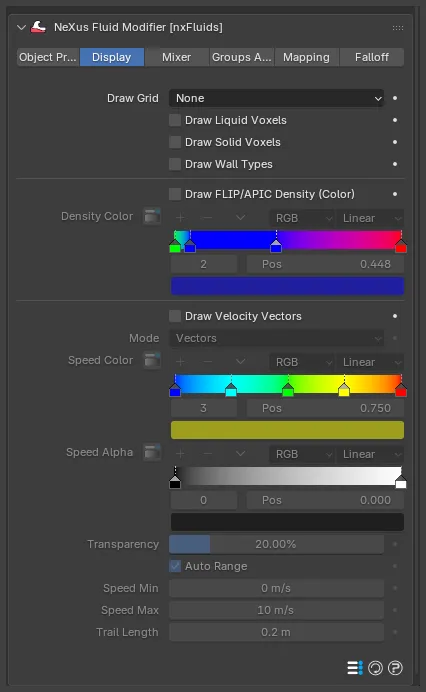
The Display tab, with the grid, density-color and velocity-field visualizations.
Draw Grid
Section titled “Draw Grid”How the simulation grid is drawn. Set as None, by default. The alternatives are Voxels, Back Only, Base Only and Base and Back.
- Voxels: draws every voxel of the grid.
- Back Only: draws the back faces of the grid only.
- Base Only: draws the base plane only.
- Base and Back: draws the base plane and the back faces.
Draw Liquid Voxels
Section titled “Draw Liquid Voxels”Draws the voxels that contain liquid. Off by default.
Draw Solid Voxels
Section titled “Draw Solid Voxels”Draws the voxels marked as solid obstacle data. Off by default.
Draw Wall Types
Section titled “Draw Wall Types”Color-codes each domain boundary wall by its type. Off by default.
Recolor Particles By Beta
Section titled “Recolor Particles By Beta”Colors the particles by a local property of the liquid, using the Color gradient. Set as Off, by default. The alternatives are Density and Viscosity.
- Density: colors the particles by the local fluid density.
- Viscosity: colors the particles by the local viscosity, which is useful for checking a mix of liquids or a non-Newtonian liquid.
This replaces the Draw FLIP/APIC Density (Color) checkbox of earlier versions.
The gradient used to color the particles, from low values on the left to high values on the right. Available when Recolor Particles By is not Off.
Draw Velocity Vectors
Section titled “Draw Velocity Vectors”Draws the fluid velocity field in the viewport. Off by default.
How the velocity field is drawn. Set as Vectors, by default. The alternative is Trails.
- Vectors: draws one arrow per voxel, with length and color encoding speed.
- Trails: traces streamlines that follow the velocity field.
Available when Draw Velocity Vectors is on.
Speed Color
Section titled “Speed Color”A gradient that colors the velocity field by speed. Available when Draw Velocity Vectors is on.
Speed Alpha
Section titled “Speed Alpha”A gradient that controls the opacity of the velocity field by speed. Available when Draw Velocity Vectors is on.
Transparency
Section titled “Transparency”The global transparency of the velocity field. Defaults to 20%. Available when Draw Velocity Vectors is on.
Auto Range
Section titled “Auto Range”Determines the speed color range automatically from the current simulation data. On by default. When off, the range is set by hand with Speed Min and Speed Max.
Speed Min
Section titled “Speed Min”The speed that maps to the left end of the Speed Color and Speed Alpha gradients. Defaults to 0m/s. Available when Auto Range is off.
Speed Max
Section titled “Speed Max”The speed that maps to the right end of the gradients. Defaults to 10m/s. Available when Auto Range is off.
Trail Length
Section titled “Trail Length”The length of the velocity trails. Defaults to 0.2m. Available when Mode is set to Trails.
Copyright © 2026 INSYDIUM LTD. All Rights Reserved.