

nxFluids - Mixer
The Mixer tab overrides the fluid settings per emitter or group, so individual emitters can have their own liquid properties.
This is how you mix different fluids in one scene and let them interact. For example, you could run water from one emitter with sand from another. You could also blend liquids that differ in viscosity, external pressure or vorticity.
In Cinema 4D this is done with per-emitter Fluid Tags. In Blender there are no tags: every override lives in this one Mixer tab on the nxFluids modifier.
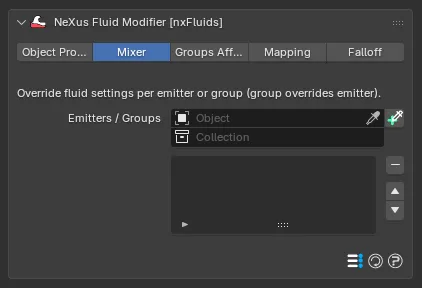
The Mixer tab, with the Emitters / Groups list. Add an emitter or group, then set its overrides below.
Add an nxEmitter or nxGroup to the Emitters / Groups list. Each entry has an object field to pick the target and a toggle on the right to enable or disable its overrides. Where an emitter and a group both cover the same particles, the group override wins.
The override fields shown for each entry depend on the solver selected on the Object Properties tab. Each field replaces the matching solver-level value for the particles from that emitter or group.
PBD overrides
Section titled “PBD overrides”With the PBD solver, each entry overrides:
- Viscosity: defaults to 5%.
- Vorticity: defaults to 1%.
- Attraction: defaults to 10%.
- Repulsion: defaults to 20%.
- Ext Pressure: defaults to 10%.
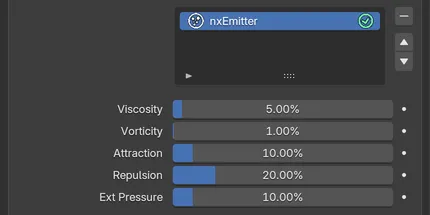
An emitter in the Emitters / Groups list with the PBD solver, showing the five PBD overrides.
SPH overrides
Section titled “SPH overrides”With the SPH solver, each entry overrides:
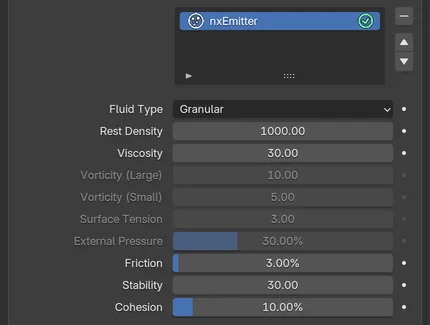
With the SPH solver and Fluid Type set to Granular, the granular overrides are live and the liquid ones are grayed out.
Fluid Type
Section titled “Fluid Type”Sets the material for this emitter or group. Set as Liquid, by default. The alternative is Granular. It selects which of the settings below apply, so one emitter can be liquid while another is sand.
Rest Density
Section titled “Rest Density”The rest density of the fluid. Defaults to 1000.
Viscosity
Section titled “Viscosity”The viscosity of the fluid. Defaults to 30.
The next four settings apply when Fluid Type is Liquid:
- Vorticity (Large): defaults to 10.
- Vorticity (Small): defaults to 5.
- Surface Tension: defaults to 3.
- External Pressure: defaults to 30%.
The last three settings apply when Fluid Type is Granular:
- Friction: defaults to 3%.
- Stability: defaults to 30.
- Cohesion: defaults to 10%.
FLIP and APIC overrides
Section titled “FLIP and APIC overrides”With the FLIP or APIC solver, each entry overrides:
- Liquid Density: the density of this liquid, in multiples of the density of water. Defaults to 1.0. Beta
- Viscosity: defaults to 0.
- Flow Index: defaults to 1.0, an ordinary liquid. Beta
- Yield Stress: defaults to 0. Beta
- Surface Tension: defaults to 0%.
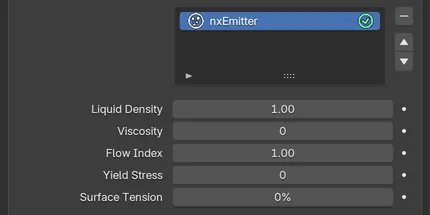
With the FLIP solver, each entry overrides Liquid Density, Viscosity, Flow Index, Yield Stress and Surface Tension.
See the solver pages for what each setting does: PBD, SPH and FLIP/APIC.
Copyright © 2026 INSYDIUM LTD. All Rights Reserved.