

nxConstraints - Connection Custom
A connection layer that works like Connection Distance, with separate control over compression and expansion, plus the option to make the springs plastic.
A plastic spring that stretches or compresses past a set point no longer springs back to its original length: it takes on the new length instead. Add it from the + menu in the nxConstraints Layers list, then select the layer to show these settings.
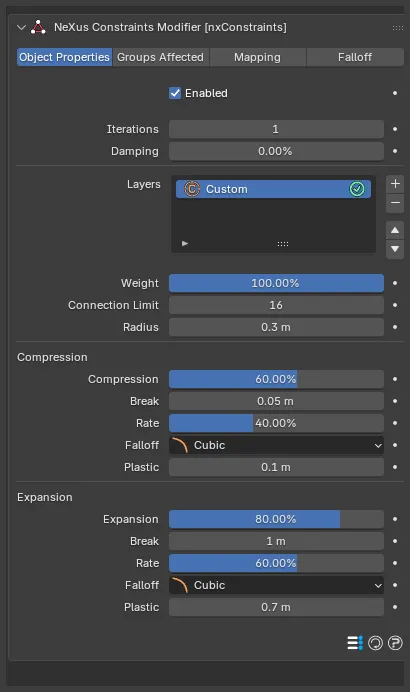
Weight
Section titled “Weight”Sets how much this layer contributes to the overall constraint solution. With a single layer this can be left at its default, 100%. When you combine several layers, lower it to blend the connections in more gently or raise it above 100% to give them more influence.
Connection Limit
Section titled “Connection Limit”The maximum number of connections each particle can make. Defaults to 16, up to a maximum of 64.
Radius
Section titled “Radius”The distance between two particles must be less than this value for a connection to be made. Defaults to 0.3m.
Compression
Section titled “Compression”These settings control the spring while it is being compressed (the particles pushed closer than the connection’s rest length).
Compression
Section titled “Compression”The stiffness of the connection when it is compressed. Defaults to 60%.
The distance below which a compressed connection breaks. This is an absolute distance. Defaults to 0.05m.
The rate at which a compressed connection becomes plastic, taking on the new distance between the particles as they move. Defaults to 40%.
Falloff
Section titled “Falloff”Sets how the compression stiffness falls off over the Radius. Set as Cubic, by default. The other options are Flat, Linear and Quadratic.
- Flat: no falloff, a constant stiffness across the range.
- Linear: the stiffness falls off evenly across the range.
- Quadratic: the stiffness falls off with the square of the distance.
- Cubic: the stiffness falls off with the cube of the distance.
Plastic
Section titled “Plastic”Below this distance the connection becomes plastic, no longer springing back to its rest length because it has been compressed too far. The stored length then changes at the Rate above. Defaults to 0.1m.
Expansion
Section titled “Expansion”These settings control the spring while it is being stretched (the particles pulled farther apart than the connection’s rest length).
Expansion
Section titled “Expansion”The stiffness of the connection when it is stretched. Defaults to 80%.
The distance above which a stretched connection breaks. This is an absolute distance. Defaults to 1m.
The rate at which a stretched connection becomes plastic, taking on the new distance between the particles. Defaults to 60%.
Falloff
Section titled “Falloff”Sets how the expansion stiffness falls off over the Radius. Set as Cubic, by default. The other options are Flat, Linear and Quadratic.
Plastic
Section titled “Plastic”Above this distance the connection becomes plastic, no longer springing back to its rest length because it has been stretched too far. Defaults to 0.7m.
Copyright © 2026 INSYDIUM LTD. All Rights Reserved.