

nxFoam
nxFoam reads a running NeXus fluid simulation and spawns secondary foam, spray and bubble particles from it.
Fast, churning water throws up whitewater: foam that mats on the surface, spray flung into the air and bubbles trapped underwater. nxFoam looks at where the fluid is energetic, aerated or breaking and creates these secondary particles there, then advects them with their own lightweight physics so they read as real whitewater rather than as the fluid itself.
nxFoam is a secondary solver. It does nothing on its own: it needs a source fluid simulation (a PBD, SPH, FLIP or APIC solve) to read from. Point it at that fluid and it generates the whitewater on top.
Add it from Add ▸ INSYDIUM NeXus ▸ Dynamics ▸ nxFoam. It arrives as an empty. All of its settings live in Properties ▸ Physics.
nxFoam whitewater on an nxLiquid Fill pool, churned up by an nxWave rolling across the surface and breaking over Suzanne.
The three secondary particle classes each get their own tab: Foam (surface foam), Spray (airborne droplets) and Bubble (submerged bubbles). The Object Properties tab holds the shared solver, spawn and containment settings.
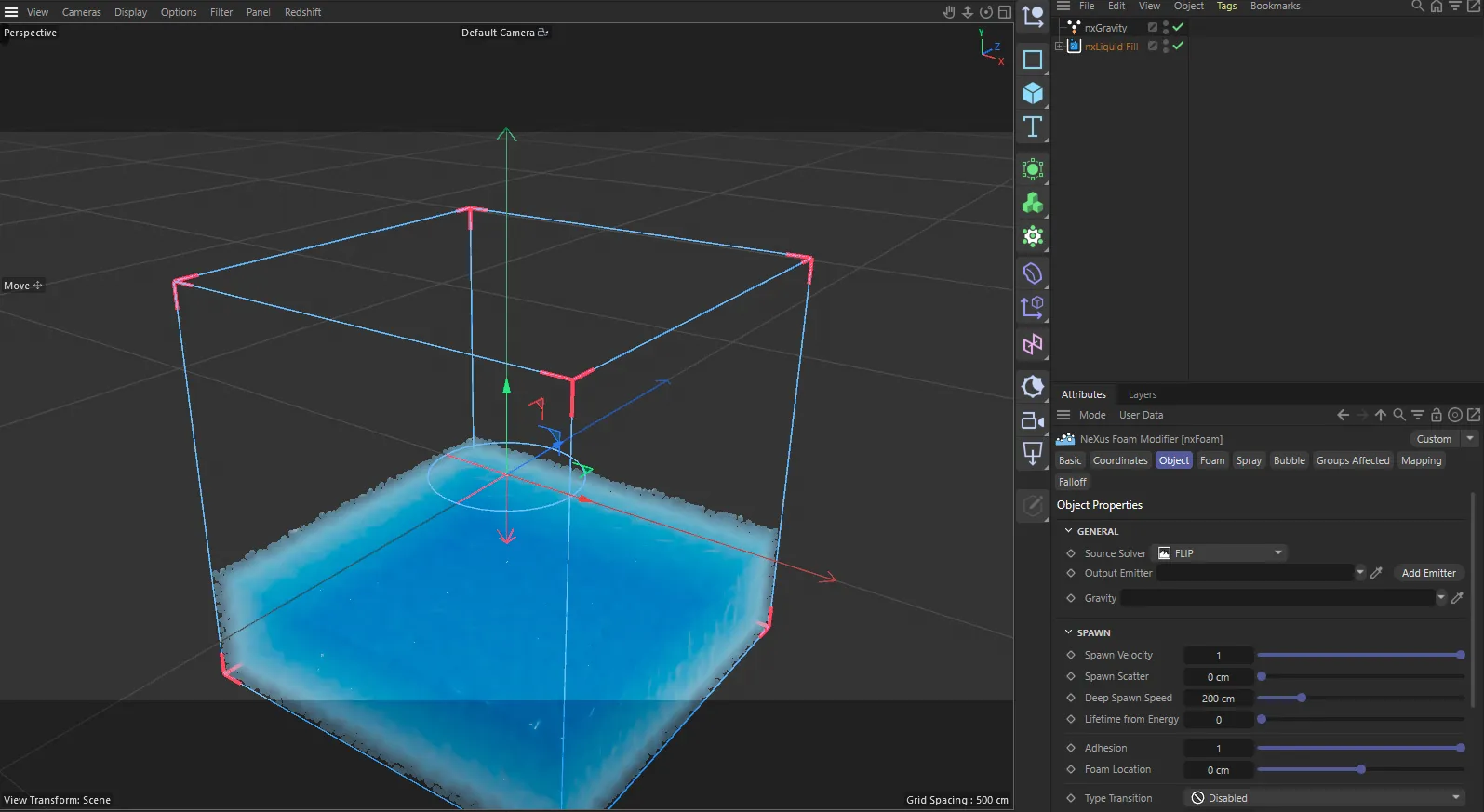
nxFoam in Cinema 4D. Its settings sit in the Attribute Manager.
Object Properties
Section titled “Object Properties”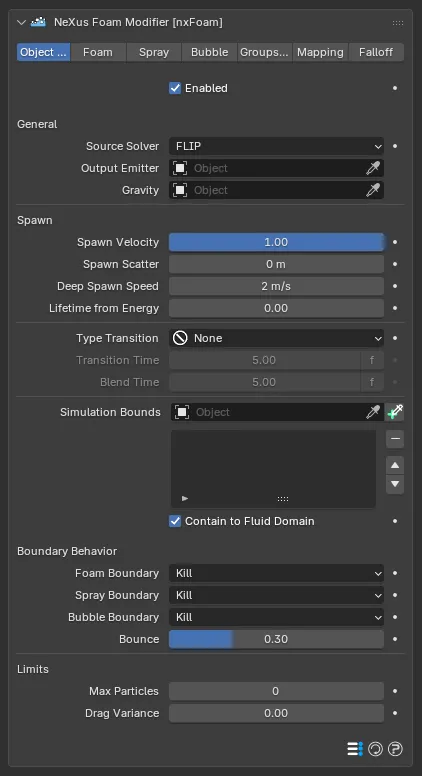
The nxFoam panel in Properties ▸ Physics, on the Object Properties tab. A row of tabs across the top switches between Object Properties, the three particle-class tabs (Foam, Spray, Bubble) and the shared Groups Affected, Mapping and Falloff tabs.
Enabled
Section titled “Enabled”Turns nxFoam on or off. Disable it to stop generating whitewater without deleting the modifier.
General
Section titled “General”Source Solver
Section titled “Source Solver”The fluid solver that produced the particles nxFoam reads. Set as FLIP, by default. The alternatives are PBD, SPH and APIC. This tunes the foam generation to suit that solver, so set it to match the fluid you are reading from.
Output Emitter
Section titled “Output Emitter”The emitter object that all foam, spray and bubble particles are created into. Leave it empty to use the source fluid’s own emitter.
Click the + button beside the field to create a new emitter for the whitewater and link it in one step. Beta
Gravity
Section titled “Gravity”The nxGravity object the foam matches: spray falls and bubbles rise along it. Leave it empty to use the first Gravity in the scene.
nxFoam handles gravity itself, so the linked Gravity is not applied to the foam particles a second time.
These settings control how newly created particles are launched. They apply to all three classes.
Spawn Velocity
Section titled “Spawn Velocity”How much of the fluid’s speed new foam, spray and bubbles start with. Defaults to 1.0. At 1.0 they set off at the full speed of the water. Lower values make them start more slowly.
Spawn Scatter
Section titled “Spawn Scatter”How far new particles are randomly offset from where they appear, so they spread out instead of stacking on top of each other. Defaults to 0m, which sets the spread automatically from the particle size.
Deep Spawn Speed
Section titled “Deep Spawn Speed”The minimum fluid speed below the surface needed to entrain air and create foam at depth. Defaults to 2m/s. Raise it so only violent plunges foam deep. Lower it for calmer deep foam.
Lifetime from Energy
Section titled “Lifetime from Energy”Makes foam thrown up by violent, fast water fade sooner than foam from calm water, so spray and splashes are short lived while gentle surface foam lingers. Defaults to 0, which gives every particle the same lifetime. Higher values shorten the most violently born foam.
Adhesion
Section titled “Adhesion”These settings control the foam and bubbles that reach the liquid’s surface. Spray is not affected and stays ballistic.
Adhesion Beta
Section titled “Adhesion Beta”How firmly foam and bubbles that reach the surface are held on it. Defaults to 1.0. At 1.0 they settle on the surface the way a floating particle does. Lower values let the flow carry them under or over the surface. At 0 they are not held at all.
Foam Location Beta
Section titled “Foam Location Beta”Raises or lowers the particles held on the surface. Defaults to 0m, which rests them on the liquid surface found at the particles’ own size. Lower it to sink them slightly into the water or raise it to lift them above it. Small values, a few centimeters either way, are usually enough.
In Cinema 4D these two controls sit in the Spawn group rather than under their own heading.
Type Transition
Section titled “Type Transition”Type Transition
Section titled “Type Transition”How secondary particles change class over their lifetime as they move between the surface, the air and the fluid interior. Set as None, by default. The alternatives are Auto and Kill.
- None: particles keep the class they were created as for life. They are never reclassified and never removed for drifting into another class’s region.
- Auto: particles change class as they move. A submerged bubble that rises becomes surface foam and surface foam dragged under becomes a bubble, after holding their birth class for the Transition Time.
- Kill: instead of changing class, a particle is removed once it is older than the Transition Time and would change class.
Transition Time
Section titled “Transition Time”How long a particle holds its class before it may change (Auto) or is removed (Kill). Defaults to 5. Short times react quickly. Longer times let a particle settle into its class first. This prevents rapid flickering when a particle sits near a boundary between classes.
Available when Type Transition is set to Auto or Kill.
Blend Time
Section titled “Blend Time”How long a particle’s color glides to its new class after a class change. Defaults to 5. A value of 0 changes the color instantly.
Available when Type Transition is set to Auto or Kill.
Simulation Bounds
Section titled “Simulation Bounds”A list of mesh objects that confine the secondary particles. Use it to stop whitewater surviving beyond the edges of the fluid or to keep it out of a solid obstacle.
You can also add a Collection Instance. Every mesh in the instanced collection is used as a bound. Beta
Pick or drop a mesh object into the Object field to add it to the list. Each entry has a toggle on the right to enable or disable it and an Inside toggle: leave Inside on to treat the object as a containment volume that keeps particles inside it or turn it off to treat it as a solid obstacle that particles stay outside of.
Contain to Fluid Domain
Section titled “Contain to Fluid Domain”Also keeps foam inside the source fluid’s simulation domain automatically, without needing a bounds object. Foam that leaves the domain is killed or bounced per the boundary behavior below. On by default, so foam never leaks out of a FLIP or APIC pour.
Boundary Behavior
Section titled “Boundary Behavior”These options decide what each class of particle does when it reaches a Simulation Bounds wall or the edge of the fluid domain. They apply when Contain to Fluid Domain is on or a bounds object is present.
Foam Boundary
Section titled “Foam Boundary”What foam does at a boundary wall. Set as Kill, by default. The alternatives are Collide and Pass Through.
- Kill: remove particles that cross the wall.
- Collide: bounce particles off the wall.
- Pass Through: let particles fly straight through the wall and out of the domain, as an open outflow.
Spray Boundary
Section titled “Spray Boundary”What spray does at a boundary wall. Set as Kill, by default, with the same Collide and Pass Through alternatives as Foam Boundary.
Bubble Boundary
Section titled “Bubble Boundary”What bubbles do at a boundary wall. Set as Kill, by default, with the same Collide and Pass Through alternatives as Foam Boundary.
Bounce
Section titled “Bounce”How much speed a particle keeps when it bounces off a wall set to Collide. Defaults to 0.3. A value of 0 stops it dead at the wall. A value of 1.0 is a full elastic bounce.
Limits
Section titled “Limits”Max Particles
Section titled “Max Particles”Stops creating new whitewater once the whole simulation, fluid plus foam, reaches this many particles, to keep memory and playback under control on heavy sims. Defaults to 0, which means no limit. The fluid is never affected. Only new secondary particles are held back.
Drag Variance
Section titled “Drag Variance”Randomly varies how fast each particle falls, rises and follows the water, so a burst of spray or bubbles scatters and breaks up instead of moving as one flat sheet. Defaults to 0, which makes every particle behave identically.
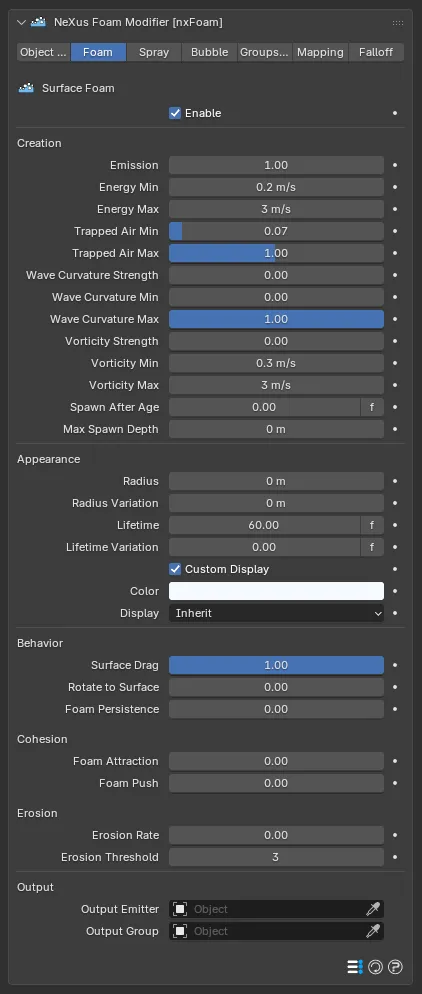
The Foam tab controls surface foam: the mat of whitewater that forms on top of energetic, breaking or aerated water and rides along the surface.
Foam alone: a patchy white mat clinging to the churning surface.
Enable
Section titled “Enable”Generates foam particles. On by default. The rest of the tab is available only when this is on.
Creation
Section titled “Creation”These controls decide where and how much foam forms. The same Creation controls appear on the Spray and Bubble tabs, tuning each class independently.
Emission
Section titled “Emission”How much foam this creates, relative to the default. Defaults to 1.0, the validated amount. Raise it for more, lower it for less, 0 for none.
Energy Min
Section titled “Energy Min”The fluid speed where foam begins to form. Defaults to 0.2m/s. Lower it to make foam appear in calmer water.
Energy Max
Section titled “Energy Max”The fluid speed where foam reaches its maximum. Defaults to 3m/s. At or above this speed the most foam forms.
Trapped Air Min
Section titled “Trapped Air Min”How much churning and air mixing is needed before foam begins to form. Defaults to 0.07.
Trapped Air Max
Section titled “Trapped Air Max”Churning at or above this produces the most foam. Defaults to 1.0.
Wave Curvature Strength
Section titled “Wave Curvature Strength”How much foam this creates at wave crests. Defaults to 0, which turns the wave-crest contribution off.
Wave Curvature Min
Section titled “Wave Curvature Min”The surface sharpness where wave-crest foam begins. Defaults to 0. Needs Wave Curvature Strength above 0.
Wave Curvature Max
Section titled “Wave Curvature Max”The surface sharpness at or above which wave-crest foam is strongest. Defaults to 1.0.
Vorticity Strength
Section titled “Vorticity Strength”How much foam this creates from rotating water. Defaults to 0, which turns the vorticity contribution off.
Vorticity Min
Section titled “Vorticity Min”The rotation speed where foam starts. Defaults to 0.3m/s.
Vorticity Max
Section titled “Vorticity Max”The rotation speed where foam saturates. Defaults to 3m/s.
Spawn After Age
Section titled “Spawn After Age”How long a source fluid particle must exist before it starts making foam. Defaults to 0, which spawns immediately. Raise it so foam only forms once the water has been moving.
Max Spawn Depth
Section titled “Max Spawn Depth”Spawns foam only within this depth of the fluid surface. Defaults to 0m, which spawns at any depth.
Appearance
Section titled “Appearance”These controls set the size, life and look of the foam particles. The same Appearance controls appear on the Spray and Bubble tabs.
Radius
Section titled “Radius”The foam particle radius, in meters. Defaults to 0m, which sizes it automatically from the source fluid particle.
Radius Variation
Section titled “Radius Variation”A random plus or minus variation in the foam radius, in meters. Defaults to 0m.
Lifetime
Section titled “Lifetime”How long foam lasts before fading out. Defaults to 60.
Lifetime Variation
Section titled “Lifetime Variation”A random plus or minus variation in the foam lifetime. Defaults to 0.
Custom Display
Section titled “Custom Display”Gives foam a fixed color and display mode instead of inheriting the source particle’s. On by default. The Color and Display controls below are available only when this is on.
The foam particle color.
Display
Section titled “Display”The display shape for foam in the viewport. Set as Inherit, by default, which uses the output emitter’s display mode. The alternatives are the standard particle display shapes, such as Points, Square, Sphere and Axis.
Behavior
Section titled “Behavior”Surface Drag
Section titled “Surface Drag”How tightly foam follows the fluid it sits on. Defaults to 1.0. At 1.0 the foam rides the surface exactly. Lower values let it lag behind and drift.
Rotate to Surface
Section titled “Rotate to Surface”Turns foam particles to lie flat against the water surface. Defaults to 0, which keeps their orientation. Useful when foam is rendered as oriented sprites or instanced geometry.
Foam Persistence
Section titled “Foam Persistence”Makes thick foam mats linger: foam well supported by the fluid surface lives longer. Defaults to 0, which keeps the plain lifetime. Higher values make dense foam last.
Cohesion
Section titled “Cohesion”Foam Attraction
Section titled “Foam Attraction”Pulls nearby foam of the same kind together so it gathers into clumps, streaks and ribbons instead of spreading into an even film. Defaults to 0, which keeps foam evenly spread. Higher values make it cling together. It works on its own or alongside Foam Push.
Foam Push
Section titled “Foam Push”Pushes neighboring foam apart so clumps spread into an even mat. Defaults to 0, which turns it off.
Erosion
Section titled “Erosion”Erosion Rate
Section titled “Erosion Rate”How quickly isolated foam, with fewer foam neighbors than the Erosion Threshold, fades. Defaults to 0, which is no erosion. Higher values remove stray foam faster.
Erosion Threshold
Section titled “Erosion Threshold”Foam with fewer neighboring foam particles than this is treated as isolated and fades. Defaults to 3. Higher values erode more, since a dense mat has many neighbors and so is spared. Lower values fade only the most isolated wisps.
Output
Section titled “Output”On the Foam, Spray and Bubble tabs, the Output Emitter and Output Group fields each have a + button beside them that creates a new emitter or nxGroup and links it in one step. Beta
Output Emitter
Section titled “Output Emitter”The emitter foam particles are created into. Leave it empty to use the overall Output Emitter on the Object Properties tab.
Output Group
Section titled “Output Group”The nxGroup that foam is created into. Leave it empty to keep the default.
The Spray tab controls spray: fine droplets flung clear of the water into the air, such as at the tip of a breaking wave or the peak of an impact.
Spray alone: dropping Suzanne into the pool throws up a crown of spray on each impact.
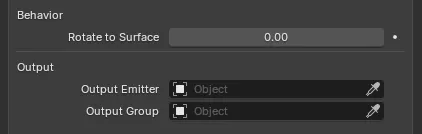
Spray’s Behavior and Output settings. Its Creation and Appearance controls match the Foam tab.
Enable
Section titled “Enable”Generates spray particles. On by default.
Spray shares the same Creation and Appearance controls as the Foam tab, tuned separately here. Its Lifetime defaults to 24, shorter than foam, since airborne droplets are short lived.
Behavior
Section titled “Behavior”Rotate to Surface
Section titled “Rotate to Surface”Turns spray particles to lie flat against the water surface. Defaults to 0, which keeps their orientation.
Output
Section titled “Output”Output Emitter
Section titled “Output Emitter”The emitter spray particles are created into. Leave it empty to use the overall Output Emitter on the Object Properties tab.
Output Group
Section titled “Output Group”The nxGroup that spray is created into. Leave it empty to keep the default.
Bubble
Section titled “Bubble”The Bubble tab controls bubbles: air trapped inside the body of the fluid that rises toward the surface under buoyancy.
Bubble alone: air rising through the pool and breaking at the surface.
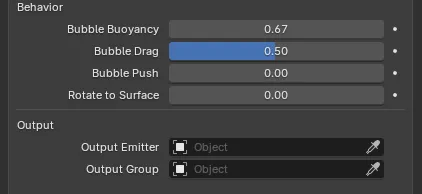
Bubble’s Behavior and Output settings. Its Creation and Appearance controls match the Foam tab.
Enable
Section titled “Enable”Generates bubble particles. On by default.
Bubbles share the same Creation and Appearance controls as the Foam tab, tuned separately here. Their Lifetime defaults to 42.
Behavior
Section titled “Behavior”Bubble Buoyancy
Section titled “Bubble Buoyancy”How fast submerged bubbles rise toward the surface. Defaults to 0.667. Higher values lift bubbles up faster. A value of 0 leaves them suspended where they were created.
Bubble Drag
Section titled “Bubble Drag”How strongly submerged bubbles are pulled along by the surrounding fluid as they rise. Defaults to 0.5. Higher values make bubbles track the flow more closely.
Bubble Push
Section titled “Bubble Push”Pushes neighboring bubbles apart so they spread out. Defaults to 0, which turns it off.
Rotate to Surface
Section titled “Rotate to Surface”Turns bubble particles to lie flat against the water surface. Defaults to 0, which keeps their orientation.
Output
Section titled “Output”Output Emitter
Section titled “Output Emitter”The emitter bubble particles are created into. Leave it empty to use the overall Output Emitter on the Object Properties tab.
Output Group
Section titled “Output Group”The nxGroup that bubbles are created into. Leave it empty to keep the default.
Groups Affected
Section titled “Groups Affected”Use the Groups Affected tab to restrict nxFoam to particles in specific nxGroup groups, rather than reading every particle. This is useful for generating whitewater from only part of a simulation.
Mapping
Section titled “Mapping”Use the Mapping tab to drive nxFoam’s settings from particle data instead of fixed values, so a particle’s own attributes can change how it makes foam. See Mapping for how this works.
Falloff
Section titled “Falloff”Use the Falloff tab to limit where nxFoam operates. Add one or more nxFalloff objects to the list and blend them, so only particles inside the falloff region generate whitewater.
Copyright © 2026 INSYDIUM LTD. All Rights Reserved.