

Script
A Script runs custom GLSL per particle on the GPU, with a set of built-in variables and functions that make it easy to read and write particle data.
This lets you build bespoke GPU particle modifiers that go beyond the question and action items.
The script editor
Section titled “The script editor”Adding a Script item does not create a script on its own. Press Edit Script… in the item’s settings to open the GLSL editor. A new script starts empty. The panel shows “No script defined” until you write or load one.
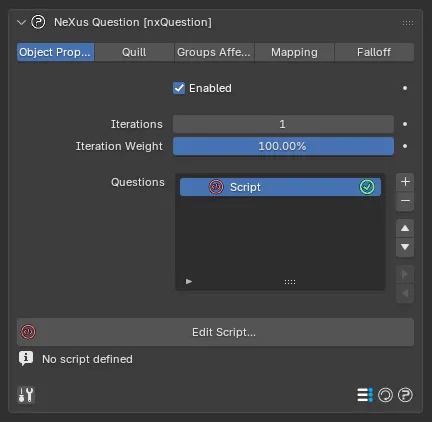
A Script item selected in the Questions list, with the Edit Script… button and the “No script defined” state before a script is written.
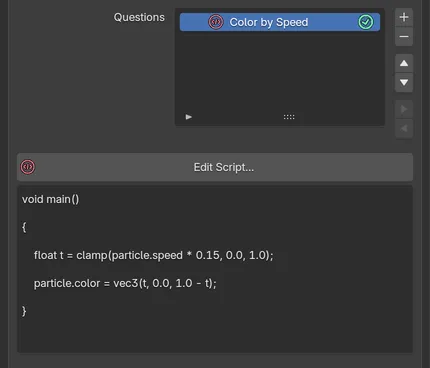
The same item once a script is written. The panel previews the first lines of the source under Edit Script…
The editor has syntax highlighting, context-aware autocompletion for the NeXus API, function signature help, find and replace, a minimap and a set of ready-made code templates you can start from. It supports the common editing shortcuts (copy, cut, paste and undo) and Tab / Shift-Tab to indent or unindent a selection. It includes an optional vim mode.
Functions
Section titled “Functions”The script can optionally contain a main() function, which is then called for the script.
void main(){ if (doc.time > 1.0) { particle.color = vec3(1.0, 1.0, 0.0); }}A main() does not have to be defined. Without one, all the script code is embedded into the currently processing code (for example, within a Question item or at the top level within the shader’s own main function).
Scripts can define functions, which can then be called within the script or by other scripts. Order matters: functions must be defined before they are called. The final shader is built in the order the items appear within nxQuestion, so if you use a user variable before it is defined the result may not be as expected and you may see an error in the console.
Functions should be defined at the top of the script. Any global variables or #define macros should appear before the first function definition. On finding the first function, anything declared before it is also included.
Debugging
Section titled “Debugging”There is a built-in print() function to print strings and simple variables back to the system console.
print() takes a format string first, then any variables or values. For example, print("hello") prints hello to the console. It prints many times, because scripts execute once per particle, so be very cautious when printing.
print("hello");The above produces output like the following, once per particle:
hellohellohellohello...It is best to guard prints with an index check so only one particle prints or to use a low particle count when debugging.
if (index == 0){ print("hello");}With the index check, only one line is printed:
helloPrint Formatting
Section titled “Print Formatting”The print() function signature is:
print("format string", parameters...)Format specifiers begin with %. The supported specifiers are:
| Specifier | Output |
|---|---|
%d, %i, %l | Signed integer |
%u | Unsigned integer |
%f | Float |
%<width>.<places>f | Float with decimal places, e.g. %.3f or %1.3f. The <width> is unused. |
%.<places>v<components>f | Vector components, e.g. %.3v3f prints all three components of a vec3 with 3 decimal places. The number before v is the decimal places and the number after v is the component count. |
Errors
Section titled “Errors”If errors are found when the GLSL is compiled, they print to the console. Generally these are script errors, but any error compiling nxQuestion is shown.
For example, a typo in a function name:
if (index == 0){ wrint("hello");}Produces the following in the console:
nxQuestion Error in Script at line 3 : 'wrint' : no matching overloaded function foundWhen making script changes, it is highly recommended to test first with a single (or low) particle count and a single frame step.
GPUs are not happy when you make mistakes.
Variables
Section titled “Variables”There are helper variables built in, which are converted from keywords at compile time.
You access the current particle’s data with particle and any particle by index using particles[particle_index].
Scripts execute per particle in parallel on the GPU. The reserved variable index holds the current particle’s index.
Access: R = read only, RW = read/write.
Particle
Section titled “Particle”These variables access data for the currently processing particle.
| Variable | Description | Type | Access |
|---|---|---|---|
particle.age / particle.time | Particle age in seconds | float | RW |
particle.frame | Particle age in frames | int | R |
particle.speed | Particle speed. Writing scales velocity magnitude while keeping direction. | float | RW |
particle.group | Particle group | int | RW |
particle.radius | Particle radius | float | RW |
particle.mass | Particle mass | float | RW |
particle.life | Particle lifespan in seconds | float | RW |
particle.id | Particle ID | int | R |
particle.flags | Particle flags | int | RW |
particle.display | Particle display flags | uint | RW |
particle.distance | Distance the particle has traveled | float | R |
particle.friction | Particle friction | float | R |
particle.bounce | Particle bounce | float | R |
particle.emitter | Particle emitter index | int | R |
particle.color | Particle RGB color | vec3 | RW |
particle.position | Particle position | vec3 | RW |
particle.velocity | Particle velocity | vec3 | RW |
particle.rotation | Particle rotation | vec3 | RW |
particle.scale | Particle scale | vec3 | RW |
particle.origin | Particle position at the start of the current frame | vec3 | R |
particle.uvw | Particle UVW coordinates | vec3 | R |
particle.vertex | Particle vertex weight | float | R |
particle.neighbors(distance) | Number of particles within distance | int | R |
particle.density | Particle density, calculated live | float | R |
particle.born | True if the particle was born this frame | bool | R |
particle.field | Falloff/field value for the particle | float | R |
particle.random | Random value derived from the particle ID | float | R |
particle.index | Particle index on the GPU | int | R |
particle.smoke | Particle smoke value (nxExplosiaFX) | float | RW |
particle.temperature | Particle temperature value (nxExplosiaFX) | float | RW |
particle.fuel | Particle fuel value (nxExplosiaFX) | float | RW |
Any particle can be accessed using particles[particle_index].<variable>, for example:
vec3 otherPos = particles[0].position;float otherAge = particles[0].age;All of the same properties listed above are available on particles[n], with the same types, but all are read-only. To get the speed of another particle use length(particles[n].velocity) rather than particles[n].speed.
Document
Section titled “Document”| Variable | Description | Type | Access |
|---|---|---|---|
doc.time | Document time in seconds | float | R |
doc.delta | Time elapsed since the last frame in seconds | float | R |
doc.frame | Current document frame | int | R |
doc.fps | Document frame rate | int | R |
| Variable | Description | Type | Access |
|---|---|---|---|
math.random(seed) | Random value generated from seed (int) | float | R |
Compute
Section titled “Compute”| Variable | Description | Type | Access |
|---|---|---|---|
compute.iteration | Current nxQuestion iteration | int | R |
compute.iterationcount | Total number of iterations set in nxQuestion | int | R |
Emitters
Section titled “Emitters”| Variable | Description | Type | Access |
|---|---|---|---|
emitters.count | Number of emitters on the GPU. May differ from the document count, as CPU-only emitters are not present. | int | R |
emitter[n].first | Index of the first particle for this emitter. On the GPU all particles share a single array. | int | R |
emitter[n].count | Number of particles for this emitter | int | R |
emitter[n].seed | Random seed for this emitter | int | R |
emitter[n].create(position, velocity, color, radius, life, flags, userdata) | Creates a new particle on the GPU. Returns the new particle’s index for use with newparticle[]. flags should be 0. userdata can be any integer value. n must be a literal integer; using particle.emitter here will cause a type error. | int | n/a |
New Particles
Section titled “New Particles”Particles created with emitter[n].create() are written into a separate output buffer. The returned index is used to set their properties via newparticle[new_index].
| Variable | Description | Type | Access |
|---|---|---|---|
newparticle[n].userdata | User-defined integer value | int | RW |
newparticle[n].emitter | GPU emitter index used to create the CPU-side particle. Set to -1 to skip CPU-side creation. | int | RW |
newparticle[n].position | Particle position | vec3 | RW |
newparticle[n].velocity | Particle velocity | vec3 | RW |
newparticle[n].radius | Particle radius | float | RW |
newparticle[n].color | Particle RGB color. If the x component is less than 0.0 the color is ignored. | vec3 | RW |
newparticle[n].life | Particle lifespan. Set to 0.0 or less to ignore. | float | RW |
newparticle[n].flags | Particle flags. Set to 0. | int | RW |
Script Examples
Section titled “Script Examples”Color by Speed
Section titled “Color by Speed”Particles are colored based on their speed. Slow particles appear blue and fast particles appear red.
void main(){ // normalize speed to 0-1 range; adjust the multiplier to suit your particle velocities float speed = clamp(particle.speed * 0.2, 0.0, 1.0); // slow = blue, fast = red particle.color = vec3(speed, 0.0, 1.0 - speed);}A color-by-speed Script running on a falling shower. Particles are born slow and blue at the top, then redden as gravity accelerates them, so a blue-to-red front sweeps down and breaks over Suzanne.
Fade Color Over Lifetime
Section titled “Fade Color Over Lifetime”Particle color fades from orange to blue over the particle’s lifetime.
void main(){ // 0.0 at birth, 1.0 at end of life float lifeRatio = particle.age / particle.life; // blend from orange to blue particle.color = mix(vec3(1.0, 0.5, 0.0), vec3(0.0, 0.2, 1.0), lifeRatio);}Orbit Force
Section titled “Orbit Force”Particles are pushed tangentially around the world origin in the XZ plane. Increase or decrease the multiplier to control orbit speed.
void main(){ // flatten to XZ plane to orbit around the Y axis vec3 pos = vec3(particle.position.x, 0.0, particle.position.z); float dist = length(pos); if (dist > 0.001) { // tangent is perpendicular to the radial direction and the Y axis vec3 tangent = cross(normalize(pos), vec3(0.0, 1.0, 0.0)); // doc.delta makes the force frame-rate independent particle.velocity += tangent * 300.0 * doc.delta; }}Color Cycling by Distance Traveled
Section titled “Color Cycling by Distance Traveled”There is no built-in way to reset particle.distance, but particle.smoke, particle.temperature and particle.fuel are writable floats that persist in the particle buffer between frames. When not used for nxExplosiaFX, any of them can serve as a custom per-particle accumulator.
This script uses particle.smoke to accumulate distance traveled. Using mod() to sample cyclically means no reset is needed; the value grows freely but the color repeats every 200 units. Three sin waves offset by 120 degrees each produce a smooth continuous cycle through the full color wheel.
void main(){    // accumulate distance traveled; particle.smoke persists between frames    particle.smoke += particle.speed * doc.delta;
    // mod() cycles the value without needing a reset    float t = mod(particle.smoke, 200.0) / 200.0;
    // three sin waves offset by 120 degrees cycle smoothly through the color wheel    particle.color = vec3(        sin(t * 6.28318) * 0.5 + 0.5,        sin(t * 6.28318 + 2.09440) * 0.5 + 0.5,        sin(t * 6.28318 + 4.18879) * 0.5 + 0.5    );}
Use particle.temperature or particle.fuel if you need additional independent counters or if nxExplosiaFX is active in the scene.
Spawn Child Particle on Birth
Section titled “Spawn Child Particle on Birth”When each particle is born a smaller child particle is spawned from the same position with an upward velocity offset and half the lifespan. The emitter index is passed as a literal; change 0 to match the GPU index of your target emitter.
void main(){ // particle.born is true only on the frame the particle is created if (particle.born) { emitter[0].create( particle.position, particle.velocity + vec3(0.0, 50.0, 0.0), // inherit velocity plus upward offset vec3(1.0, 0.8, 0.0), // orange particle.radius * 0.5, // half the parent radius particle.life * 0.5, // half the parent lifespan 0, // flags (always 0) 0 // userdata ); }}Animated Vector Field
Section titled “Animated Vector Field”A time-animated trig field steers particles along flowing organic paths, similar in look to curl noise but with no solver required. The three field components are offset across spatial and time axes so each axis flows independently. Particle color reflects the current field direction, mapping XYZ to RGB.
Adjust scale to match your scene size (smaller values give larger slower waves) and the force multiplier to taste.
void main(){    // scale position into field space    float scale = 0.004;    vec3 p = particle.position * scale;    // animate the field over time    float t = doc.time * 0.3;
    // each component uses offset axes to prevent the field aligning to a single direction    vec3 field = vec3(        cos(p.y + t) - sin(p.z + t),        cos(p.z + t) - sin(p.x + t),        cos(p.x + t) - sin(p.y + t)    );
    particle.velocity += field * 200.0 * doc.delta;    // map field direction to color    particle.color = abs(normalize(field));}
Expanding Shockwave
Section titled “Expanding Shockwave”A wave front expands outward from the world origin at a set speed, repeating every wavePeriod seconds. Particles are pushed radially as the wave passes through them and briefly lit up against a dark base color. Adjust waveSpeed, wavePeriod and waveWidth to control the timing and sharpness of the pulse.
void main(){    float waveSpeed = 400.0;  // units per second    float wavePeriod = 3.0;   // seconds between pulses    float waveWidth = 40.0;   // sharpness of the pulse edge
    // current radius of the wave front    float waveRadius = mod(doc.time, wavePeriod) * waveSpeed;    float dist = length(particle.position);    // Gaussian falloff centered on the wave front    float wave = exp(-pow(dist - waveRadius, 2.0) / (waveWidth * waveWidth));
    if (dist > 0.001)    {        // push particles outward proportional to wave intensity        particle.velocity += normalize(particle.position) * wave * 2000.0 * doc.delta;    }
    // blend from dark base color to bright orange at the wave front    particle.color = mix(vec3(0.05, 0.05, 0.1), vec3(1.0, 0.6, 0.1), wave);}
Sphere Surface Flow
Section titled “Sphere Surface Flow”Particles are attracted to the surface of a sphere and simultaneously pushed tangentially, causing them to flow across it. Particles on the surface appear cyan and those far from it appear orange. Set targetRadius to match the scale of your emitter.
void main(){    // set this to match the scale of your emitter    float targetRadius = 300.0;    float dist = length(particle.position);
    if (dist > 0.001)    {        vec3 normal = particle.position / dist;
        // attract toward the sphere surface; strength scales with distance from it        particle.velocity += normal * (targetRadius - dist) * 3.0 * doc.delta;
        // push tangentially to create surface flow around the Y axis        vec3 tangent = cross(normal, vec3(0.0, 1.0, 0.0));        particle.velocity += tangent * 200.0 * doc.delta;
        // cyan on the surface, orange when far from it        float t = clamp(abs(dist - targetRadius) / 100.0, 0.0, 1.0);        particle.color = mix(vec3(0.2, 0.8, 1.0), vec3(1.0, 0.2, 0.0), t);    }}
Writing Scripts with AI
Section titled “Writing Scripts with AI”AI assistants are well suited to writing nxQuestion scripts. Because the scripting environment is a defined subset of GLSL with a fixed set of variables, giving an AI the right context up front produces accurate and immediately usable results.
nxQuestion also has a built-in AI author, Quill, on the nxQuestion Quill tab, which builds whole node graphs from a prompt. The workflow below is for writing GLSL Script code with an external assistant.
Claude works particularly well for this. Paste the context block below at the start of your conversation, then describe what you want in plain language.
Context Prompt
Section titled “Context Prompt”Copy this into Claude before making any script requests.
You are writing scripts for the nxQuestion Script layer in NeXus for Blender.Scripts are written in GLSL and run once per particle per frame on the GPU in parallel.
The script can use a void main() function or plain inline code.
PARTICLE VARIABLES (current particle):particle.age / particle.time  float  RW  age in secondsparticle.frame                int    R   age in framesparticle.speed                float  RW  speed; writing scales velocity while keeping directionparticle.group                int    RWparticle.radius               float  RWparticle.mass                 float  RWparticle.life                 float  RW  lifespan in secondsparticle.id                   int    Rparticle.flags                int    RWparticle.display              uint   RW  particle display flagsparticle.distance             float  R   total distance traveled, cannot be resetparticle.friction             float  Rparticle.bounce               float  Rparticle.emitter              int    R   GPU emitter indexparticle.color                vec3   RW  RGBparticle.position             vec3   RWparticle.velocity             vec3   RWparticle.rotation             vec3   RWparticle.scale                vec3   RWparticle.origin               vec3   R   position at start of current frameparticle.uvw                  vec3   Rparticle.vertex               float  R   vertex weightparticle.neighbors(dist)      int    R   particle count within radiusparticle.density              float  R   local density, calculated liveparticle.born                 bool   R   true only on birth frameparticle.field                float  R   falloff valueparticle.random               float  R   stable random value from particle IDparticle.index                int    R   GPU array indexparticle.smoke                float  RW  nxExplosiaFX or repurpose as custom float storageparticle.temperature          float  RW  nxExplosiaFX or repurpose as custom float storageparticle.fuel                 float  RW  nxExplosiaFX or repurpose as custom float storage
OTHER PARTICLES (read access):particles[n].property         same properties as above
DOCUMENT:doc.time    float  secondsdoc.delta   float  seconds since last frame; use this to make forces frame-rate independentdoc.frame   intdoc.fps     int
MATH:math.random(seed int)  float  random value from integer seed
COMPUTE:compute.iteration       int  current iterationcompute.iterationcount  int  total iterations
EMITTERS:emitters.count         int  GPU emitter countemitter[n].first       int  index of first particle for emitter nemitter[n].count       int  particle count for emitter nemitter[n].seed        int  random seed for emitter nemitter[n].create(position vec3, velocity vec3, color vec3, radius float, life float, flags int, userdata int)                       int  spawns a new particle; returns its index for use with newparticle[]                            always use a literal integer for n, not particle.emitter
NEW PARTICLES (after emitter[n].create()):newparticle[n].position    vec3   RWnewparticle[n].velocity    vec3   RWnewparticle[n].color       vec3   RW  ignored if x < 0.0newparticle[n].radius      float  RWnewparticle[n].life        float  RW  ignored if <= 0.0newparticle[n].flags       int    RW  always 0newparticle[n].userdata    int    RWnewparticle[n].emitter     int    RW  GPU emitter index for CPU-side creation; -1 to skip
RULES:- Use doc.delta to keep forces frame-rate independent- particle.smoke, particle.temperature and particle.fuel persist between frames and can store custom per-particle float values when nxExplosiaFX is not in use- particle.neighbors(), particle.density and particles[i] automatically insert the neighbor and sort passes they need- The variable `index` is the current particle's GPU array index- Standard GLSL functions (sin, cos, length, normalize, cross, mix, clamp, mod, exp, abs, etc.) are all available
Example
Section titled “Example”Prompt:
Make particles orbit the Y axis with inner particles spinning faster than outer ones. Push particles outward from the Y axis over time so they spread out. Zero the velocity to avoid drift. Color them red close to the center and blue farther out.The result below is one example of what this prompt produced. AI responses vary each time, so the same prompt may return a different but equally valid script. If the first result is not quite right, refine the prompt or ask the AI to adjust specific parts.
Result:
void main() {    float dist = length(particle.position.xz);
    // outward radial push -- spreads particles away from the Y axis over time    float pushStrength = 20.0;    vec2 outward = normalize(particle.position.xz + vec2(0.0001)) * pushStrength * doc.delta;    particle.position.x += outward.x;    particle.position.z += outward.y;
    // recalculate dist after push    dist = length(particle.position.xz);
    // angular velocity decreases with distance; inner particles spin faster    float omega = 8.0 / (dist + 0.001);    float angle = omega * doc.delta;    float cosA  = cos(angle);    float sinA  = sin(angle);
    // rotate position directly in XZ using a 2D rotation matrix    float x = particle.position.x;    float z = particle.position.z;    particle.position.x =  x * cosA - z * sinA;    particle.position.z =  x * sinA + z * cosA;
    // zero velocity to prevent drift from physics integration    particle.velocity = vec3(0.0);
    // red at the center, blue toward the outside    float minDist = 5.0;    float maxDist = 200.0;    float t = clamp((dist - minDist) / (maxDist - minDist), 0.0, 1.0);    particle.color = mix(vec3(1.0, 0.0, 0.0), vec3(0.0, 0.0, 1.0), t);}
Copyright © 2026 INSYDIUM LTD. All Rights Reserved.