

nxDendrite
nxDendrite grows branching, network and crystalline structures from your NeXus particles, building trees, dendrites and circuit-like patterns out of a stack of layers.
Add it from Add ▸ INSYDIUM NeXus ▸ Modifiers ▸ nxDendrite. It arrives as an empty, already set up with one starting layer. All of its settings live in Properties ▸ Physics.
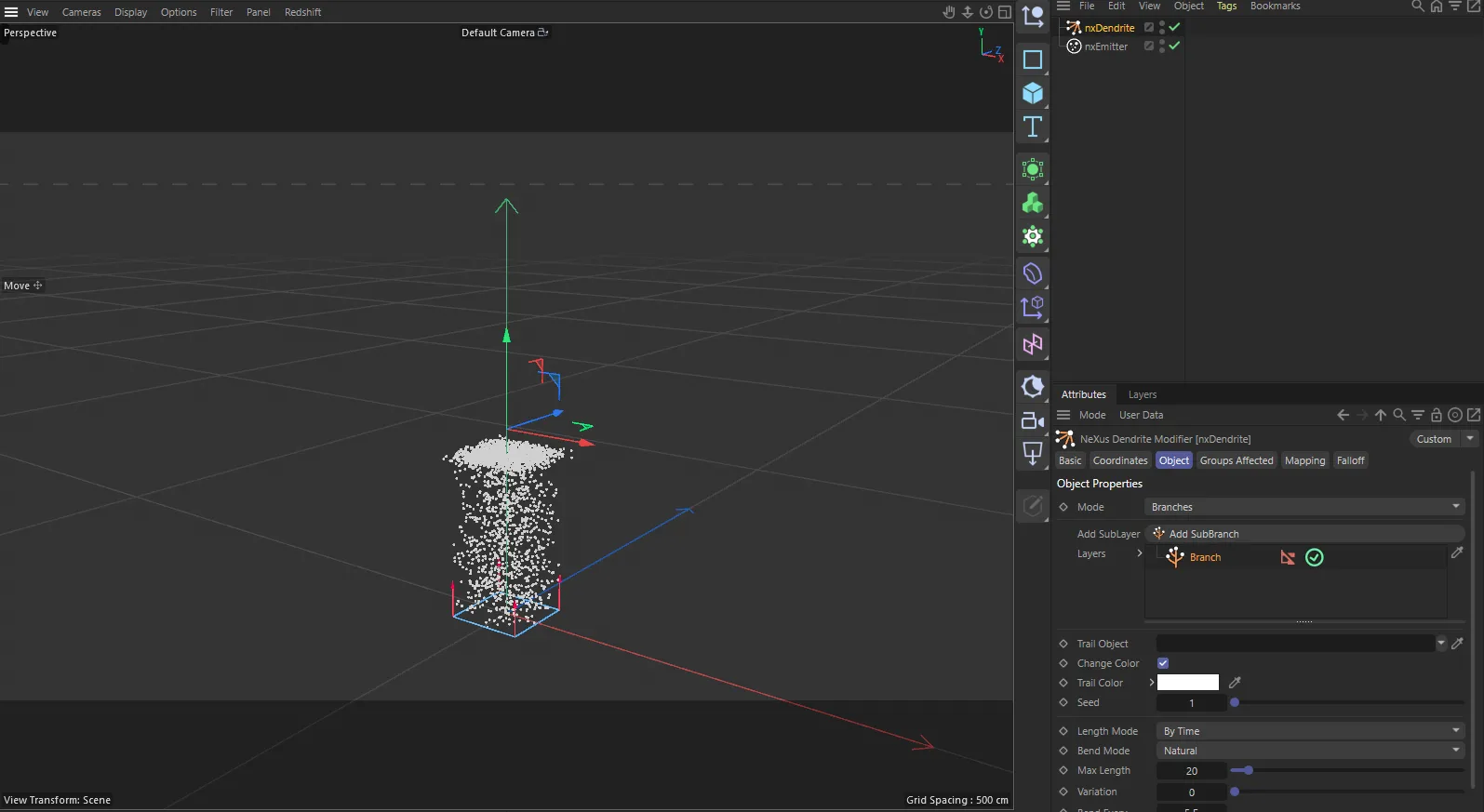
nxDendrite in Cinema 4D. Its settings sit in the Attribute Manager.
Object Properties
Section titled “Object Properties”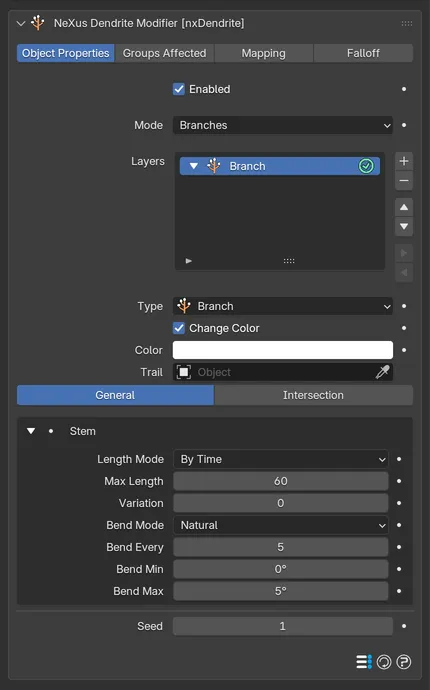
The nxDendrite panel in Properties ▸ Physics, in Branches mode, on the General tab of its starting layer.
Enabled
Section titled “Enabled”Turns nxDendrite on or off. Disable it to switch off its growth without deleting the modifier.
Sets the kind of structure nxDendrite grows. Set as Branches, by default. The other options are Network, Bethe Lattice and Dendrite. The Mode changes what the layers below do and relabels them to match.
- Branches: grow branching stems, a trunk with sub-branches, like a plant or tree.
- Network: steer the particles along an angular grid, for a circuit-board or maze look.
- Bethe Lattice: build a regular, self-similar tree where each node splits into an even number of children.
- Dendrite: grow crystalline structures, with stems that wander and side-branch at a set angle.
Layers
Section titled “Layers”The stack of layers that builds the structure.
The stack is a hierarchy. Its order is the branch generation order: the first layer makes the trunks, a layer nested under it makes the first branches, a layer nested under that makes the sub-branches and so on. The starting layer is a Branch (a root). Add more with the + button. They arrive as SubBranch layers nested under the selected one.
Select a layer to reveal its settings. Each has an enable toggle on the right of its row.
Layer settings
Section titled “Layer settings”Each layer has a header with its Type (Branch for a root or SubBranch for a child, relabeled per Mode), a Change Color switch and a Color that tints this generation’s particles and their linked trail. A Trail field links an nxTrail that draws this layer’s branches. Below the header, its settings are split into a General tab and an Intersection tab. The General tab shows different controls for each Mode.
Change Color Beta
Section titled “Change Color Beta”Sets whether this layer recolors its particles with its Color. On by default. Turn it off to keep the color the particles already have, for example from the emitter or the parent branch. The Color control is grayed out while it is off.
Stem (Branches mode)
Section titled “Stem (Branches mode)”Grows the layer’s stem. Length Mode sets how the stem’s length is measured, By Time by default, with By Distance and By Spline the alternatives. Max Length and its Variation set how far it grows. Max Length defaults to 60, in frames for By Time or world units for By Distance. Beta 3 Scenes saved before Beta 3 keep their old default of 20. Bend Mode sets the character of the bends, Natural by default, with Zigzag and Curl the alternatives.
With Natural or Zigzag, Bend Every sets how often the stem bends. Bend Min and Bend Max set the bend angle.
Curl turns the stem a little every frame instead, so it winds into a spiral. It replaces the bend controls with its own. Curl Angle is the turn applied each frame, 5° by default. A negative value curls the other way. Tightening is an extra angle per frame added for every frame of the stem’s age, so the curl winds tighter as it grows. It defaults to 0.1°. Curl Strength scales both angles. It defaults to 1.
Speed Reduction Beta
Section titled “Speed Reduction Beta”Shown when Bend Mode is set to Curl. The fraction of its speed a curling stem loses every frame, so the spiral closes in on itself. Defaults to 0.02. Set it to 0 to keep the speed constant.
Plane Angle Beta
Section titled “Plane Angle Beta”Shown when Bend Mode is set to Curl. Rolls the plane the stem curls in around the stem’s starting direction. Defaults to 0°.
Spawn (Branches mode)
Section titled “Spawn (Branches mode)”Shown on a SubBranch layer. Spawns the child branches that make the next generation. Branch Every sets how often they spawn, Branches how many per event and Max Branches the total cap. Angle Min and Angle Max set how far the children branch off. Rotation sets how they are arranged around the stem. Set as Random, by default. The alternatives are Spiral and Symmetrical. Symmetrical adds a Symmetry choice of Straight or Offset. When Rotation is Spiral or Symmetrical, a Rotation Angle appears: for Spiral it sets the rotation step per branch (0 uses the golden angle). For Symmetrical it sets the base offset. Branch Scale sets the child length relative to the parent.
Network (Network mode)
Section titled “Network (Network mode)”Steers the particles along an angular grid. Change sets whether the heading changes By Time or By Distance, with the matching interval below. Heading and Pitch set the turn angles. Plane constrains the turns to Any plane or the XY, XZ or YZ plane. Axis allows turns in Both directions or only the Positive or Negative one.
A SubNetwork layer also shows a Spawn group above the steering, with Branch Every, Branches and Max Branches controlling how it branches off its parent network.
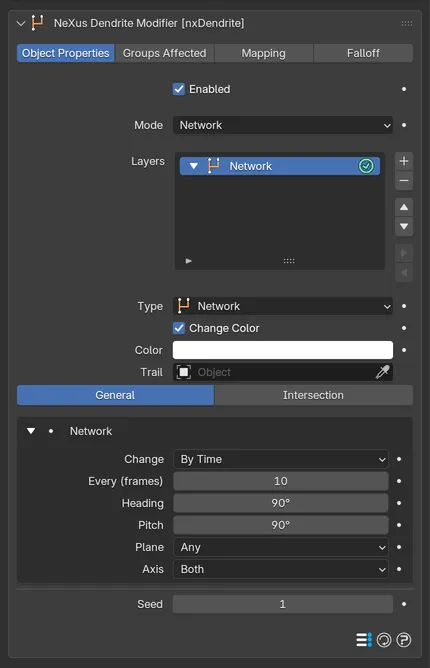
The General tab in Network mode.
Lattice (Bethe Lattice mode)
Section titled “Lattice (Bethe Lattice mode)”Builds a regular recursive tree. Branching Factor sets how many children each node splits into, Branch Angle their spread and Levels the recursion depth. Segment Length sets the length of each step and Scale how children shrink. A Sub-Lattice adds a Spacing control for its side-shoots.
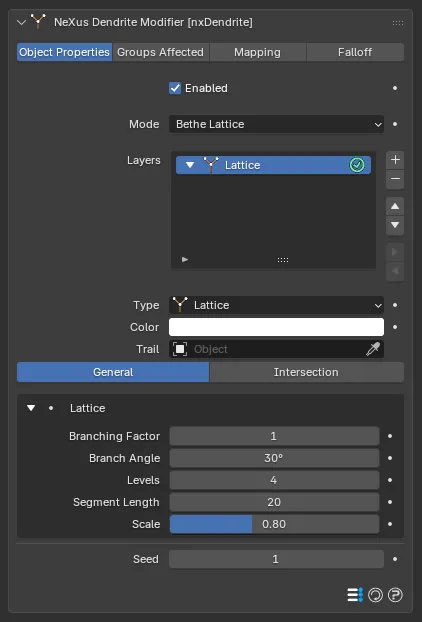
The General tab in Bethe Lattice mode.
Dendrite (Dendrite mode)
Section titled “Dendrite (Dendrite mode)”Grows crystalline stems. Crystal Angle and Crystal Angle Min set the side-branch angle, Branches the count, Branch Spacing their spacing and Levels the depth. Segment Length and its Length Variation set the stem step and Scale how children shrink. A Sub-Dendrite adds a Seed Spacing control. Wander sets how much the stems drift as they grow. Bias Strength and Bias Direction pull the growth toward a preferred axis.
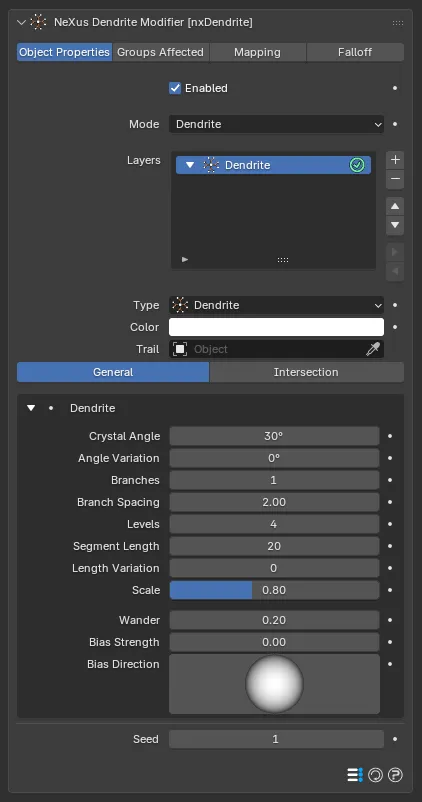
The General tab in Dendrite mode.
Sets the random seed for the layer, so you can shuffle its result. Defaults to 1.
Intersection
Section titled “Intersection”The Intersection tab, on each layer, sets what a branch does when it meets a trail or an object.
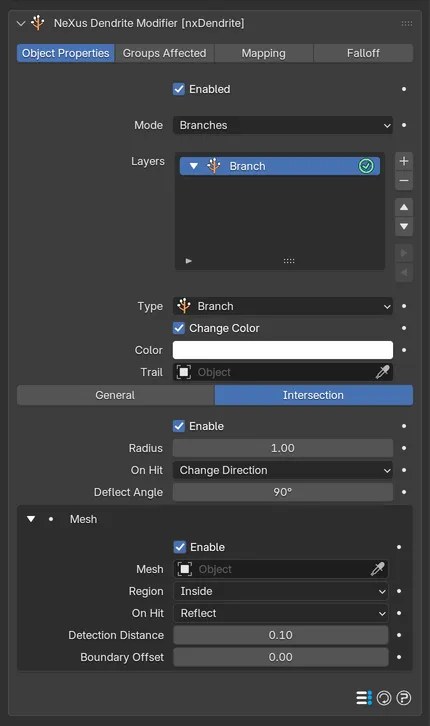
The Intersection tab, with Enable and the Mesh containment group both turned on.
Intersection
Section titled “Intersection”Enable turns intersection on. Radius sets the detection distance. On Hit sets the response, Change Direction by default, with Stop and Die the alternatives. Change Direction reveals a Deflect Angle.
Contains the layer’s branches within a volume mesh. Enable turns it on. Mesh is the containing object. Region keeps the branches Inside or Outside the mesh. On Hit sets the response at the boundary, Reflect by default, with Stop and Die the alternatives. Detection Distance and Boundary Offset tune where the boundary acts.
Groups Affected
Section titled “Groups Affected”Use the Groups Affected tab to restrict nxDendrite to particles in specific nxGroup groups, rather than affecting every particle.
Mapping
Section titled “Mapping”Use the Mapping tab to drive nxDendrite’s settings from particle data instead of fixed values. See Mapping for how this works.
Falloff
Section titled “Falloff”Use the Falloff tab to limit where nxDendrite acts. Add one or more nxFalloff objects to the list and blend them, so only particles inside the falloff region grow.
Copyright © 2026 INSYDIUM LTD. All Rights Reserved.