

nxPPCollisions
nxPPCollisions detects and resolves collisions between your NeXus particles, so they push apart and bounce off each other instead of passing through.
By default particles ignore one another and freely overlap. Add nxPPCollisions and each particle is treated as a small sphere the size of its own radius. When two particles overlap they are pushed apart. Their speeds are resolved with a bounce and friction response, so a stream landing on a surface stacks into a pile rather than collapsing into a flat sheet.
This makes it the modifier for granular and pile-forming effects: sand, gravel, snow, coffee beans, a bucket of balls. Set Cohesion and the grains cling together like wet sand.
The solver runs entirely on the GPU as a position-based (PBD) substep solve: each frame is split into Substeps that predict a short slice of motion, sort the particles into a grid, then resolve contacts over several Iterations so deep piles settle firmly without particles tunneling through one another.
Add it from Add ▸ INSYDIUM NeXus ▸ Dynamics ▸ nxPPCollisions. All of its settings live in Properties ▸ Physics.
A shower of grains raining onto Suzanne. With nxPPCollisions active they collide with each other and with her surface, so they collect and spread across her instead of passing straight through.
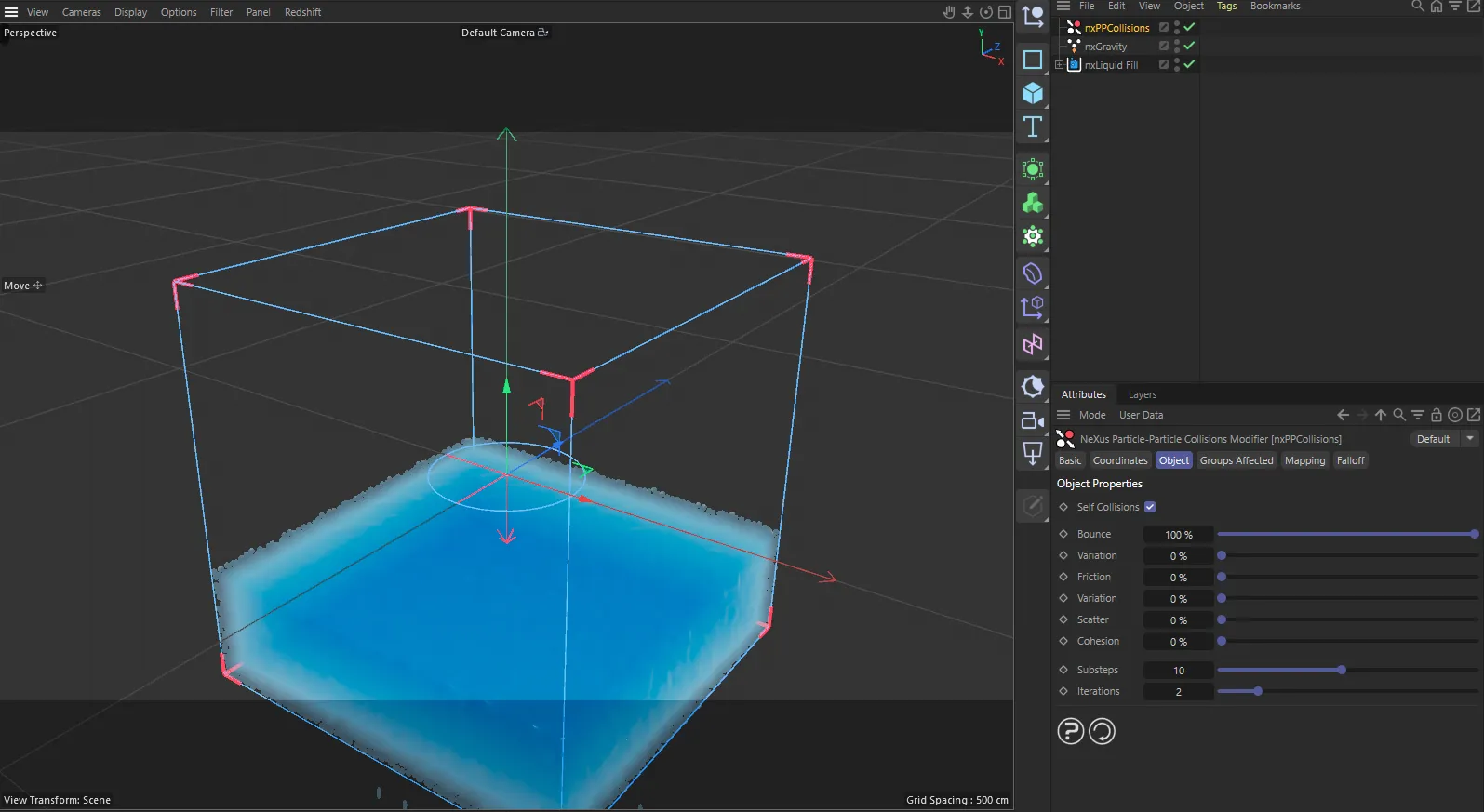
nxPPCollisions in Cinema 4D. Its settings sit in the Attribute Manager.
Object Properties
Section titled “Object Properties”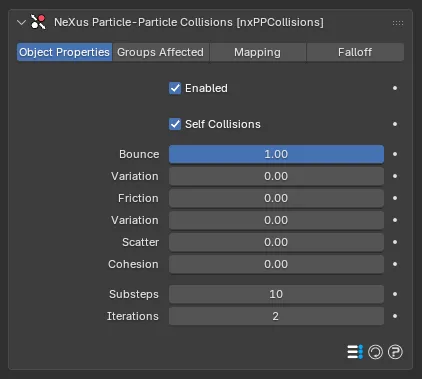
The nxPPCollisions panel in Properties ▸ Physics, on the Object Properties tab.
Enabled off
Enabled on
The same shower of grains falling onto a flat ground. With nxPPCollisions off, on the left, the grains pass straight through each other and collapse into one dense, overlapping spot. With it on, on the right, they push apart as they fall and stack across the surface, building up instead of interpenetrating.
Enabled
Section titled “Enabled”Turns nxPPCollisions on or off. Disable it to switch off particle-particle collisions without deleting the modifier.
Self Collisions
Section titled “Self Collisions”When on, particles born from the same emitter collide with each other. Turn it off and same-emitter particles pass through one another freely, while they still collide with particles from other emitters. On by default.
Use this to let two separate particle systems interact without each one piling up internally or to save solver work when a system only needs to collide against another.
Bounce
Section titled “Bounce”The collision elasticity: how much speed a particle keeps when it bounces off another. At 1.00 the collision is fully elastic and particles rebound with all of their approach speed. At 0.00 it is fully inelastic and they lose all of their approach speed, so they settle against each other and stack. Defaults to 1.00.
The modifier’s Bounce scales each particle’s own bounce, so a per-particle bounce value carried from the emitter still contributes to the result.
Bounce Variation
Section titled “Bounce Variation”Shown in the panel as Variation, directly beneath Bounce. It randomly reduces the Bounce on each individual collision, so not every impact rebounds by the same amount. Defaults to 0.00, which applies the full Bounce to every collision. Raise it to break up a uniform bounce and give a pile a more natural, uneven settle. Runs from 0.00 to 1.00.
Friction
Section titled “Friction”Tangential friction at the contact between two particles. Friction resists sliding, so grains grip one another rather than skating apart, letting a pile hold a steeper slope. At 0.00 there is no friction and particles slide freely past each other. Defaults to 0.00. Runs from 0.00 to 1.00.
Like Bounce, the modifier’s Friction scales each particle’s own friction value.
Friction Variation
Section titled “Friction Variation”Shown in the panel as Variation, directly beneath Friction. It randomly reduces the Friction on each individual collision, so the grip varies from contact to contact. Defaults to 0.00, which applies the full Friction to every collision. Runs from 0.00 to 1.00.
Scatter
Section titled “Scatter”Randomly perturbs the direction a particle takes after a collision. A clean contact rebounds along the exact contact line, which can look too regular. Scatter jitters that direction, spreading the rebounds for a more varied, natural result. Defaults to 0.00. Runs from 0.00 to 1.00.
Cohesion
Section titled “Cohesion”Attraction between nearby particles, so they cling together like wet sand instead of behaving as loose, dry grains. At 0.00 there is no attraction. Raise it and particles within a short reach of one another are pulled together, so a pile holds its shape and clumps form rather than spreading out. Defaults to 0.00. Runs from 0.00 to 1.00.
Substeps
Section titled “Substeps”The number of time substeps the solver takes per frame. Each substep advances a short slice of the frame, rebuilds the collision grid and resolves contacts, so more substeps give firmer, more accurate contacts and stop fast particles from tunneling through each other. Fewer substeps are faster to compute but softer. Defaults to 10.
Raise Substeps when fast-moving particles pass through one another or a dense pile feels spongy. Lower it to speed up a scene where contacts are gentle.
Iterations
Section titled “Iterations”The number of solver passes within each substep. Each pass re-solves the contacts on the updated positions, so corrections propagate up through a stack and deep piles settle firmer with less penetration. Defaults to 2. Values of 2 to 4 suit dense stacking.
Groups Affected
Section titled “Groups Affected”Use the Groups Affected tab to restrict nxPPCollisions to particles in specific nxGroup groups, rather than affecting every particle. Only particles in the listed groups take part in the collisions.
Mapping
Section titled “Mapping”Use the Mapping tab to drive nxPPCollisions from particle data instead of fixed values, so a particle’s own attributes can change the collision response it feels. Bounce, Friction and Cohesion are the mappable settings. See Mapping for how this works.
Falloff
Section titled “Falloff”Use the Falloff tab to limit where nxPPCollisions acts. Add one or more nxFalloff objects to the list and blend them, so particles only collide with each other inside the falloff region.
Copyright © 2026 INSYDIUM LTD. All Rights Reserved.