

Question
A Question is a condition that, when passed, triggers the items nested beneath it.
Add a Question from the + button on the nxQuestion Questions list, then nest an Action (or other items) under it. The question is asked every frame. Its children run only when the condition passes.
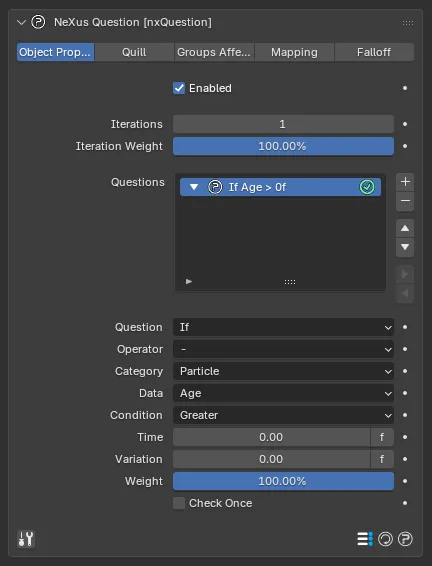
A Question selected in the Questions list, here testing each particle’s Age. The Category, Data and Condition menus and the value fields below them define what the question asks.
Question
Section titled “Question”The first setting chooses the kind of question: If (the default), Else If or Else.
The starting question of any hierarchy must always be an If.
For example, to set a particle’s color once it reaches a certain age, use an If question on the particle’s Age with a Set Color action nested under it. The question is asked every frame and the action fires only when the condition passes.
Else If
Section titled “Else If”Else If can only be used following an If question. Think of it as a follow-up that is asked only when the preceding If answered “no”. Add one to test a second condition when the first fails, for example a different color change at another age.
Else can only be used following an If or Else If question. It is asked only when every preceding question answered “no”, so it acts as the fallback.
Consider a case with bad logic: an Age > 2s question placed above an Age > 3s question. Because the lower-age question comes first, once a particle passes 2s the first question always passes and the second is never reached. The list is evaluated top to bottom, so put the narrower, higher-threshold conditions first.
Operator
Section titled “Operator”Operators layer questions together so that conditions across multiple data types must be met to trigger an action. To test for age AND radius, add a second question as a child of the first and set its Operator.
The options are AND, AND NOT, OR and OR NOT. The default is - (none).
AND / AND NOT
Section titled “AND / AND NOT”Both questions must pass for the action to trigger. AND requires the second condition to be true. AND NOT requires it to be false.
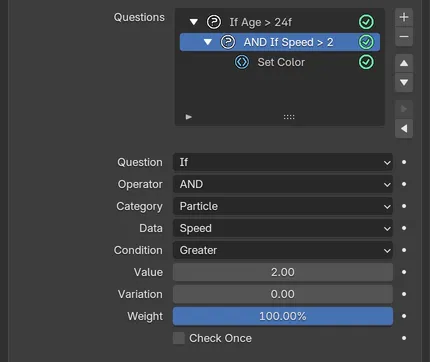
An If Age question with a child question set to AND, so the Set Color action fires only when both pass.
OR / OR NOT
Section titled “OR / OR NOT”Only one of the questions needs to pass. OR passes when the second condition is true. OR NOT passes when it is false.
Category
Section titled “Category”What you are questioning. Set as Particle, by default. The alternatives are Document and Math.
Most categories share the same Condition, Value and Check Once parameters, described at the bottom of this page. The parameters specific to each Data option are described below.
The data available from the chosen Category. Each category has its own set of Data options.
Document category
Section titled “Document category”Tests a scene-level value rather than a per-particle one.
Triggers at a specified scene frame. Opens the Condition, Value and Check Once parameters.
Camera Distance
Section titled “Camera Distance”The distance from the particle to a camera. Opens a Camera field, where you assign a scene camera, plus the Condition, Value and Check Once parameters.
Camera FOV
Section titled “Camera FOV”Tests whether a particle is within the assigned camera’s field of view. Opens a Camera field, a Widen FOV angle that widens the searched cone and Check Once.
Object Distance
Section titled “Object Distance”Works like Camera Distance, but measures the distance to one or more objects in a list and adds a Mode menu.
How the object distance is measured. Set as Position, by default.
- Points: distance to the nearest vertex.
- Position: distance to the object’s origin.
- Polygons: distance to the nearest polygon.
- Volume: distance to the nearest polygon, including a volume test, where a value below 0 is inside the object.
The scene time. Whether this reads in seconds or frames depends on the frames/seconds toggle on the Time value. As well as Condition and Check Once, this adds the Time parameter.
Math category
Section titled “Math category”Generates a value to test against.
A constant value set in the panel, which can be driven by a driver or keyframes.
Random
Section titled “Random”A random value between the Min and Max settings.
Enable Particle ID to give each particle its own random number. Time Variation controls whether the random number is constant or re-rolled: set to None it stays fixed for the whole scene; in Document mode it changes every frame globally; in Particle mode it changes every frame per particle. A Seed sets the random sequence.
Spline
Section titled “Spline”A value read from a curve, where the x axis is time (from the particle or the document).
Variable
Section titled “Variable”A value read from a named Variable or a variable defined in a script. Enter the variable name in the Variable Name field, then the question tests that variable’s value against the condition.
A sine-based wave in the range -100 to 100, whose value varies with the Frequency amount and the Time Variation setting (Document or Particle). Useful for oscillating effects such as regularly flashing particles. Enable Particle ID to offset the wave per particle.
Particle category
Section titled “Particle category”Tests a per-particle property. This is the default category.
The particle’s age, in seconds.
The particle’s color, tested by Vector Component: R, G, B or Brightness.
A Display Channel row below Vector Component sets which emitter Display Channel the question tests. Set as None, by default, which tests the particles’ own color. The other entries are the Display Channels set up on the nxEmitter Display tab, listed by name. This is the same scene-wide setting as the Display Channel on the Mapping tab, so changing one changes the other. In Cinema 4D this row is not shown. Beta
The total number of particles. Tested with Within or Not Within a range.
Fluid Density
Section titled “Fluid Density”The calculated fluid density around a particle.
Traveled
Section titled “Traveled”The total distance the particle has traveled so far.
Emitter
Section titled “Emitter”Tests whether the particle’s emitter is (or is not) in the Emitters list shown. Use it to limit an action to particles from specific emitters. The condition is Within or Not Within.
The falloff value for the particle. This requires an active nxFalloff in the nxQuestion object’s Falloff tab, so contact with the falloff region can trigger the action.
Tests whether any of the shown flags are set for the particle: Hit Object, Hit Particle, Changed Group, Stuck, Frozen, Born, Escaped, Asleep and Bound. Enable the flags you want to test for. Escaped is set when a particle leaves an nxFlowField domain that has Tag On Escape enabled.
Asleep is set while the particle is asleep in an nxMPM domain and Bound while it is held by nxBind. Beta
A Question on the Hit Object flag with a Kill Action nested under it. The falling particles disappear the instant they strike Suzanne, so none pile up or pass through.
The particle’s fuel value.
The nxGroup the particle belongs to (0 means no group assigned).
The particle’s unique ID. Tested with Within or Not Within.
The particle’s lifespan, in seconds.
The particle’s mass.
Neighbors
Section titled “Neighbors”How many particles are within a Distance around the particle. Set the search Distance (defaults to 0.1m), then test the count against the condition.
Position
Section titled “Position”The world position of the particle, tested by Vector Component: X, Y or Z.
Radius
Section titled “Radius”The particle’s radius.
Rotation
Section titled “Rotation”The particle’s rotation, tested by Vector Component: H (heading), P (pitch) or B (bank).
The particle’s smoke value.
The particle’s speed.
Temperature
Section titled “Temperature”The particle’s temperature value.
The particle’s UVW coordinates, tested by Vector Component: X, Y or Z. UVW data is only available when the emitter is set up to emit from an object’s texture coordinates.
Velocity
Section titled “Velocity”The particle’s velocity, tested by Vector Component: X, Y or Z.
Vertex Weight
Section titled “Vertex Weight”The particle’s assigned vertex weight, usually set on emission. This data is generated when particles are emitted from the vertices of an object that carries a vertex group, with vertex emission enabled on the emitter.
Shared parameters
Section titled “Shared parameters”Condition
Section titled “Condition”How the data is compared to the Value. The options are Less, Less-Equal, Equal, Not Equal, Greater-Equal and Greater. Defaults to Greater.
Within and Not Within test whether the value falls inside a range, which is useful for floating-point data that is rarely exact. They add a To value for the top of the range.
For the Count, Emitter and ID data the only conditions are Within and Not Within.
The constant value the data is measured against. Integer data, including Frame, uses a whole-number Value. Time-based data (Age, Life and Time) uses a Time value with a frames/seconds toggle.
Variation
Section titled “Variation”A random amount added to the Value, so the threshold is not identical for every particle.
The upper end of the range, shown when the Condition is Within or Not Within.
Weight
Section titled “Weight”The weight given to this question when it passes, as a percentage. Defaults to 100%.
Check Once
Section titled “Check Once”When enabled, once the question passes for a particle it is not checked again for that particle.
Copyright © 2026 INSYDIUM LTD. All Rights Reserved.