

nxLiquid
nxLiquid is a one-click FLIP liquid setup. Pick a command from the Add menu and NeXus builds a complete, ready-to-solve liquid for you.
Setting up a liquid by hand means adding an emitter, an nxFluids solver, a surface mesher and whitewater foam, then wiring their scales and settings together so they agree. nxLiquid does all of that from a single menu click.
There are two commands, both in the Add ▸ INSYDIUM NeXus ▸ Presets submenu, alongside nxMaterial:
- nxLiquid Fill fills a volume with liquid, for a body of water that settles and sloshes.
- nxLiquid Flow emits a continuous flow, for a pour or an inflow.
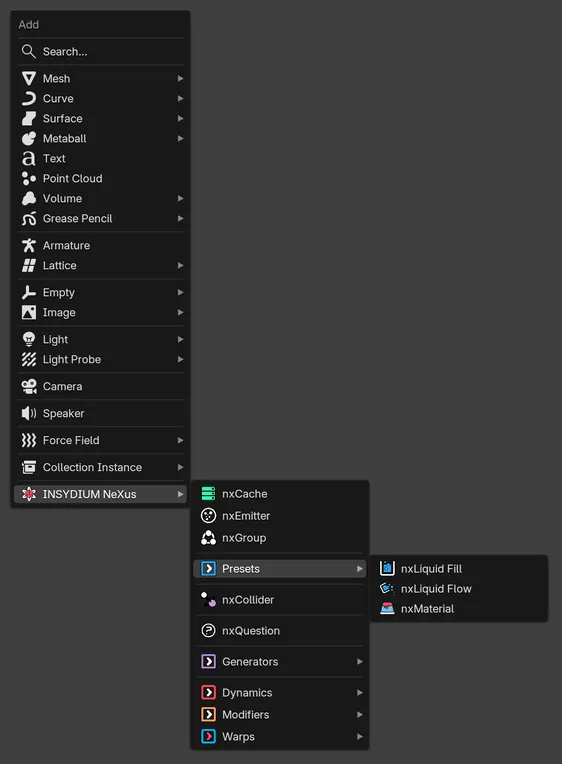
nxLiquid Fill and nxLiquid Flow in the Presets submenu of the INSYDIUM NeXus menu. Beta
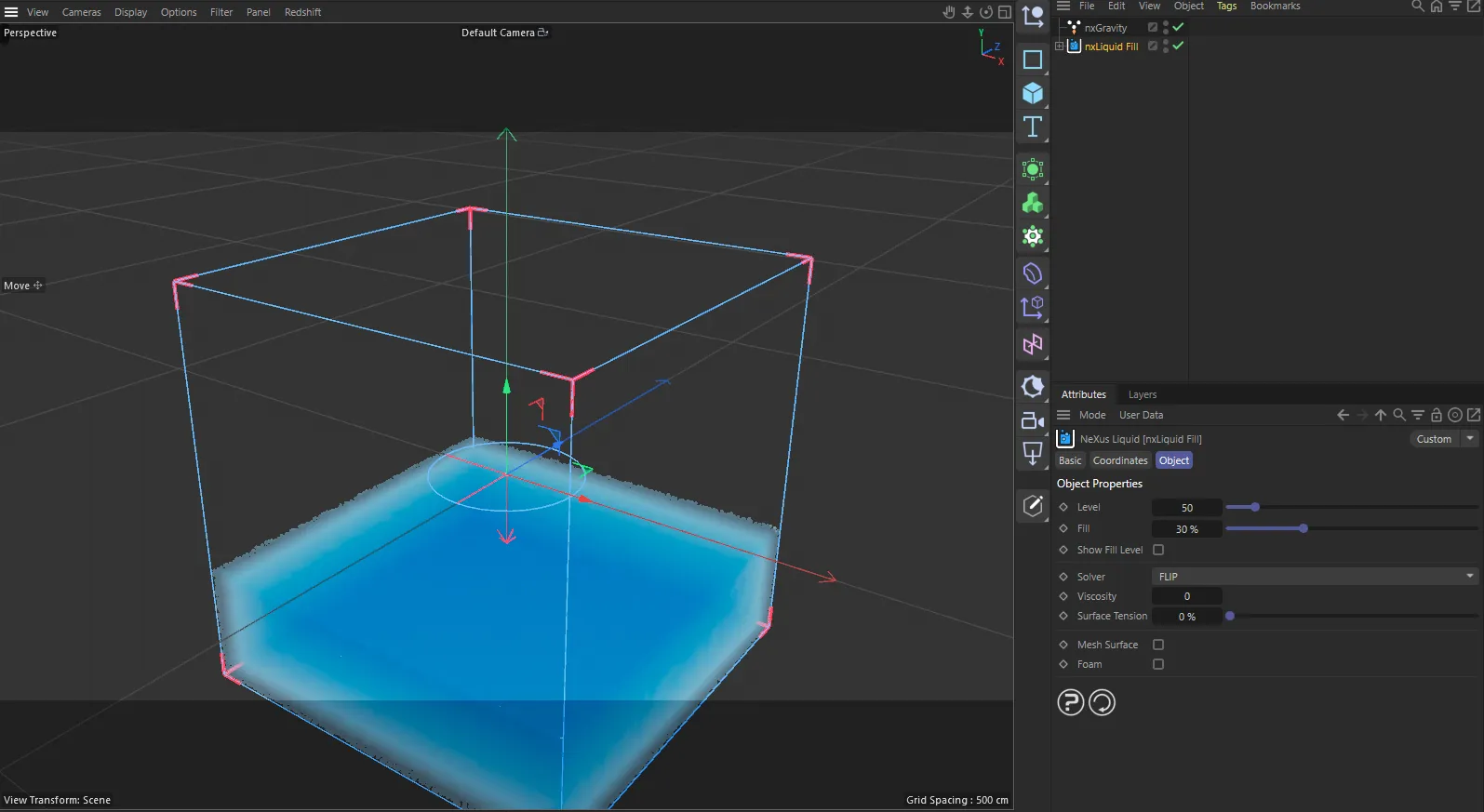
nxLiquid in Cinema 4D. Its settings sit in the Attribute Manager.
nxLiquid Fill
Section titled “nxLiquid Fill”nxLiquid Fill fills the solver domain with liquid from the bottom up, then lets it settle and slosh. The Fill Level sets how full it starts, 30% by default. Use it for a body of standing water: a pool, a glass, a tank or a flooded scene.
An nxLiquid Fill built in one click. The domain fills to the Fill Level and the liquid settles around Suzanne.
nxLiquid Flow
Section titled “nxLiquid Flow”nxLiquid Flow emits a continuous stream that pours downward at a set Speed. Use it for a pour, a tap, a spout or any inflow that keeps feeding liquid into the scene.
An nxLiquid Flow pouring over Suzanne. The FLIP solver, the Screen Space Fluid surface and gravity are all set up and sized to fit for you.
What one click builds
Section titled “What one click builds”Either command adds a small stack of NeXus objects, sizes them to fit each other and parents them under a single empty. Selecting that empty in the Outliner gives you the whole setup and the NeXus Liquid control panel described below.
The stack is:
- An nxEmitter set to the matching emission type, Liquid Fill or Liquid Flow. A Fill emitter fills its shape on frame 1 and starts at rest, with the Fill Level set to 30%. A Flow emitter pours downward at a set Speed. Its display is switched to Screen Space Fluid, so you see a shaded liquid surface in the viewport rather than raw particles.
- An nxFluids solver set to the grid-based FLIP method by default, which you can switch to APIC, PBD or SPH in the panel below, with its domain sized to contain the emitter so the liquid stays inside. Its viscosity and surface tension start at water values, which you can change in the panel below.
- An nxMesher, optional, using a Zhu-Bridson surface and a blue water material. It is created disabled so you can solve and preview quickly, then turn it on to build a render surface.
- An nxFoam whitewater setup, optional, feeding its foam, spray and bubble into an nxGroup. It is also created disabled, ready to switch on once the base liquid looks right.
- An nxGravity so the liquid falls. An existing scene gravity is reused if there is one, rather than adding a second.
Everything is parented under one empty and revealed in the Outliner, so the new setup is easy to find and move as a unit.
The NeXus Liquid control panel
Section titled “The NeXus Liquid control panel”Select the group empty and open Properties ▸ Physics. The NeXus Liquid panel gathers the settings you reach for most often across the emitter, solver, mesher and foam into one place, so you can shape the liquid without hunting through each child modifier.
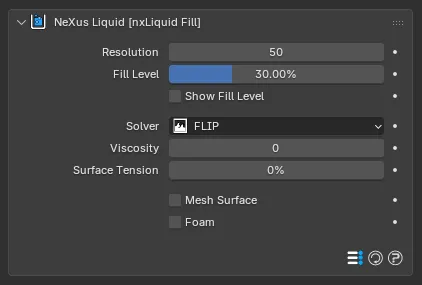
The NeXus Liquid panel for an nxLiquid Fill group, with Resolution, Fill Level, Show Fill Level, Solver, Viscosity, Surface Tension, Mesh Surface and Foam in one place.
Resolution
Section titled “Resolution”Voxels along the longest side of the fluid domain. Higher is finer and slower. This drives the emitter particle size, the FLIP voxel size and the mesher grid together, so the whole setup stays consistent as you change it.
Fill Level
Section titled “Fill Level”Fill commands only. How much of the volume to fill, as a percentage measured from the bottom. Lower values leave a shallower body of liquid.
Start Beta 3
Section titled “Start Beta 3”Fill commands only. The frame the liquid is born on. The one-click build sets it to frame 1, so the domain is full as the scene starts. Set a later frame to drop the liquid in partway through the scene. Click the f/s toggle beside the field to switch between frames and seconds. This is the same Start as on the nxEmitter.
In Cinema 4D there is no Start control. The fill always starts on the scene’s first frame.
Show Fill Level
Section titled “Show Fill Level”Fill commands only. Draws the fill surface in the viewport, so you can see where the liquid level sits before you solve. Off by default.
Flow commands only. How fast the liquid pours from the emitter.
Solver
Section titled “Solver”The fluid solver the nxFluids domain uses. The one-click build sets this to FLIP. You can switch it to APIC, PBD or SPH here without selecting the domain. See Choosing a solver below for what each one does and when to use it.
Viscosity
Section titled “Viscosity”The solver’s viscosity. Higher values make the liquid thicker and slower to spread, for honey or paint rather than water.
Surface Tension
Section titled “Surface Tension”The solver’s surface tension. Higher values pull the surface together into rounded drops and beads.
Mesh Surface
Section titled “Mesh Surface”Turns the nxMesher on or off. Leave it off while you dial in the motion, then turn it on to generate the render surface. Present only when the setup was built with a mesher.
Turns the nxFoam whitewater on or off. Present only when the setup was built with foam.
In Cinema 4D the same commands build a NeXus Liquid object that holds the setup and forwards these controls to its children. There, Resolution is labeled Level and Fill Level is labeled Fill. Beta
Choosing a solver
Section titled “Choosing a solver”The one-click build uses FLIP, which suits most liquids. The Solver dropdown in the NeXus Liquid panel switches the nxFluids domain to another method without leaving the panel. The four solvers fall into two families, each with its own look and strengths. Every clip below is the same liquid poured over Suzanne, with only the solver changed.
Grid-based volumes: FLIP and APIC
Section titled “Grid-based volumes: FLIP and APIC”FLIP and APIC solve the liquid on a background voxel grid inside a bounded domain. They preserve volume and hold a crisp, detailed surface, so they are the best choice for a body of fluid that sits inside a box: a pool, a tank, a dam break or a large splash. FLIP is the energetic default. APIC preserves more angular momentum, so it holds swirls and stays stable when the fluid moves fast.
FLIP
APIC
Both hold a full, smooth volume of liquid inside the domain box.
Particle-based motion: PBD and SPH
Section titled “Particle-based motion: PBD and SPH”PBD and SPH are particle solvers with no grid and no fixed domain, so they suit liquid that moves freely rather than filling a box: streams, sheets, moving splashes and stylized effects. PBD (Position Based Dynamics) is fast and stable with a soft, squashy feel. It pairs well with nxConstraints for stylized setups. SPH (Smoothed-Particle Hydrodynamics) resolves finer particle detail and is the only solver that also handles granular materials like sand and snow.
PBD
SPH
The particle solvers spread more freely and do not hold the boxed volume the grid solvers do.
Building on the setup
Section titled “Building on the setup”nxLiquid gives you a working starting point, not a locked preset. Each object in the stack is an ordinary NeXus modifier, so you can select any of them and tune it fully. Open the nxFluids solver for the full FLIP controls, the nxMesher to shape the render surface or the nxEmitter to change where and how the liquid is emitted.
Copyright © 2026 INSYDIUM LTD. All Rights Reserved.