

nxRotate
nxRotate spins your whole NeXus particle stream around an axis, sweeping the particles into a rotating spiral.
It rotates the stream as a whole. It does not spin each particle in place. The nxRotate empty sets the center and axis of the rotation.
Add it from Add ▸ INSYDIUM NeXus ▸ Modifiers ▸ nxRotate. It arrives as an empty with a gizmo that shows the rotation axis and plane. Rotate the empty to aim the axis. All of its settings live in Properties ▸ Physics.
A stream of particles swept into a spinning spiral by nxRotate turning about its axis, flinging particles across to Suzanne.
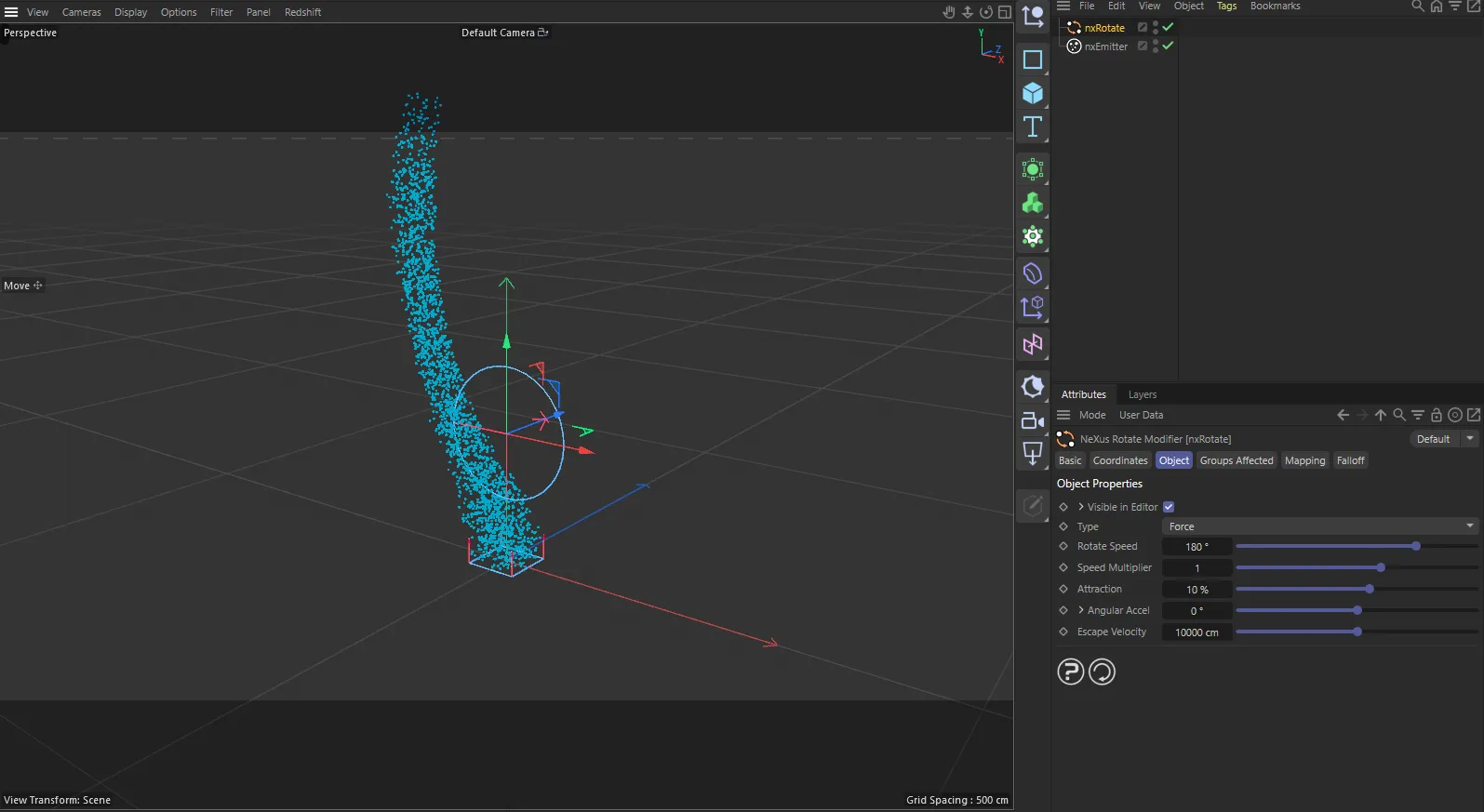
nxRotate in Cinema 4D. Its settings sit in the Attribute Manager.
Object Properties
Section titled “Object Properties”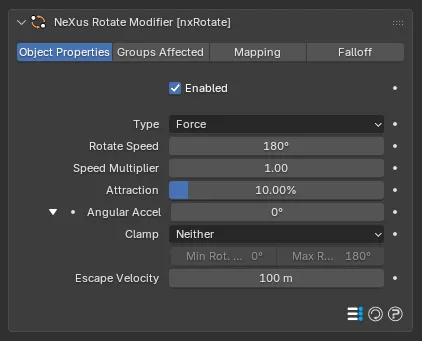
The nxRotate panel in Properties ▸ Physics, on the Object Properties tab, with the Angular Accel group open.
Enabled
Section titled “Enabled”Turns nxRotate on or off. Disable it to switch off its force without deleting it.
Sets how nxRotate drives the particles. Set as Force, by default. The alternative is Velocity.
- Force: the rotation adds to the particles’ own motion rather than replacing it, so they spiral outward and other forces still affect them. Use this to add rotation on top of other movement.
- Velocity: the rotation takes full control of the motion, for a tighter, more contained spin. Other forces that set speed and direction then have little effect.
Force
Velocity
The same rotation as a Force, on the left, and as a Velocity, on the right. As a Force the particles spiral out into a loose, widening whirl. As a Velocity the rotation takes over and holds them in a tighter, more contained spin.
Rotate Speed
Section titled “Rotate Speed”The speed of rotation, in degrees per second. Defaults to 180°. Negative values rotate the particles the other way.
90°
360°
At a low Rotate Speed the stream turns slowly into a wide, lazy spiral. At a high value it whips around the axis far faster, winding into a tight whirl.
Speed Multiplier
Section titled “Speed Multiplier”Multiplies the Rotate Speed. Defaults to 1. Raise it to accelerate the rotation or use a negative value to reverse it.
Attraction
Section titled “Attraction”Available only when Type is set to Force. Pulls the particles in toward the rotation axis. Defaults to 10%. Higher values hold them in a tighter spiral. Lower or negative values let them spread outward.
0%
100%
Only the Attraction changes here. At 0% the particles are free to fly outward into a wide spiral. At 100% they are drawn in against the axis, winding into a tight, compact spin.
Angular Accel
Section titled “Angular Accel”Adds to the Rotate Speed every frame, so the rotation speeds up over time (or slows down with a negative value). Defaults to 0. Click the arrow beside it to reveal the clamping options.
Limits the rotation speed as Angular Accel drives it up or down. Set as Neither, by default, which applies no limit. The other options are Both, Min and Max.
Min Rot. Speed and Max Rot. Speed set the lower and upper speeds the rotation is held between, each active when its matching clamp is on.
Escape Velocity
Section titled “Escape Velocity”As the particles rotate they are flung outward, gaining speed, as if by centrifugal force. Once a particle is moving fast enough to break past this limit it escapes nxRotate and flies off on its current course. Defaults to 100m. Lower it so particles escape sooner, for a dissolving effect.
Groups Affected
Section titled “Groups Affected”Use the Groups Affected tab to restrict nxRotate to particles in specific nxGroup groups, rather than affecting every particle.
Mapping
Section titled “Mapping”Use the Mapping tab to drive nxRotate’s settings from particle data instead of fixed values, so a particle’s own attributes can change the rotation it feels. See Mapping for how this works.
Falloff
Section titled “Falloff”Use the Falloff tab to limit where nxRotate acts. Add one or more nxFalloff objects to the list and blend them, so the rotation only affects particles inside the falloff region.
Copyright © 2026 INSYDIUM LTD. All Rights Reserved.