

nxFluids - PBD solver parameters
The PBD (Position Based Dynamics) solver is a fast, stable particle fluid solver, suited to small to mid-scale simulations.
It works well alongside nxConstraints and other modifiers to create stylized simulations that go beyond strict physical accuracy. Select it from the Solver dropdown at the top of the Object Properties tab.
A PBD liquid streamed over Suzanne and left to settle into a pool. PBD solves fast and stays stable, so it is quick to iterate on.
Object Properties
Section titled “Object Properties”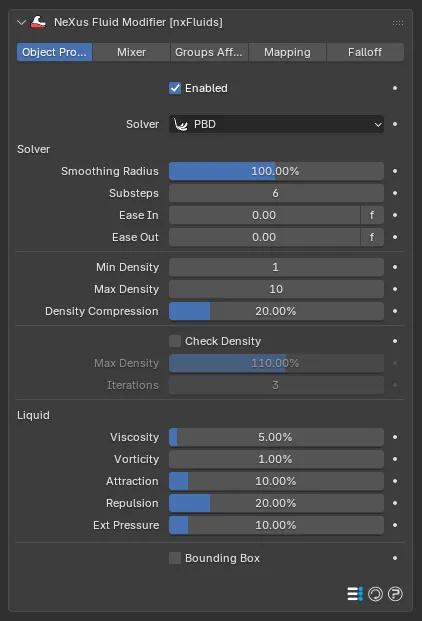
The nxFluids panel with the Solver set to PBD, showing the Solver, Liquid and Bounding Box controls.
Enabled
Section titled “Enabled”Turns nxFluids on or off. Disable it to stop the fluid solve without deleting the modifier.
Solver
Section titled “Solver”Sets the simulation method. Set as PBD here. See the overview for the other solvers.
Solver
Section titled “Solver”Smoothing Radius
Section titled “Smoothing Radius”Blends each particle’s fluid properties with those of its neighbors. Defaults to 100%.
Higher values let each particle influence more of its neighbors, so the fluid surface is smoother and less frenetic. Lower values involve fewer neighbors, giving a choppier, finer-detailed fluid.
Substeps
Section titled “Substeps”The number of solver steps per frame. Defaults to 6.
Raising it makes the solve more accurate, which helps with fast-moving particles, at the cost of simulation time.
Ease In
Section titled “Ease In”Eases the simulation in over this length of time, so the fluid starts gently rather than all at once. Defaults to 0. Click the f button beside the field to switch between frames and seconds.
Ease Out
Section titled “Ease Out”Eases the simulation out over this length of time before particles die. Defaults to 0.
Min Density
Section titled “Min Density”The minimum number of density solver iterations per step. Defaults to 1.
Max Density
Section titled “Max Density”The maximum number of density solver iterations per step. Defaults to 10.
More iterations give a more accurate, less compressible fluid, at the cost of simulation time.
Density Compression
Section titled “Density Compression”The amount the fluid is allowed to compress by before a further iteration is spent making it more accurate. Defaults to 20%.
At higher percentages the solver uses fewer iterations. At lower percentages it works up toward the Max Density iteration count, with an effect on simulation time.
Check Density
Section titled “Check Density”Fluids are normally incompressible and so have a constant density. When this is on, the density is checked to keep the particle stream consistent, with far less blasting. Off by default.
New particles whose density exceeds the Max Density value below are killed as they are born, which controls the pressure in the stream. When it is off, no check is applied.
Max Density
Section titled “Max Density”The density limit used when Check Density is on, controlling the pressure in the particle stream. Defaults to 110%. Available when Check Density is on.
Iterations
Section titled “Iterations”The number of iterations used for the density check. Defaults to 3. Raise it for greater accuracy, at the cost of simulation speed. Available when Check Density is on.
Liquid
Section titled “Liquid”Viscosity
Section titled “Viscosity”Controls the level of viscosity in the fluid. Defaults to 5%.
Vorticity
Section titled “Vorticity”Controls the swirling in the fluid. Defaults to 1%.
Attraction
Section titled “Attraction”Pulls particles together. Defaults to 10%.
Raising it can break the liquid up unless it is balanced against Repulsion and Ext Pressure, which keep the separation of the fluid in check. As a rule, keep Repulsion higher than Attraction.
Repulsion
Section titled “Repulsion”Forces particles apart. Defaults to 20%. Use it carefully alongside Attraction and Ext Pressure so the particles continue to behave as a fluid.
Ext Pressure
Section titled “Ext Pressure”External pressure. Defaults to 10%. It acts as a binding agent that keeps the fluid together and holds the attraction and repulsion forces in check.
Bounding Box
Section titled “Bounding Box”PBD has no simulation domain of its own, so the Bounding Box gives it a quick container that stops the fluid falling away. It is drawn at the bottom of the Object Properties tab. The same controls appear for the SPH solver.
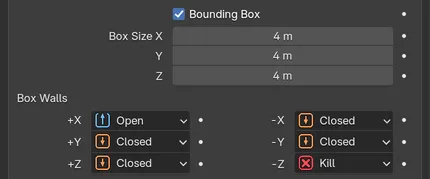
Bounding Box turned on, with the +X wall set to Open and the -Z wall set to Kill.
You can resize the box interactively with the gizmo handles in the viewport.
Bounding Box
Section titled “Bounding Box”Contains the fluid in a box. Off by default. The controls below appear when it is on.
Box Size
Section titled “Box Size”The size of the box on each axis, centered on the nxFluids object. Defaults to 4m on X, Y and Z.
Box Walls
Section titled “Box Walls”Sets how each of the six walls (+X, -X, +Y, -Y, +Z, -Z) behaves. Each is set independently. Set as Closed, by default. The alternatives are Open and Kill.
- Closed: particles collide with the wall and stay inside the box.
- Open: particles can pass through the wall and leave the box.
- Kill: particles are killed when they reach the wall.
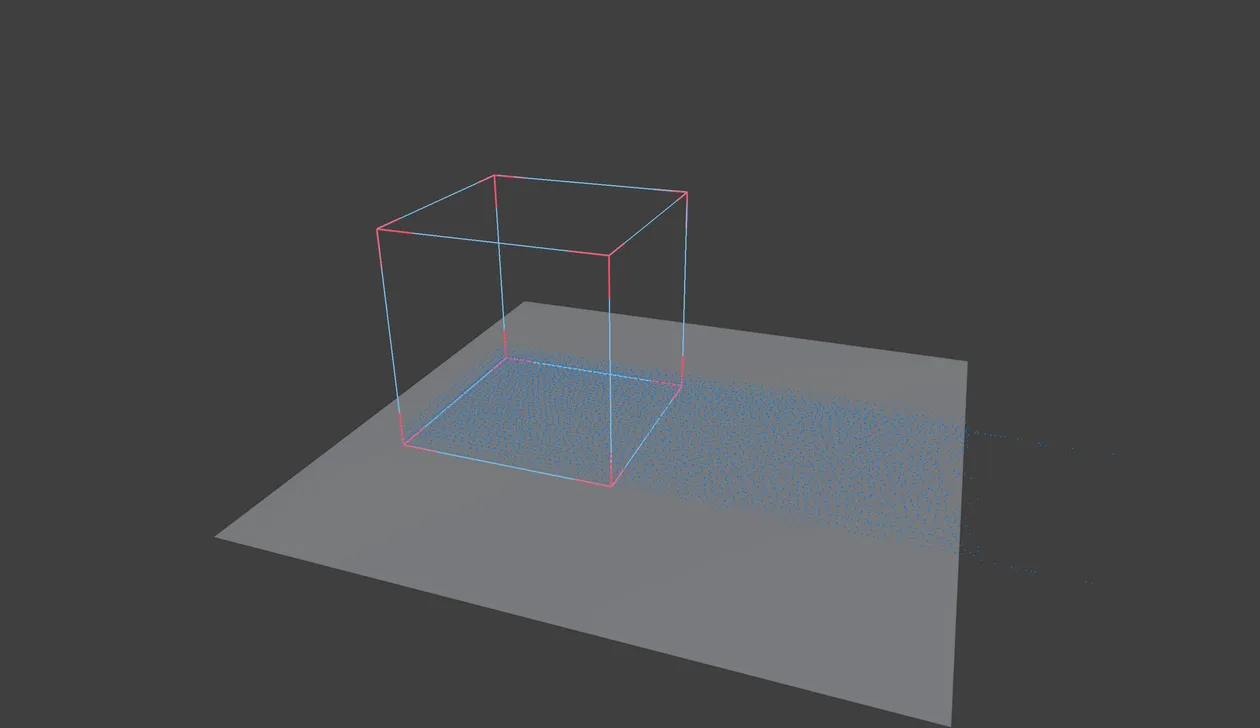
A PBD liquid in a Bounding Box with the +X wall set to Open runs out of that side while the closed walls hold it in.
Copyright © 2026 INSYDIUM LTD. All Rights Reserved.