

nxInfectio
nxInfectio spreads a state from particle to particle across your NeXus system, like an infection passing through a crowd, growing outward from one or more seed points.
It is modeled on the idea of an infection, but you can use it for any kind of spreading growth. A particle starts uninfected, turns incubating when it catches the infection from a neighbor, incubates for a while, then becomes infected and can pass it on in turn.
Add it from Add ▸ INSYDIUM NeXus ▸ Modifiers ▸ nxInfectio. It arrives as an empty. A first seed is added for you as a child empty. Position the seeds where you want the infection to start, then tune how it spreads. All of its settings live in Properties ▸ Physics.
An infection spreading out through a field of particles from a single seed. Each particle it reaches changes color as it catches and incubates the infection, so a growing front of color ripples outward across the field.
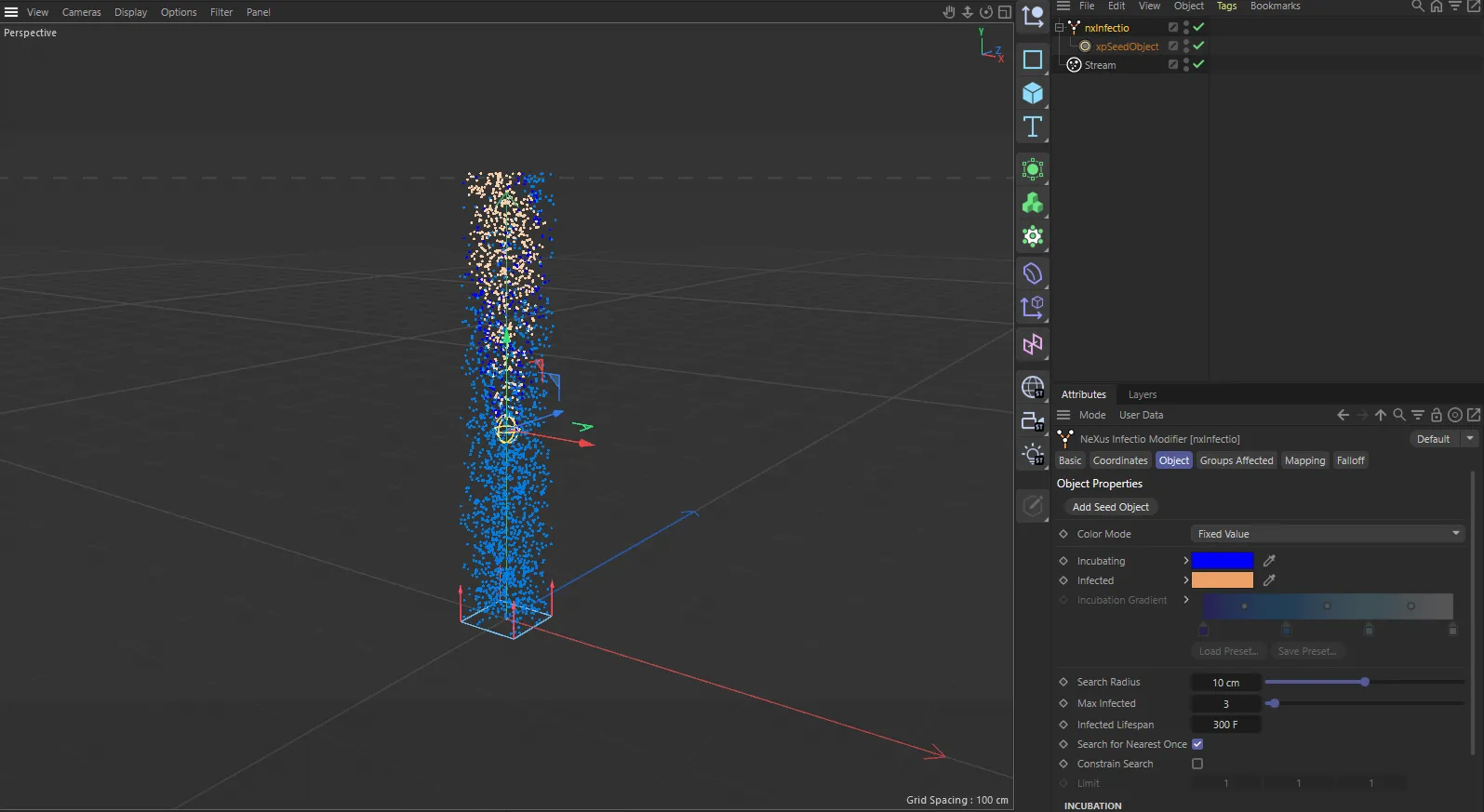
nxInfectio in Cinema 4D. Its settings sit in the Attribute Manager.
Object Properties
Section titled “Object Properties”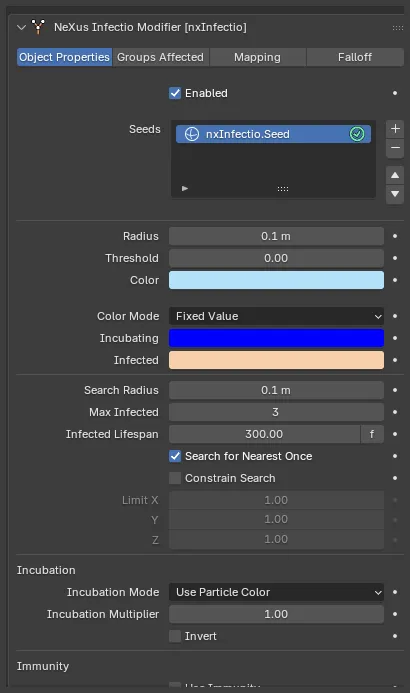
The nxInfectio panel in Properties ▸ Physics, with its seed.
Enabled
Section titled “Enabled”Turns the whole nxInfectio on or off. Disable it to stop the spread without deleting the modifier.
The list of seed points the infection starts from.
Add a seed with the + button. Each one is added to the scene as a child empty of the nxInfectio object, which you move to position the start of the infection. Select an entry in the list to reveal its settings. Each entry has an enable toggle on the right of its row, so you can switch individual seeds on or off without removing them.
Without at least one seed, nothing is infected.
Radius
Section titled “Radius”The radius of the seed. Any particle inside this radius is infected at the start. Defaults to 0.1 m.
Threshold
Section titled “Threshold”The incubation level a particle must reach before the seed triggers it. Defaults to 0.
The color used to draw the seed’s radius in the viewport, so you can see and place it. This is a display color only and does not affect the particles.
Controls how a particle’s color changes as it moves from uninfected to incubating to infected.
Color Mode
Section titled “Color Mode”Sets how the infected particles are colored. Set as Fixed Value, by default. The other options are Gradient, Use Groups and No Color Change.
- Fixed Value: incubating and infected particles take the Incubating and Infected colors below.
- Gradient: particles take their color from along the Incubation Gradient, moving from the left of the gradient as they start incubating to the right as they become infected.
- Use Groups: particles change nxGroup group instead of color as they change state.
- No Color Change: the particle color is left alone.
Fixed Value
Gradient
In Fixed Value, on the left, the front is two flat states: an Incubating blue ring giving way to the Infected color in the cleared center. In Gradient, on the right, each particle takes its color from along the Incubation Gradient by its incubation level, so the front reads as a smooth color sweep rather than hard bands.
Incubating
Section titled “Incubating”Available when Color Mode is set to Fixed Value. The color an incubating particle takes on. Defaults to blue.
Infected
Section titled “Infected”Available when Color Mode is set to Fixed Value. The color an infected particle takes on. Defaults to orange.
Incubation Gradient
Section titled “Incubation Gradient”Available when Color Mode is set to Gradient. The gradient a particle’s color is read from as it incubates, from the left as it starts to the right once infected.
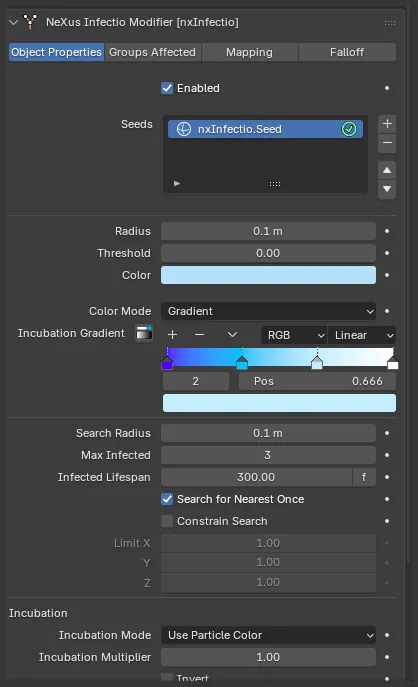
With Color Mode set to Gradient, the Incubating and Infected color fields are replaced by the Incubation Gradient ramp.
Incubating Group
Section titled “Incubating Group”Available when Color Mode is set to Use Groups. The nxGroup group a particle joins as it starts incubating.
Infected Group
Section titled “Infected Group”Available when Color Mode is set to Use Groups. The nxGroup group a particle joins as it becomes infected. Set both this and the Incubating Group when you use Use Groups. This mode colors the particles from the groups themselves, not from the Fixed Value colors, so a group left empty gives no group color for that state.
Group Color Change
Section titled “Group Color Change”Available when Color Mode is set to Use Groups. Sets which state changes also apply the group’s color. Set as Both Stages, by default. The other options are Uninfected to Incubated Stage, Incubated to Infected Stage and No Color Changes.
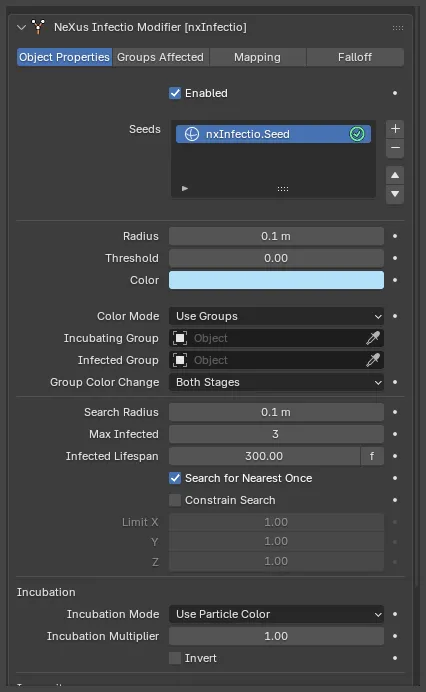
With Color Mode set to Use Groups, the color fields give way to the Incubating Group and Infected Group slots and the Group Color Change menu.
Search
Section titled “Search”Controls how an infected particle finds the uninfected particles it passes the infection to.
Search Radius
Section titled “Search Radius”The radius an infected particle searches around itself for uninfected particles to infect. Defaults to 0.1 m. Too small and the spread can stall for want of a neighbor. Too large and the infection races through the system.
Max Infected
Section titled “Max Infected”The most uninfected particles a single infected particle can pass the infection to in one step. Defaults to 3. The higher it is, the faster the infection spreads.
Infected Lifespan
Section titled “Infected Lifespan”The lifespan a particle is given once it becomes infected, so you can have particles die a set time after they catch it. Defaults to 300 frames. You can click the f label beside the value to switch it between frames and seconds. Set it to 0 for no limit, so infected particles live on.
15 frames
0 (infinite)
At a short Infected Lifespan each particle dies soon after it is infected, so the infection burns through the field as a traveling ring and leaves a hollow, cleared center behind it. At 0 the infected particles never die, so the infection fills the field and stays.
Search for Nearest Once
Section titled “Search for Nearest Once”Makes each infected particle search for neighbors only once, rather than every step, which speeds up the simulation. On by default. It suits static particles. Turn it off for moving particles, where a neighbor that was out of range can drift into range later.
Constrain Search
Section titled “Constrain Search”Restricts the search to within the Limit below, rather than searching in every direction. Off by default.
Available when Constrain Search is on. Restricts the search along the X, Y and Z axes. Defaults to 1 on each axis, which is no restriction. Lower an axis to hold the spread back along it, so the infection grows in a flatter or more directional shape.
Incubation
Section titled “Incubation”Controls how long a particle incubates before it turns infected.
Incubation Mode
Section titled “Incubation Mode”Sets what drives each particle’s incubation rate, decided when the particle is born. Set as Use Particle Color, by default. The other options are Set From Incubation Rate, Particle Radius and Particle Mass.
- Use Particle Color: the particle’s color brightness sets the rate. Black never becomes infected; white becomes infected quickly.
- Set From Incubation Rate: every particle uses the Incubation Rate below, with optional Variation.
- Particle Radius: the particle’s radius sets the rate, mapped between the Min Value and Max Value.
- Particle Mass: the particle’s mass sets the rate, mapped between the Min Value and Max Value.
Min Value
Section titled “Min Value”Available when Incubation Mode is set to Particle Radius or Particle Mass. A particle at or below this radius or mass has an incubation rate of zero, so it incubates but never turns infected. Defaults to 0.
Max Value
Section titled “Max Value”Available when Incubation Mode is set to Particle Radius or Particle Mass. A particle at or above this radius or mass has an incubation rate of 100%. Defaults to 10.
Incubation Rate
Section titled “Incubation Rate”Available when Incubation Mode is set to Set From Incubation Rate. The rate every particle incubates at. Defaults to 50%.
Variation
Section titled “Variation”Available when Incubation Mode is set to Set From Incubation Rate. Adds a random amount to the Incubation Rate per particle, so they do not all incubate in step. Defaults to 25%.
Incubation Multiplier
Section titled “Incubation Multiplier”Multiplies a particle’s incubation for each additional infected neighbor around it, so a particle pressed in on by more infected neighbors incubates faster. Defaults to 1.0. Raise it to speed the spread up, for example when the particle colors are dark and incubating slowly. Lower it below 1 to slow the spread down.
Invert
Section titled “Invert”Available when Incubation Mode is not Set From Incubation Rate. Inverts the calculated rate, so the particles that would incubate fastest instead incubate slowest. Off by default.
Immunity
Section titled “Immunity”Lets you make some particles resist the infection.
Use Immunity
Section titled “Use Immunity”Turns immunity on, enabling the Immunity Level below. Off by default.
Immunity Level
Section titled “Immunity Level”Sets the immunity threshold, measured against a particle’s incubation rate. A particle with a rate below this level is never infected. Defaults to 0.
Groups Affected
Section titled “Groups Affected”Use the Groups Affected tab to restrict nxInfectio to particles in specific nxGroup groups, rather than affecting every particle.
Mapping
Section titled “Mapping”Use the Mapping tab to drive nxInfectio’s settings from particle data instead of fixed values, so a particle’s own attributes can change how it catches and spreads the infection. See Mapping for how this works.
Falloff
Section titled “Falloff”Use the Falloff tab to limit where nxInfectio acts. Add one or more nxFalloff objects to the list and blend them, so the infection only spreads among particles inside the falloff region.
Copyright © 2026 INSYDIUM LTD. All Rights Reserved.