

nxCollider
nxCollider makes NeXus particles collide with one or more objects in your scene.
You build a list of scene objects to collide against and set how particles respond to each one: which side of the surface stops them, how much they bounce, how much they are slowed by friction and how much their direction is scattered on impact.
A stream of particles cascading onto a mesh added to the Colliders list, bouncing and scattering across its surface.
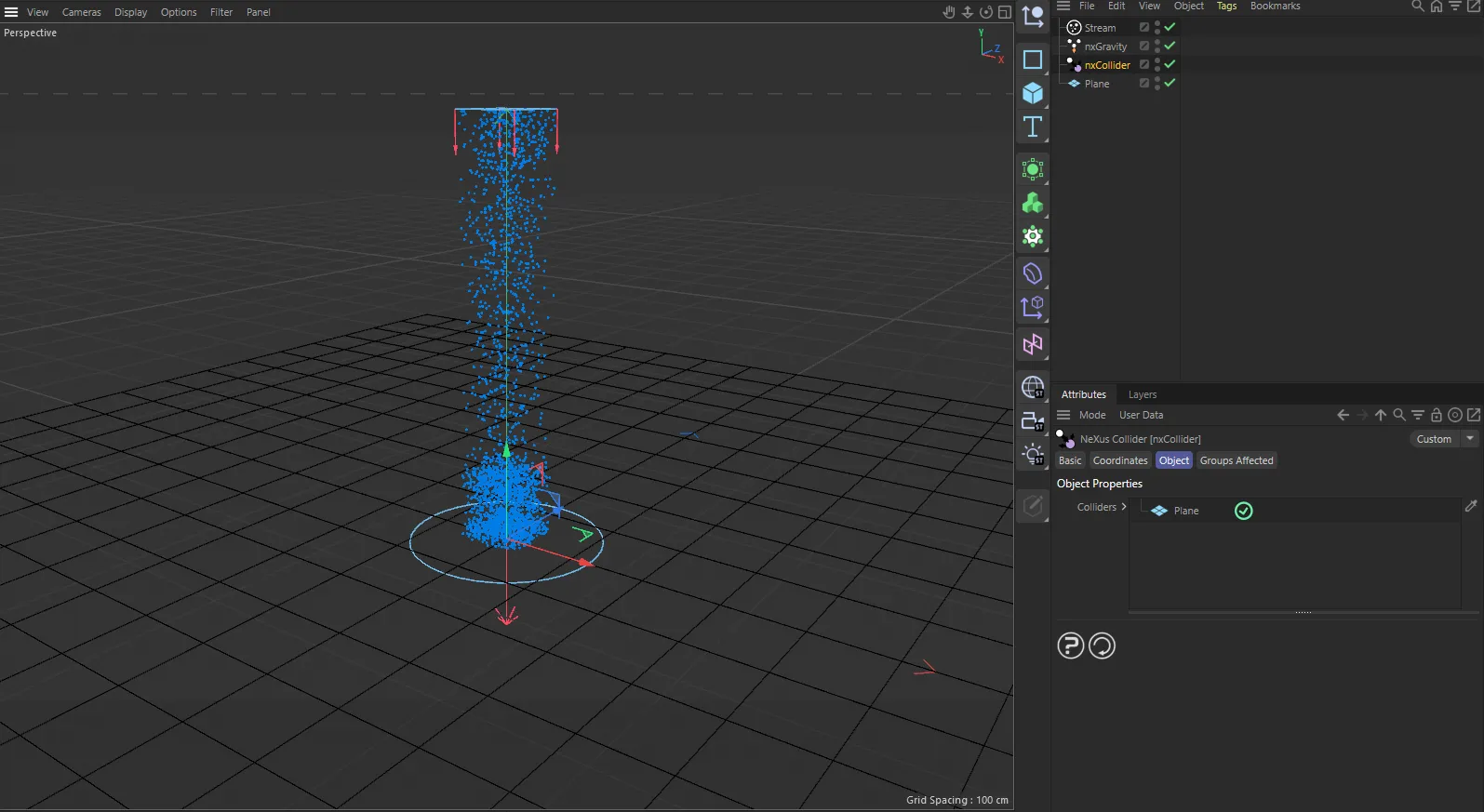
nxCollider in Cinema 4D. Its settings sit in the Attribute Manager.
Object Properties
Section titled “Object Properties”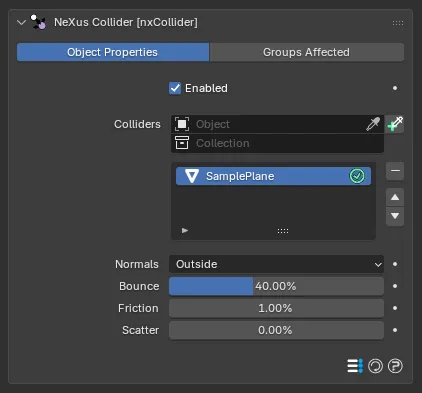
The nxCollider panel in Properties ▸ Physics, with a collision object added to the list.
Enabled
Section titled “Enabled”Turns the whole nxCollider on or off. Disable it to switch off all of its colliders at once without deleting them.
Colliders
Section titled “Colliders”The list of objects that particles will collide with.
Add objects to the list, then select an entry to reveal its settings below. Each entry has an enable toggle on the right of its row, so you can switch individual colliders on or off without removing them from the list.
You can add both Mesh and Curves objects as colliders.
You can also add a Collection Instance. Particles collide with every mesh and curves object in the instanced collection, each in its own place in the scene. Beta
Collider settings
Section titled “Collider settings”These settings apply to the currently selected collider in the list.
Bounce, Friction, Adhesion, Scatter and Expand each have a fold arrow beside them. Open it to show that setting’s Variation and, except on Expand, its Map By controls, described below. Beta
Attraction and Repulsion have a fold arrow too. Theirs shows only a Radius. Beta 3
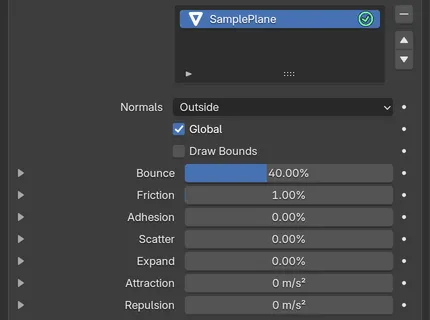
The settings below the Colliders list, applying to the selected collider. With Global off, each entry in the list carries its own Normals, Bounce, Friction and Scatter.
Normals
Section titled “Normals”Sets which side of the mesh surface a particle collides with. Mesh normals usually point outward, so the inside of an object is the opposite direction to its normals.
- Outside: any particle found inside the mesh is pushed back out. This is the default and is what you want for particles landing on or bouncing off a solid object.
- Inside: any particle found outside the mesh is pushed back in. Use this to keep particles contained within a volume, for example inside a bowl or a box.
- Any: the inside and outside are ignored and the particle simply collides with the polygons it hits.
- Outside, Fill Hollows: collides with the outside like Outside and also treats any hollow the mesh encloses as solid, removing particles caught inside it. Use it for a hull modeled as a thin shell. It is used by the FLIP and APIC solvers and by nxOcean. Other particle collisions treat it as Outside. Beta 2
Here the collider is a bowl. With Normals set to Outside the particles fall straight through it. Switching to Inside catches them and keeps them contained within the bowl.
Global Beta
Section titled “Global Beta”Uses one set of settings for every collider in the list. On by default, so the settings of the first collider in the list drive them all, whichever entry you select. Turn it off to give each collider its own settings.
Draw Bounds Beta
Section titled “Draw Bounds Beta”Draws the collider’s acceleration tree in the viewport. This is the set of nested boxes the collision test actually walks, so it shows how finely the mesh is divided, which helps when collisions are slow or a thin part is being missed. Off by default.
When it is on, Bound Color 1 sets the color of the outermost box and Bound Color 2 the color of the deepest ones. The boxes in between ramp from one color to the other by depth.
Bounce
Section titled “Bounce”Controls the speed at which a particle rebounds from the surface. A value of 100% means the particle leaves the surface at the same speed it arrived, for a fully elastic bounce. At 0% the particle keeps none of its speed and settles against the surface. Defaults to 40%.
The Bounce value is raised partway through, from 5% to 95%. The low setting lets particles settle against the surface. The high setting sends them rebounding well clear of it.
Friction
Section titled “Friction”Adds friction between the particle and the surface it hits. Friction slows particles as they slide or roll across the surface and brings rolling particles to a halt. The higher the value, the more quickly they stop. Defaults to 1%.
The Friction value is raised partway through, from 1% to 100%. At the low setting particles skid a long way across the surface. At the high setting they come to rest soon after landing.
Adhesion Beta
Section titled “Adhesion Beta”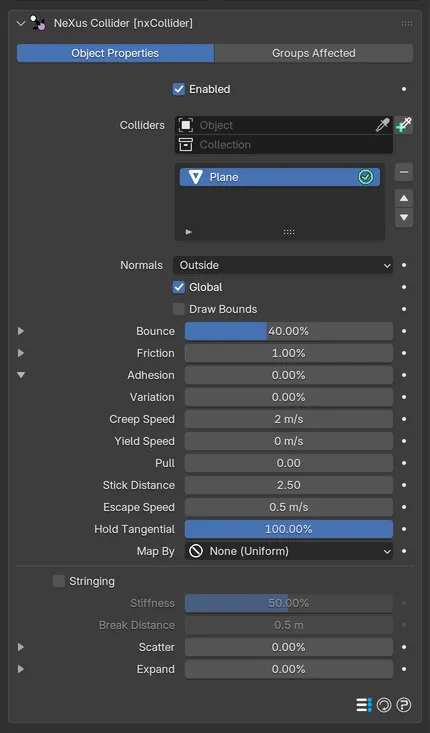
The Adhesion fold open, with its settings below Friction.
Makes the surface sticky. Friction brakes a particle sliding along the surface, while Adhesion resists it leaving the surface. Defaults to 0%. A sticky surface works best with a low Bounce, since the two pull against each other.
Open the fold to show the adhesion controls:
- Creep Speed: the fastest a stuck particle can still move. Adhesion scales it down, so 100% holds a particle still and 90% lets it creep at a tenth of this speed, which lets a heavy patch run into a drip. Defaults to 2 m/s.
- Yield Speed: how hard a stuck particle has to be pushed along the surface before it moves at all. Below this it is held still. Above it it flows at up to Creep Speed, so the loaded parts of a film run while the rest holds. Defaults to 0 m/s. Try a tenth of Creep Speed as a starting point.
- Pull: how hard the surface pulls nearby particles onto it, so a fluid can coat an object, wrap around it and bank up behind it. Defaults to 0, which is off. Raise it gently on fluids, as too much can make a simulation jitter.
- Stick Distance: how far from the surface Adhesion reaches, in particle radii. The grip is full where a particle touches the surface and fades to nothing at this distance. Defaults to 2.5. Raise it to hold a thicker layer, so the fluid above does not roll over the stuck film.
- Escape Speed: how fast a particle has to move away from the surface to break free. Defaults to 0.5 m/s. At 0 it lets go as soon as the particle starts moving away.
- Hold Tangential: how much of the sliding motion Adhesion also removes. Defaults to 100%, so a particle stops where it lands. Lower it to let particles creep along the surface.
Stringing Beta
Section titled “Stringing Beta”Shown in the Adhesion fold. Keeps a link between a particle and the exact spot it stuck to. Pull the particle away and the link stretches and holds, then snaps once it passes Break Distance. The link follows the surface, so it works on moving and deforming colliders. Off by default.
- Stiffness: how hard the link pulls a stretched particle back. Defaults to 50%. At 100% it draws the particle straight back to the surface. Low values let it trail out.
- Break Distance: how far a link can stretch before it snaps. Defaults to 0.5m. At 0 it never lets go.
These two are grayed out until Stringing is on.
Scatter
Section titled “Scatter”When a particle bounces from a flat surface it rebounds at the reflected angle. This is geometrically correct but can look too uniform. Scatter adds a random spread to the rebound direction, breaking up that uniform bounce for a more natural, varied result. Defaults to 0%.
The Scatter value is raised partway through, from 0% to 45%. At zero the particles rebound in a tight, uniform stream. Raising it spreads them into a wider, more varied spray.
Expand Beta
Section titled “Expand Beta”Widens the contact shell, as a percentage of particle size. Particles collide farther out from the surface. A sticky surface reaches farther. Defaults to 0%.
Attraction Beta 3
Section titled “Attraction Beta 3”How hard the surface pulls nearby particles toward it, as an acceleration. The pull is strongest at the surface and fades to nothing at Radius. Defaults to 0m/s², which is off.
- Radius: how far from the surface Attraction reaches, measured from the edge of the particle. Defaults to 1m.
Repulsion Beta 3
Section titled “Repulsion Beta 3”How hard the surface pushes nearby particles away from it, as an acceleration. The push is strongest at the surface and fades to nothing at Radius. Defaults to 0m/s², which is off.
- Radius: how far from the surface Repulsion reaches, measured from the edge of the particle. Defaults to 1m.
You can use both at once. A collider attracts or repels only the groups set in its Groups Affected tab.
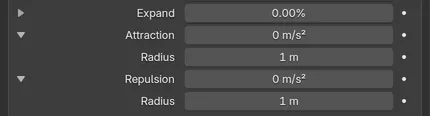
Attraction and Repulsion with their folds open, each showing its Radius.
Variation Beta
Section titled “Variation Beta”Shown in the fold of Bounce, Friction, Adhesion, Scatter and Expand. Adds a random spread to that setting per particle. Each particle keeps its own value for life. Defaults to 0%.
Map By Beta
Section titled “Map By Beta”Shown in the fold of Bounce, Friction, Adhesion and Scatter. Drives that setting from a value on the collider’s surface, so it can change from place to place. Set as None (Uniform), by default, which keeps it the same everywhere. The other options are:
- Vertex Group: the weights of a painted vertex group, picked by name.
- Attribute: a point-domain float attribute, such as a sculpt mask or a Geometry Nodes output.
- Color Attribute: one channel of a color attribute. Weight From picks the channel: R, G, B, A or Luminance (the default).
- Texture: an image sampled on the surface. Coordinates sets how it is placed: UV (the default, with a UV Map picker), Object or Bounds.
- Noise: a procedural noise evaluated where the particle hits, so there is nothing to paint.
Strength sets how much the map drives the setting. Defaults to 100%. At 0% the map is ignored. At 100% the setting is scaled fully by the map, so it has its full value where the map is 1 and none where it is 0.
The Noise option has its own controls:
- Type: set as Simplex, by default. The other options are FBM, Turbulence, Wavy Turbulence, Voronoise and Cubic.
- Space: set as Local, by default, so the pattern travels with the collider. World fixes the pattern in the scene, so the collider moves through it.
- Length Scale: the size of the noise features. Defaults to 1m. Keep it smaller than the collider or the pattern is bigger than the object and the surface reads as uniform.
- Octaves, Persistence and Lacunarity: the detail of the noise. They default to 2, 80% and 2.
- Frequency: how fast the pattern changes over time. Defaults to 0%, which holds it still.
- Low Clip, High Clip, Brightness and Contrast: shape the noise output. They default to 0%, 100%, 0% and 100%.
Groups Affected
Section titled “Groups Affected”Use the Groups Affected tab to restrict the collider to particles in specific nxGroup groups, rather than affecting every particle.
Copyright © 2026 INSYDIUM LTD. All Rights Reserved.