

nxShatter Beta 2
nxShatter breaks any mesh into pieces, with layers that break those pieces again.
You pick a source mesh and nxShatter cuts it into shards, using one of several fracture patterns. Each Fracture layer breaks the whole object. Each SubFracture layer under it re-breaks the pieces above it. Triggers decide when pieces break free. The shards can stay in place, follow an nxEmitter or be cut and carried by an nxMPM simulation.
Add it from Add ▸ INSYDIUM NeXus ▸ Generators ▸ nxShatter. If a mesh is selected when you add it, that mesh becomes the Source and is shattered right away. The pieces are built into a child mesh object, which is the object that renders. All of nxShatter’s settings live in Properties ▸ Physics, across six tabs: Object Properties, Sources, Gap, Detail, Maps and Display. The Sources, Gap and Detail tabs show the settings of the layer selected in the Layers list.
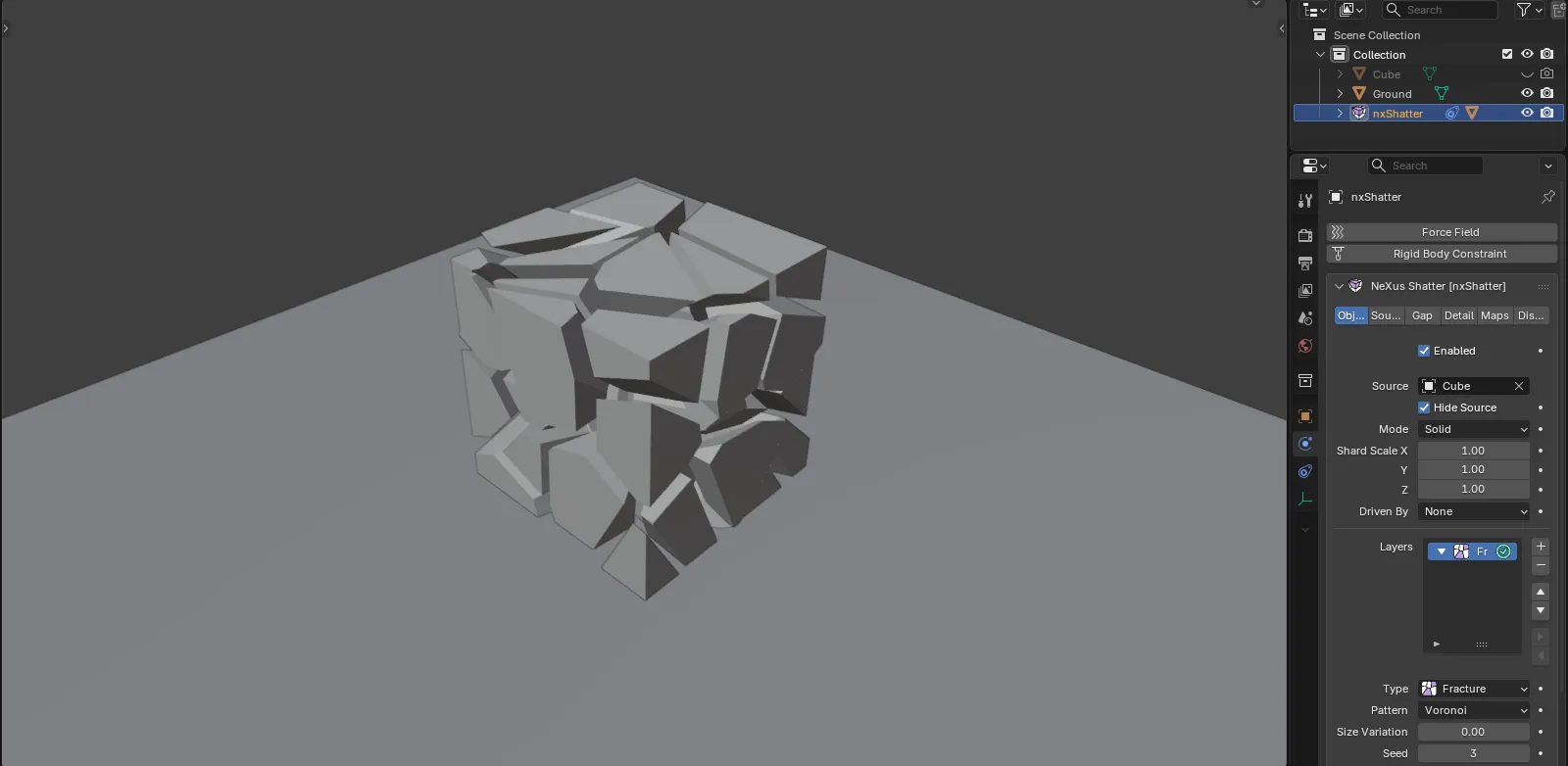
A cube broken into Voronoi pieces by nxShatter, with the pieces pushed slightly apart so the cracks show.
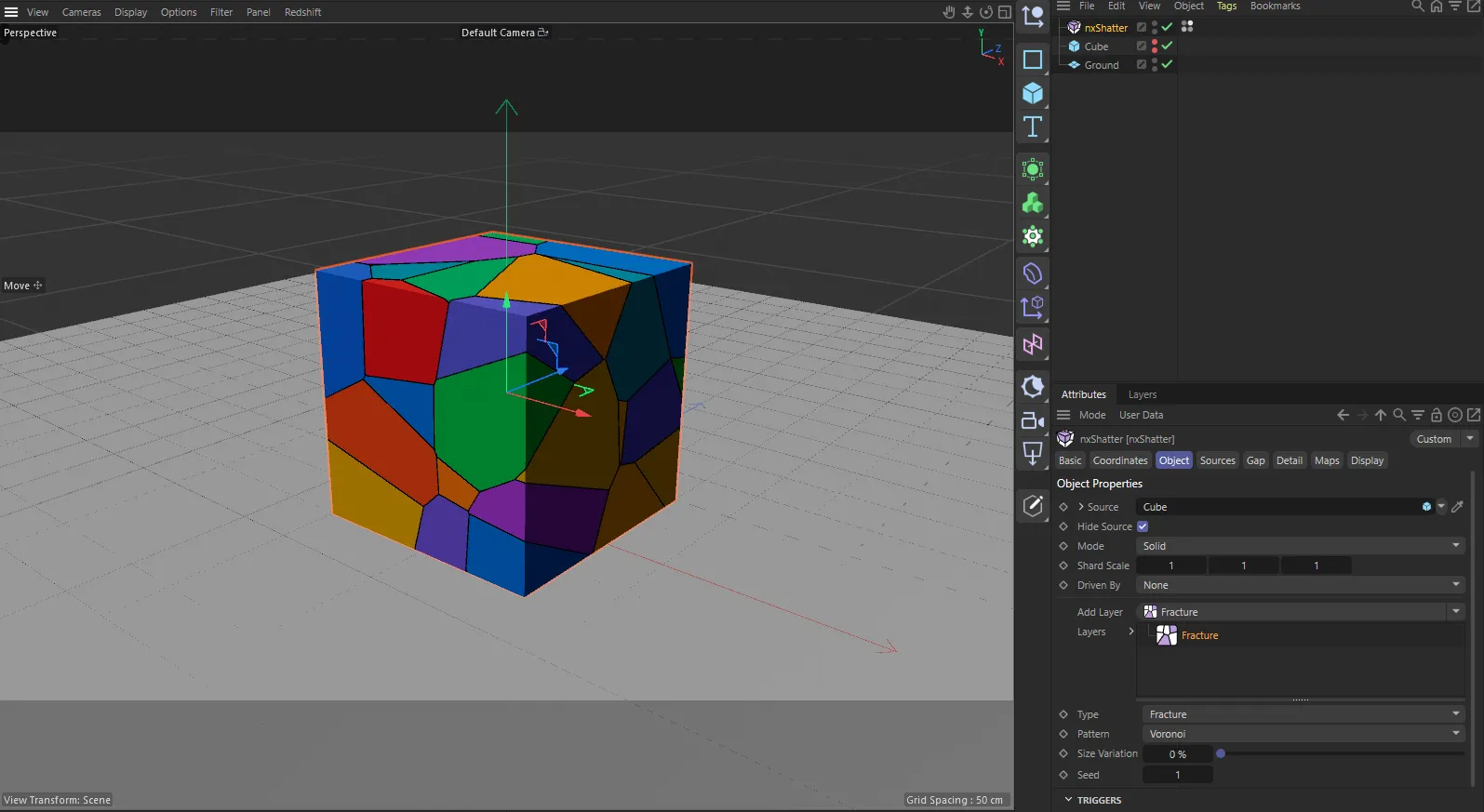
nxShatter in Cinema 4D. The settings are the same and sit in the Attribute Manager.
Object Properties
Section titled “Object Properties”Enabled
Section titled “Enabled”Turns nxShatter on or off.
Source
Section titled “Source”The mesh to break. The field turns red if there is a problem with it.
Hide Source
Section titled “Hide Source”Hides the source in the viewport and in renders while the pieces stand in for it. On, by default.
Sets what kind of object the source is. Set as Solid, by default. The other option is Surface.
- Solid: the source is a closed solid and every piece gets inside faces.
- Surface: the source is an open surface such as a sheet. The pieces are patches of it or plates when you give them a Thickness.
The field turns red when the source is an open mesh and Mode is still Solid.
Thickness
Section titled “Thickness”Shown in Surface mode. Gives the surface pieces a thickness, so they become plates. Defaults to 0m.
Shard Scale
Section titled “Shard Scale”Stretches the shards along the source’s own X, Y and Z axes. Defaults to 1 on each axis.
Driven By
Section titled “Driven By”Sets what moves the pieces. Set as None, by default. The other options are MPM Emitter and Emitter.
- None: the shards stay where they were cut.
- MPM Emitter: each shard moves with the nxMPM particles it was cut around. Choosing it adds an MPM Fragments source to the first layer.
- Emitter: each piece gets a particle in the chosen emitter when it breaks free and moves with it.
Emitter
Section titled “Emitter”The NeXus emitter that drives the pieces. With Driven By set to Emitter, this emitter gets one particle per piece and emits nothing of its own while it is linked. With MPM Emitter, it is the emitter whose MPM particles fill the source.
Break At
Section titled “Break At”Shown for MPM Emitter. How damaged two MPM particles must be for the link between them to break. Defaults to 0.4.
Build Shatter
Section titled “Build Shatter”Shown for MPM Emitter. Runs the MPM simulation through the scene and cuts the shards where the material broke. A progress bar shows while it runs. You can press Esc to stop it. If nothing broke, give the nxMPM a brittle material with fracture on and make sure the impact happens within the scene’s frames.
Layers
Section titled “Layers”The Layers list holds the fracture layers. Add a Fracture layer to break the object or a SubFracture layer to re-break the pieces of the layer above it. A new nxShatter starts with one Fracture layer. Select a layer to edit its settings below the list.
Whether the layer is a Fracture or a SubFracture layer.
Pattern
Section titled “Pattern”The fracture pattern. Set as Voronoi, by default. The other options are Glass, Wood, Stone, Bricks, Slices and Clusters.
- Voronoi: convex cells around the source points.
- Glass: shards on spokes around a center, cut right through.
- Wood: splinters stretched along a grain.
- Stone: small cells glued into chunks with frayed edges.
- Bricks: courses of bricks laid in a bond.
- Slices: parallel flat cuts.
- Clusters: neighboring cells glued into larger pieces.
Each pattern adds its own settings:
- Glass: Center (an object to break around; empty uses the middle of the mesh), Facing (Auto, X, Y or Z; Auto picks from the object’s shape), Spokes (defaults to 12) and Wobble (how far the spokes lean and bend, defaults to 0.3).
- Wood: Grain (the axis) and Stretch (how many times longer than wide the splinters are, defaults to 4).
- Slices: Direction (the axis) and Spacing, either Even (spaced by Thickness, defaults to 0.1m) or At Points (one cut between each pair of source points).
- Bricks: Up (the axis), Bond (Stretcher, Stack, Flemish or English), Course Height (defaults to 0.1m) and Brick Length (defaults to 0.25m).
- Stone and Clusters: Cells per Piece (defaults to 6). Stone also has Roughness (how frayed the chunk edges are, defaults to 0.5).
- Voronoi, Glass, Wood, Stone and Clusters: Size Variation (how much the cell sizes vary, defaults to 0).
Pieces
Section titled “Pieces”How many pieces a Fracture layer breaks into. Defaults to 40. It is only shown when the layer has no sources, since otherwise the sources set the count.
Pieces Each
Section titled “Pieces Each”SubFracture layers only. How many pieces each chosen parent piece breaks into. Defaults to 6. Not shown for the Bricks pattern or evenly spaced Slices.
SubFracture layers only. The fraction of the parent’s pieces this layer breaks. Defaults to 1, so every piece breaks.
Only Bigger Than
Section titled “Only Bigger Than”SubFracture layers only. Parent pieces smaller than this stay whole. Defaults to 0m.
Repeat
Section titled “Repeat”SubFracture layers only. Re-breaks the layer’s own pieces this many more times, up to 8. Defaults to 0. Only Bigger Than also ends the repeats. Not shown for Bricks or evenly spaced Slices.
The random seed for the layer. Defaults to 1.
Triggers
Section titled “Triggers”The collapsible Triggers box holds the layer’s Trigger Layers list, which decides when its pieces break free. A layer with no triggers breaks from the start. The trigger types are:
- Frame: at a set Frame (defaults to 1), spread at random over Spread frames per piece (defaults to 0).
- Falloff: when a falloff at the piece reaches Value (defaults to 0.5). Add nxFalloff objects to its list.
- Distance: when an Object comes within Distance of the piece (defaults to 0.5m).
- Parent Broke: a Delay in frames after the piece it belongs to broke free (defaults to 0), plus a random Spread.
- Collision: when a Collider object touches or enters the piece, within a Margin (defaults to 0m).
- Vertex Map: when a vertex group on the source reaches Value at the piece.
- Particles Hit: when an Emitter’s particles collide inside the piece, within a Margin.
- nxQuestion: when particles that an nxQuestion moved into a Group are inside the piece. Set the Group, Emitter and Margin.
With the Falloff, Distance, Collision and Particles Hit triggers, a piece stays broken once the trigger has fired.
Break When
Section titled “Break When”Shown when the layer has two or more triggers. Set as Any, by default, which breaks a piece when any of its triggers fires. The other option is All, which waits until every trigger has fired.
Chance
Section titled “Chance”The share of the layer’s pieces that break at all. Defaults to 1.
Explode
Section titled “Explode”At the bottom of the tab, below the Layers list, Explode pushes the pieces apart so you can see the cuts. Defaults to 0, which leaves them in place. At 1 every piece moves out by its own distance from the middle.
Sources
Section titled “Sources”The Sources tab lists the point sources of the selected layer, which set where the cuts go. A new Fracture layer starts with one Distribution source. Sources only apply to the first enabled Fracture layer and not to the Bricks pattern or evenly spaced Slices. They are grayed out otherwise.
The source types are:
- Distribution: points spread over the model itself. Spread sets where: Volume (the default), Surface, Edges or Vertices.
- Object: points spread over another mesh Object, with the same Spread options.
- Impact Point: points clustered around an Object, thinning out with distance up to Radius (defaults to 1m).
- Spline: points along a curve Object. Mode is Even (the default) or Random. Spread Distance lets points stray from the curve (defaults to 0m). Density Start and Density End ramp the density along it (both default to 1).
- Noise: points only where a Noise passes a Threshold (defaults to 0.5). The noise types are Simplex (the default), FBM, Turbulence, Wavy Turbulence, Voronoise and Cubic. Noise Scale defaults to 0.5m.
- Particles: points where a NeXus emitter’s particles are. Mode is Live or Frozen. Live (the default) makes the cracks follow the particles as they move. Frozen locks the pattern at one Frame.
- MPM Fragments: one shard for each piece an MPM run broke into, cut where it broke. It shows Break At and Build Shatter, as on the Object Properties tab.
- Spline Growth: breaking that travels along a curve between a Start Frame (defaults to 10) and an End Frame (defaults to 40).
- Seed Growth: breaking that spreads out from an object, from a Start Frame on.
Most sources have a Count (defaults to 40) and a Seed (defaults to 1). Particles has no Seed.
Density
Section titled “Density”Every source except Noise, MPM Fragments and the growth sources can thin out its points. Set as None, by default, which spreads them evenly. The other options are Noise, Vertex Map (a vertex group on the source) and Falloff (an nxFalloff list). Strength sets how strongly the density applies and defaults to 1.
Growth sources
Section titled “Growth sources”Spline Growth follows a path. With Path set to Standard (the default), nxShatter draws a path in the viewport that you reshape by dragging its points. Mode sets it Linear (the default) or Smooth. Points sets how many points it has (defaults to 6). With Path set to Custom, it follows a Spline object of your own. Direction is Start to End (the default), End to Start or From Both Ends. Reach sets how far from the curve the breaking reaches (defaults to 0.4m).
Seed Growth creates a Seed empty to spread from. Speed sets how fast the breaking spreads (defaults to 0.5m/s) and Max Radius how far it goes (defaults to 2m).
Both growth sources also have:
- Amount: how many pieces. Defaults to 120 for Spline Growth and 200 for Seed Growth.
- Front Noise: 0 keeps a clean front, more makes it creep unevenly. Defaults to 0.25 for Spline Growth and 0.5 for Seed Growth.
- Size Variation: how much the pieces’ sizes vary. Defaults to 0.4.
- Seed: the random seed.
Output
Section titled “Output”Sets what the cuts produce. Set as Pieces, by default. The other options are Lattice and Both.
- Pieces: the pieces, pulled apart by the gap.
- Lattice: only the space between the pieces, as beams in the shape of the cracks.
- Both: the pieces and the lattice, the lattice with a material of its own.
For the selected layer. How far apart its pieces are pulled. Defaults to 0m.
Gap Noise
Section titled “Gap Noise”For the selected layer. How much each piece’s gap varies. Defaults to 0.
Detail
Section titled “Detail”The Detail tab roughens the cut faces of the selected layer.
Sets what the detail noise moves. Set as Inside Faces, by default. The other options are Edges and Whole Shard.
- Inside Faces: the noise moves the inside faces and the outside stays as it was.
- Edges: the outside follows the noise along each crack too.
- Whole Shard: the noise bends every piece, outside included.
Strength
Section titled “Strength”How far the inside faces are roughened. Defaults to 0m, which is off. Above 0 these controls appear:
- Noise: the noise type. Set as Voronoise, by default.
- Scale: the size of the noise’s features. Defaults to 0.2m.
- Adaptive: lets triangles grow bigger away from the edges where the noise is flat. Defaults to 0.
- Edge Width: in Edges mode, how far from a crack the outside follows the noise. Defaults to 0.05m.
Detail Size
Section titled “Detail Size”Shown when Strength or Edge Chipping is above 0. How finely the inside faces are cut up to carry the noise. Defaults to 0.02m.
Edge Chipping
Section titled “Edge Chipping”How deep the bites along each crack’s outer rim go. Defaults to 0m, which is off. Above 0, Chip Size sets the size of the bites and Chip Width how far from a crack they reach. Both default to 0.05m.
Shrink
Section titled “Shrink”SubFracture layers only. A layer with no detail of its own takes its parent’s detail, scaled by this value. Defaults to 0, which takes none.
Each map reads a value at every piece, from a vertex group on the source or from an nxFalloff list. Each is set as None, by default.
Protect
Section titled “Protect”Pieces where the map reads 0.5 or more never break further.
Gap Map
Section titled “Gap Map”Scales each piece’s gap.
Strength Map
Section titled “Strength Map”Scales how far the detail and chipping move each point.
Detail Map
Section titled “Detail Map”Makes the detail noise’s features finer where the map is high.
Trigger Map
Section titled “Trigger Map”Delays each piece’s break by the map’s value times Delay. Delay defaults to 24 frames, so a piece breaks 24 frames later where the map is full.
Outputs
Section titled “Outputs”These write data onto the piece mesh, for use in materials or geometry nodes. All are off, by default.
- Crack Distance: a point attribute,
shatter_crack, that is 0 on every crack and fades to 1 at the Width (defaults to 0.05m). Its Vertex Group toggle also writes it as a vertex group. - Edge Band: a face attribute,
shatter_edge, marking the outside faces within the Width of a crack (defaults to 0.02m). It has a Vertex Group toggle and a Material toggle that gives those faces a material of their own. - Lattice Faces: a face attribute,
shatter_lattice, marking the lattice’s faces, with a Vertex Group toggle. - Inside Faces: a vertex group of the inside faces’ vertices. Its Material per Layer toggle gives the inside faces of each layer depth a material of their own.
- Parent: a face attribute,
shatter_parent, holding the piece each piece was broken from (-1 for the first layer). - Piece Size: a face attribute,
shatter_size, holding each piece’s size. - Release Time: a face attribute,
shatter_release, holding the second each piece broke free (-1 if it never did).
Display
Section titled “Display”Color Mode
Section titled “Color Mode”Sets how the pieces are colored. Set as Gradient, by default. The other options are Material (keeps the source’s materials) and Single (gives every piece one Color).
With Gradient, Parameter picks the value read from the gradient: Random (a random value per piece, the default) or Layer Depth (how many layers deep the piece is). Random also has a Seed.
Outline
Section titled “Outline”Draws each piece’s outline in the viewport: its cracks and the edges between its walls. On, by default.
Points
Section titled “Points”Draws the points the pieces are cut around. Off, by default.
Piece Centers
Section titled “Piece Centers”Draws a dot at the middle of each piece. Off, by default.
Point Size
Section titled “Point Size”Shown with Points or Piece Centers. The size of the dots, in pixels. Defaults to 4.
Only Selected Layer
Section titled “Only Selected Layer”Shown with Points or Piece Centers. Draws only the selected layer’s points. Off, by default.
In Cinema 4D
Section titled “In Cinema 4D”nxShatter shows status messages for the Source, Mode, Driven By and MPM settings where Blender turns the field red. Vertex maps are linked as Vertex Map tags instead of picked by vertex group name. The Seed Growth Speed is shown as a length. Lengths are in cm and factors are percentages.
Copyright © 2026 INSYDIUM LTD. All Rights Reserved.