

Loop
A Loop repeats its child items, either cycling particle data over time, stepping through an index range or iterating over each particle or its neighbors.
Nest the items you want to repeat under the Loop. Its behavior depends on the Loop Type.
Loop Type
Section titled “Loop Type”The kind of loop. The options are For Each, For Index and Time Cycle. Defaults to Time Cycle.
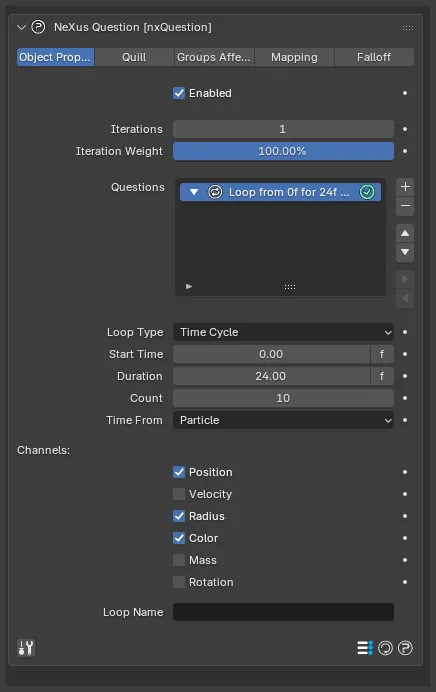
A Loop selected in the Questions list, on the default Time Cycle type, with its Start Time, Duration, Count, Time From and Channels settings.
Time Cycle
Section titled “Time Cycle”Cycles the chosen particle data over time to create a ping-pong effect. As the loop starts, the particle’s data is stored. On each cycle the chosen channels are restored to their start values.
For example, cycling Position and Radius from frame 0 for a duration of 60 frames, with a count of 3, loops the particle animation three times before it continues normally.
Start Time
Section titled “Start Time”The scene time at which the loop begins.
Duration
Section titled “Duration”How long each cycle lasts.
How many cycles occur. Defaults to 10.
Time From
Section titled “Time From”Whether the loop timing comes from the Document or the Particle. Defaults to Particle, which lets each particle loop on its own timeline.
Channels
Section titled “Channels”Which particle data is cycled. Enable the channels you want to loop:
- Position: on by default.
- Velocity: off by default.
- Radius: on by default.
- Color: on by default.
- Mass: off by default.
- Rotation: off by default.
For Index
Section titled “For Index”Runs the child items repeatedly over a fixed range of indices.
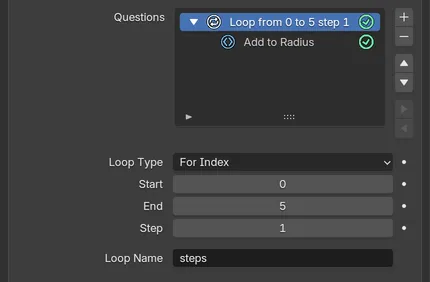
A For Index loop from 0 to 5 in steps of 1, named steps, with an Add to Radius action nested under it.
The first index. Defaults to 0.
The last index. Defaults to 10.
How much the index increases each pass. Defaults to 1.
For Each
Section titled “For Each”Runs the child items once for each target.
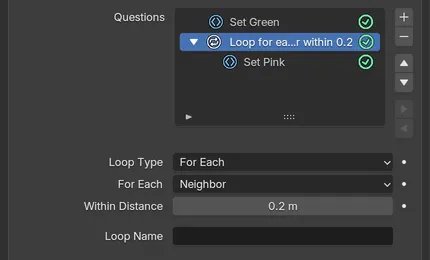
A Set Green action, then a loop over each Neighbor within 0.2m with a Set Pink action nested under it.
For Each
Section titled “For Each”The target to iterate over: Particle or Neighbor. Defaults to Particle.
- Particle: runs the child items for each particle.
- Neighbor: runs them for each neighboring particle within the Within Distance.
For example, setting every particle green first, then using a Neighbor loop to set any neighbor within a short distance to pink, turns tightly clumped particles pink and leaves spread-out particles green.
Within Distance
Section titled “Within Distance”The distance within which neighbor particles are included in the loop. Defaults to 0.2m. Shown only for the Neighbor target.
Loop Name
Section titled “Loop Name”You can name the loop. The name can then be referenced in a Script or in a Math Variable question, for decisions that depend on the loop.
Copyright © 2026 INSYDIUM LTD. All Rights Reserved.