

nxConstraints - Friction
A layer that adds a friction force between particles, resisting the way they slide past one another.
Add it from the + menu in the nxConstraints Layers list, then select the layer to show these settings.
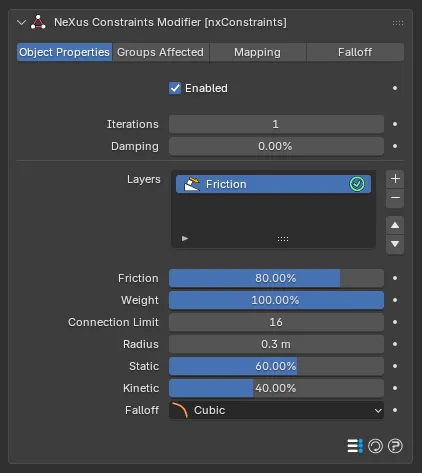
Friction
Section titled “Friction”The overall strength of the friction. Defaults to 80%.
Weight
Section titled “Weight”Sets how much this layer contributes to the overall constraint solution. With a single layer this can be left at its default, 100%. When you combine several layers, lower it to blend the friction in more gently or raise it above 100% to give it more influence.
Connection Limit
Section titled “Connection Limit”The maximum number of connections each particle can make when building a friction force. Defaults to 16, up to a maximum of 64.
Radius
Section titled “Radius”The distance between particles must be less than this value for friction to be applied. Defaults to 0.3m.
Static
Section titled “Static”A percentage of the Radius. Within this distance the particles have the full friction stiffness applied, giving a static friction that holds them together and stops relative motion between them. Defaults to 60%.
Kinetic
Section titled “Kinetic”If the distance between particles is greater than the value derived from the Static setting, this controls how stiff the kinetic friction is. Defaults to 40%.
Falloff
Section titled “Falloff”Sets how the friction effect falls off over the Radius. Set as Cubic, by default. The other options are Flat, Linear and Quadratic.
- Flat: no falloff, a constant friction across the range.
- Linear: the friction fades evenly with distance.
- Quadratic: the friction fades with the square of the distance.
- Cubic: the friction fades with the cube of the distance.
Copyright © 2026 INSYDIUM LTD. All Rights Reserved.